Chapters
Chapter 8. Installing Basic System Software

Chapter 8. Installing Basic System Software

In this chapter, we start constructing the LFS system in earnest.

The installation of this software is straightforward. Although in many cases the installation instructions could be made shorter and more generic, we have opted to provide the full instructions for every package to minimize the possibilities for mistakes. The key to learning what makes a Linux system work is to know what each package is used for and why you (or the system) may need it.

We do not recommend using customized optimizations. They can make a program run slightly faster, but they may also cause compilation difficulties, and problems when running the program. If a package refuses to compile with a customized optimization, try to compile it without optimization and see if that fixes the problem. Even if the package does compile when using a customized optimization, there is the risk it may have been compiled incorrectly because of the complex interactions between the code and the build tools.

Also note that the -march and -mtune options using values not specified in the book have not been tested. This may cause problems with the toolchain packages (Binutils, GCC and Glibc). The small potential gains achieved by customizing compiler optimizations are often outweighed by the risks. First-time builders of LFS are encouraged to build without custom optimizations.

On the other hand, we keep the optimizations enabled by the default configuration of the packages. In addition, we sometimes explicitly enable an optimized configuration provided by a package but not enabled by default. The package maintainers have already tested these configurations and consider them safe, so it's not likely they would break the build. Generally the default configuration already enables -O2 or -O3 , so the resulting system will still run very fast without any customized optimization, and be stable at the same time.

Before the installation instructions, each installation page provides information about the package, including a concise description of what it contains, approximately how long it will take to build, and how much disk space is required during this building process. Following the installation instructions, there is a list of programs and libraries (along with brief descriptions) that the package installs.


Note

The SBU values and required disk space include test suite data for all applicable packages in Chapter 8. SBU values have been calculated using four CPU cores (-j4) for all operations unless specified otherwise.

8.1.1. About Libraries

In general, the LFS editors discourage building and installing static libraries.

Most static libraries have been made obsolete in a modern Linux system. In addition, linking a static library into a program can be detrimental. If an update to the library is needed to remove a security problem, every program that uses the static library will need to be relinked with the new library. Since the use of static libraries is not always obvious, the relevant programs (and the procedures needed to do the linking) may not even be known.

The procedures in this chapter remove or disable installation of most static libraries. Usually this is done by passing a --disable-static option to configure . In other cases, alternate means are needed. In a few cases, especially Glibc and GCC, the use of static libraries remains an essential feature of the package building process.

For a more complete discussion of libraries, see Libraries: Static or shared? in the BLFS book.

8.2. Package Management

Package Management is an often requested addition to the LFS Book. A Package Manager tracks the installation of files, making it easier to remove and upgrade packages. A good package manager will also handle the configuration files specially to keep the user configuration when the package is reinstalled or upgraded. Before you begin to wonder, NO —this section will not talk about nor recommend any particular package manager. What it does provide is a roundup of the more popular techniques and how they work. The perfect package manager for you may be among these techniques, or it may be a combination of two or more of these techniques. This section briefly mentions issues that may arise when upgrading packages.

Some reasons why no package manager is mentioned in LFS or BLFS include:

  • Dealing with package management takes the focus away from the goals of these books—teaching how a Linux system is built.
  • There are multiple solutions for package management, each having its strengths and drawbacks. Finding one solution that satisfies all audiences is difficult.

There are some hints written on the topic of package management. Visit the Hints Project and see if one of them fits your needs.

8.2.1. Upgrade Issues

A Package Manager makes it easy to upgrade to newer versions when they are released. Generally the instructions in the LFS and BLFS books can be used to upgrade to the newer versions. Here are some points that you should be aware of when upgrading packages, especially on a running system.

  • If the Linux kernel needs to be upgraded (for example, from 5.10.17 to 5.10.18 or 5.11.1), nothing else needs to be rebuilt. The system will keep working fine thanks to the well-defined interface between the kernel and userspace.

Specifically, Linux API headers need not be upgraded along with the kernel. You will merely need to reboot your system to use the upgraded kernel.

  • If Glibc needs to be upgraded to a newer version, (e.g., from Glibc-2.36 to Glibc-2.42), some extra steps are needed to avoid breaking the system. Read Section 8.5, “Glibc-2.42” for details. 1
  • If a package containing a shared library is updated, and if the name of the library changes, then any packages dynamically linked to the library must be recompiled, to link against the newer library. For example, consider a package foo-1.2.3 that installs a shared library with the name libfoo.so.1 . Suppose you upgrade the package to a newer version foo-1.2.4 that installs a shared library with the name libfoo.so.2 . In this case, any packages that are dynamically linked to libfoo.so.1 need to be recompiled to link against libfoo.so.2 in order to use the new library version. You should not remove the old libraries until all the dependent packages have been recompiled.
  • If a package is (directly or indirectly) linked to both the old and new names of a shared library (for example, the package links to both libfoo.so.2 and libbar.so.1 , while the latter links to libfoo.so.3 ), the package may malfunction because the different revisions of the shared library present incompatible definitions for some symbol names. This can be caused by recompiling some, but not all, of the packages linked to the old shared library after the package providing the shared library is upgraded. To avoid the issue, users will need to rebuild every package linked to a shared library with an updated revision (e.g. libfoo.so.2 to libfoo.so.3) as soon as possible. The name of a shared library is the string coded in the DT_SONAME entry of its ELF dynamic section. You can get it with the readelf -d <library file> | grep SONAME command.

In most cases it's suffixed with .so.<a version number> , but there are some cases where it contains multiple numbers for versioning (like libbz2.so.1.0 ), contains the version number before the .so suffix (like libbfd-2.45 ), or does not contain any version number at all (for example libmemusage.so ). Generally there is no correlation between the package version and the version number(s) in the library name.


  • If a package containing a shared library is updated, and the name of the library doesn't change, but the version number of the library file decreases (for example, the library is still named libfoo.so.1 , but the name of the library file is changed from libfoo.so.1.25 to libfoo.so.1.24 ), you should remove the library file from the previously installed version ( libfoo.so.1.25 in this case). Otherwise, a ldconfig command (invoked by yourself from the command line, or by the installation of some package) will reset the symlink libfoo.so.1 to point to the old library file because it seems to be a “newer” version; its version number is larger. This situation may arise if you have to downgrade a package, or if the authors change the versioning scheme for library files.
  • If a package containing a shared library is updated, and the name of the library doesn't change, but a severe issue (especially, a security vulnerability) is fixed, all running programs linked to the shared library should be restarted.

The following command, run as root after the update is complete, will list which processes are using the old versions of those libraries (replace libfoo with the name of the library):

grep -l 'libfoo.*deleted' /proc/*/maps | tr -cd 0-9\\n | xargs -r ps u


If OpenSSH is being used to access the system and it is linked to the updated library, you must restart the sshd service, then logout, login again, and run the preceding command again to confirm that nothing is still using the deleted libraries.

  • If an executable program or a shared library is overwritten, the processes using the code or data in that program or library may crash. The correct way to update a program or a shared library without causing the process to crash is to remove it first, then install the new version. The install command provided by coreutils has already implemented this, and most packages use that command to install binary files and libraries. This means that you won't be troubled by this issue most of the time. However, the install process of some packages (notably SpiderMonkey in BLFS) just overwrites the file if it exists; this causes a crash. So it's safer to save your work and close unneeded running processes before updating a package.

8.2.2. Package Management Techniques

The following are some common package management techniques. Before making a decision on a package manager, do some research on the various techniques, particularly the drawbacks of each particular scheme.

8.2.2.1. It is All in My Head!

Yes, this is a package management technique. Some folks do not need a package manager because they know the packages intimately and know which files are installed by each package. Some users also do not need any package management because they plan on rebuilding the entire system whenever a package is changed.

8.2.2.2. Install in Separate Directories

This is a simplistic package management technique that does not need a special program to manage the packages. Each package is installed in a separate directory. For example, package foo-1.1 is installed in /opt/foo-1.1 and a symlink is made from /opt/foo to /opt/foo-1.1 . When a new version foo-1.2 comes along, it is installed in /opt/foo-1.2 and the previous symlink is replaced by a symlink to the new version.

Environment variables such as PATH , MANPATH , INFOPATH , PKG_CONFIG_PATH , CPPFLAGS , LDFLAGS , and the configuration file /etc/ld.so.conf may need to be expanded to include the corresponding subdirectories in /opt/foo-x.y .

This scheme is used by the BLFS book to install some very large packages to make it easier to upgrade them. If you install more than a few packages, this scheme becomes unmanageable. And some packages (for example Linux API headers and Glibc) may not work well with this scheme. Never use this scheme system-wide.

8.2.2.3. Symlink Style Package Management

This is a variation of the previous package management technique. Each package is installed as in the previous scheme.

But instead of making the symlink via a generic package name, each file is symlinked into the /usr hierarchy. This removes the need to expand the environment variables. Though the symlinks can be created by the user, many package managers use this approach, and automate the creation of the symlinks. A few of the popular ones include Stow, Epkg, Graft, and Depot.

The installation script needs to be fooled, so the package thinks it is installed in /usr though in reality it is installed in the /usr/pkg hierarchy. Installing in this manner is not usually a trivial task. For example, suppose you are installing a package libfoo-1.1. The following instructions may not install the package properly:

./configure --prefix=/usr/pkg/libfoo/1.1
make
make install

The installation will work, but the dependent packages may not link to libfoo as you would expect. If you compile a package that links against libfoo, you may notice that it is linked to /usr/pkg/libfoo/1.1/lib/libfoo.so.1 instead of /usr/lib/libfoo.so.1 as you would expect. The correct approach is to use the DESTDIR variable to direct the installation.

This approach works as follows:

./configure --prefix=/usr
make
make DESTDIR=/usr/pkg/libfoo/1.1 install

Most packages support this approach, but there are some which do not. For the non-compliant packages, you may either need to install the package manually, or you may find that it is easier to install some problematic packages into /opt .


8.2.2.4. Timestamp Based

In this technique, a file is timestamped before the installation of the package. After the installation, a simple use of the find command with the appropriate options can generate a log of all the files installed after the timestamp file was created. A package manager that uses this approach is install-log.

Though this scheme has the advantage of being simple, it has two drawbacks. If, during installation, the files are installed with any timestamp other than the current time, those files will not be tracked by the package manager. Also, this scheme can only be used when packages are installed one at a time. The logs are not reliable if two packages are installed simultaneously from two different consoles.


8.2.2.5. Tracing Installation Scripts

In this approach, the commands that the installation scripts perform are recorded. There are two techniques that one can use:

The LD_PRELOAD environment variable can be set to point to a library to be preloaded before installation. During installation, this library tracks the packages that are being installed by attaching itself to various executables such as cp, install, mv and tracking the system calls that modify the filesystem. For this approach to work, all the executables need to be dynamically linked without the suid or sgid bit. Preloading the library may cause some unwanted side-effects during installation. Therefore, it's a good idea to perform some tests to ensure that the package manager does not break anything, and that it logs all the appropriate files.

Another technique is to use strace , which logs all the system calls made during the execution of the installation scripts.


8.2.2.6. Creating Package Archives

In this scheme, the package installation is faked into a separate tree as previously described in the symlink style package management section. After the installation, a package archive is created using the installed files. This archive is then used to install the package on the local machine or even on other machines.

This approach is used by most of the package managers found in the commercial distributions. Examples of package managers that follow this approach are RPM (which, incidentally, is required by the Linux Standard Base Specification), pkg-utils, Debian's apt, and Gentoo's Portage system. A hint describing how to adopt this style of package management for LFS systems is located at https://www.linuxfromscratch.org/hints/downloads/files/fakeroot.txt. The creation of package files that include dependency information is complex, and beyond the scope of LFS.

Slackware uses a tar -based system for package archives. This system purposely does not handle package dependencies as more complex package managers do. For details of Slackware package management, see
https://www.slackbook.org/html/package-management.html

8.2.2.7. User Based Management

This scheme, unique to LFS, was devised by Matthias Benkmann, and is available from the Hints Project. In this scheme, each package is installed as a separate user into the standard locations. Files belonging to a package are easily identified by checking the user ID. The features and shortcomings of this approach are too complex to describe in this section. For the details please see the hint at https://www.linuxfromscratch.org/hints/downloads/files/more_control_and_pkg_man.txt

8.2.3. Deploying LFS on Multiple Systems

One of the advantages of an LFS system is that there are no files that depend on the position of files on a disk system.

Cloning an LFS build to another computer with the same architecture as the base system is as simple as using tar on the LFS partition that contains the root directory (about 900MB uncompressed for a basic LFS build), copying that file via network transfer or CD-ROM / USB stick to the new system, and expanding it. After that, a few configuration files will have to be changed. Configuration files that may need to be updated include: /etc/hosts, /etc/fstab, /etc/passwd, / etc/group , /etc/shadow , /etc/ld.so.conf , /etc/sysconfig/rc.site , /etc/sysconfig/network , and /etc/sysconfig/ifconfig.eth0 .

A custom kernel may be needed for the new system, depending on differences in system hardware and the original kernel configuration.

Important

If you want to deploy the LFS system onto a system with a different CPU, when you build Section 8.21, “GMP-6.3.0” and Section 8.50, “Libffi-3.5.2” you must follow the notes about overriding the architecture- specific optimization to produce libraries suitable for both the host system and the system(s) where you'll deploy the LFS system. Otherwise you'll get Illegal Instruction errors running LFS.

Finally, the new system has to be made bootable via Section 10.4, “Using GRUB to Set Up the Boot Process”.

8.3. Man-pages-6.15

The Man-pages package contains over 2,400 man pages.

Approximate build time: 0.1 SBU Required disk space: 52 MB (Required disk space: 52 MB)

8.3.1. Installation of Man-pages

Remove two man pages for password hashing functions. Libxcrypt will provide a better version of these man pages:

rm -v man3/crypt*

Install Man-pages by running:

make -R GIT=false prefix=/usr install

The meaning of the options:-R

This prevents make from setting any built-in variables. The building system of man-pages does not work well with built-in variables, but currently there is no way to disable them except passing -R explicitly via the command line.

GIT=false

This prevents the building system from emitting many git: command not found warnings lines.

8.3.2. Contents of Man-pages

Installed files: various man pages

Short Descriptions

man pages Describe C programming language functions, important device files, and significant configuration files

8.4. Iana-Etc-20250807

The Iana-Etc package provides data for network services and protocols.

Approximate build time: less than 0.1 SBU Required disk space: 4.8 MB (Required disk space: 4.8 MB)

8.4.1. Installation of Iana-Etc

For this package, we only need to copy the files into place:

cp services protocols /etc

8.4.2. Contents of Iana-Etc

Installed files: /etc/protocols and /etc/services

Short Descriptions

/etc/protocols

Describes the various DARPA Internet protocols that are available from the TCP/IP subsystem

/etc/services

Provides a mapping between friendly textual names for internet services, and their underlying assigned port numbers and protocol types

8.5. Glibc-2.42

The Glibc package contains the main C library. This library provides the basic routines for allocating memory, searching directories, opening and closing files, reading and writing files, string handling, pattern matching, arithmetic, and so on.

Approximate build time: 12 SBU Required disk space: 3.3 GB (Required disk space: 3.3 GB)

8.5.1. Installation of Glibc

Some of the Glibc programs use the non-FHS compliant /var/db directory to store their runtime data. Apply the following patch to make such programs store their runtime data in the FHS-compliant locations:

patch -Np1 -i ../glibc-2.42-fhs-1.patch

Now fix an issue which may break Valgrind in BLFS:

sed -e '/unistd.h/i #include <string.h>' \
-e '/libc_rwlock_init/c\
__libc_rwlock_define_initialized (, reset_lock);\
memcpy (&lock, &reset_lock, sizeof (lock));' \
-i stdlib/abort.c

The Glibc documentation recommends building Glibc in a dedicated build directory:

mkdir -v build
cd       build

Ensure that the ldconfig and sln utilities will be installed into /usr/sbin :

echo "rootsbindir=/usr/sbin" > configparms

Prepare Glibc for compilation:

../configure --prefix=/usr                   \
--disable-werror                \
--disable-nscd                  \
libc_cv_slibdir=/usr/lib        \
--enable-stack-protector=strong \
--enable-kernel=5.4

The meaning of the configure options:

--disable-werror This option disables the -Werror option passed to GCC. This is necessary for running the test suite.

--enable-kernel=5.4

This option tells the build system that this Glibc may be used with kernels as old as 5.4. This means generating workarounds in case a system call introduced in a later version cannot be used.

--enable-stack-protector=strong

This option increases system security by adding extra code to check for buffer overflows, such as stack smashing attacks. Note that Glibc always explicitly overrides the default of GCC, so this option is still needed even though we've already specified --enable-default-ssp for GCC.

--disable-nscd

Do not build the name service cache daemon which is no longer used.

libc_cv_slibdir=/usr/lib

This variable sets the correct library for all systems. We do not want lib64 to be used.

Compile the package:

make

Important

In this section, the test suite for Glibc is considered critical. Do not skip it under any circumstance.

Generally a few tests do not pass. The test failures listed below are usually safe to ignore.

make check

You may see some test failures. The Glibc test suite is somewhat dependent on the host system. A few failures out of over 6000 tests can generally be ignored. This is a list of the most common issues seen for recent versions of LFS:

  • io/tst-lchmod is known to fail in the LFS chroot environment.
  • misc/tst-preadvwritev2 and misc/tst-preadvwritev64v2 are known to fail if the host kernel is Linux-6.14 or later.
  • Some tests, for example nss/tst-nss-files-hosts-multi and nptl/tst-thread-affinity* are known to fail due to a timeout (especially when the system is relatively slow and/or running the test suite with multiple parallel make jobs).

These tests can be identified with:

grep "Timed out" $(find -name \*.out)

It's possible to re-run a single test with enlarged timeout with TIMEOUTFACTOR=<factor>make test t=<testname> . For example, TIMEOUTFACTOR=10 make test t=nss/tst-nss-files-hosts-multi will re-run nss/tst-nss- files-hosts-multi with ten times the original timeout.

  • Additionally, some tests may fail with a relatively old CPU model (for example elf/tst-cpu-features-cpuinfo) or host kernel version (for example stdlib/tst-arc4random-thread).

Though it is a harmless message, the install stage of Glibc will complain about the absence of /etc/ld.so.conf . Prevent this warning with:

touch /etc/ld.so.conf

Fix the Makefile to skip an outdated sanity check that fails with a modern Glibc configuration:

sed '/test-installation/s@$(PERL)@echo not running@' -i ../Makefile

Important

If upgrading Glibc to a new minor version (for example, from Glibc-2.36 to Glibc-2.42) on a running LFS system, you need to take some extra precautions to avoid breaking the system:

  • Upgrading Glibc on a LFS system prior to 11.0 (exclusive) is not supported. Rebuild LFS if you are running such an old LFS system but you need a newer Glibc.
  • If upgrading on a LFS system prior to 12.0 (exclusive), install Libxcrypt following Section 8.27, “Libxcrypt-4.4.38.” In addition to a normal Libxcrypt installation, you MUST follow the note [b] in Libxcrypt section to install libcrypt.so.1* (replacing libcrypt.so.1 from the prior Glibc installation).
  • If upgrading on a LFS system prior to 12.1 (exclusive), remove the nscd program: rm -f /usr/sbin/nscd
  • Upgrade the kernel and reboot if it's older than 5.4 (check the current version with uname -r ) or if you want to upgrade it anyway, following Section 10.3, “Linux-6.16.1.”
  • Upgrade the kernel API headers if it's older than 5.4 (check the current version with cat /usr/include/linux/version.h) or if you want to upgrade it anyway, following Section 5.4, “Linux-6.16.1 API Headers” (but removing $LFS from the cp command).
  • Perform a DESTDIR installation and upgrade the Glibc shared libraries on the system using one single

install command:

make DESTDIR=$PWD/dest install
install -vm755 dest/usr/lib/*.so.* /usr/lib

It's imperative to strictly follow these steps above unless you completely understand what you are doing. Any unexpected deviation may render the system completely unusable. YOU ARE WARNED.

Then continue to run the make install command, the sed command against /usr/bin/ldd , and the commands to install the locales. Once they are finished, reboot the system immediately.

When the system has successfully rebooted, if you are running a LFS system prior to 12.0 (exclusive) where GCC was not built with the --disable-fixincludes option, move two GCC headers into a better location and remove the stale “fixed” copies of the Glibc headers:

DIR=$(dirname $(gcc -print-libgcc-file-name))
[ -e $DIR/include/limits.h ]    || mv $DIR/include{-fixed,}/limits.h
[ -e $DIR/include/syslimits.h ] || mv $DIR/include{-fixed,}/syslimits.h
rm -rfv $DIR/include-fixed/*
unset DIR

Install the package:

make install

Fix a hardcoded path to the executable loader in the ldd script:sed '/RTLDLIST=/s@/usr@@g' -i /usr/bin/ldd

Next, install the locales that can make the system respond in a different language. None of these locales are required, but if some of them are missing, the test suites of some packages will skip important test cases.

Individual locales can be installed using the localedef program. E.g., the second localedef command below combines the /usr/share/i18n/locales/cs_CZ charset-independent locale definition with the /usr/share/i18n/charmaps/UTF-8.gz charmap definition and appends the result to the /usr/lib/locale/locale-archive file. The following instructions will install the minimum set of locales necessary for the optimal coverage of tests:

localedef -i C -f UTF-8 C.UTF-8
localedef -i cs_CZ -f UTF-8 cs_CZ.UTF-8
localedef -i de_DE -f ISO-8859-1 de_DE
localedef -i de_DE@euro -f ISO-8859-15 de_DE@euro
localedef -i de_DE -f UTF-8 de_DE.UTF-8
localedef -i el_GR -f ISO-8859-7 el_GR
localedef -i en_GB -f ISO-8859-1 en_GB
localedef -i en_GB -f UTF-8 en_GB.UTF-8
localedef -i en_HK -f ISO-8859-1 en_HK
localedef -i en_PH -f ISO-8859-1 en_PH

... (24 more lines)

In addition, install the locale for your own country, language and character set.

Alternatively, install all the locales listed in the glibc-2.42/localedata/SUPPORTED file (it includes every locale listed above and many more) at once with the following time-consuming command:

make localedata/install-locales

Note

Glibc now uses libidn2 when resolving internationalized domain names. This is a run time dependency. If this capability is needed, the instructions for installing libidn2 are in the BLFS libidn2 page.

8.5.2. Configuring Glibc

8.5.2.1. Adding nsswitch.conf

The /etc/nsswitch.conf file needs to be created because the Glibc defaults do not work well in a networked environment.

Create a new file /etc/nsswitch.conf by running the following:

cat > /etc/nsswitch.conf << "EOF"
# Begin /etc/nsswitch.conf
passwd: files
group: files
shadow: files
hosts: files dns
networks: files
protocols: files
services: files
ethers: files

8.5.2.2. Adding Time Zone Data

Install and set up the time zone data with the following:

tar -xf ../../tzdata2025b.tar.gz
ZONEINFO=/usr/share/zoneinfo
mkdir -pv $ZONEINFO/{posix,right}
for tz in etcetera southamerica northamerica europe africa antarctica  \
asia australasia backward; do
zic -L /dev/null   -d $ZONEINFO       ${tz}
zic -L /dev/null   -d $ZONEINFO/posix ${tz}
zic -L leapseconds -d $ZONEINFO/right ${tz}
done
cp -v zone.tab zone1970.tab iso3166.tab $ZONEINFO
zic -d $ZONEINFO -p America/New_York
unset ZONEINFO tz

The meaning of the zic commands:

zic -L /dev/null ...

This creates posix time zones without any leap seconds. It is conventional to put these in both zoneinfo and zoneinfo/posix . It is necessary to put the POSIX time zones in zoneinfo , otherwise various test suites will report errors. On an embedded system, where space is tight and you do not intend to ever update the time zones, you could save 1.9 MB by not using the posix directory, but some applications or test suites might produce some failures.

zic -L leapseconds ...

This creates right time zones, including leap seconds. On an embedded system, where space is tight and you do not intend to ever update the time zones, or care about the correct time, you could save 1.9MB by omitting the right directory.

zic ... -p ...

This creates the posixrules file. We use New York because POSIX requires the daylight saving time rules to be in accordance with US rules.

One way to determine the local time zone is to run the following script:

tzselect

After answering a few questions about the location, the script will output the name of the time zone (e.g., America/ Edmonton). There are also some other possible time zones listed in /usr/share/zoneinfo such as Canada/Eastern or EST5EDT that are not identified by the script but can be used.

Then create the /etc/localtime file by running:

ln -sfv /usr/share/zoneinfo/<xxx> /etc/localtime

Replace <xxx> with the name of the time zone selected (e.g., Canada/Eastern).

8.5.2.3. Configuring the Dynamic Loader


By default, the dynamic loader ( /lib/ld-linux.so.2 ) searches through /usr/lib for dynamic libraries that are needed by programs as they are run. However, if there are libraries in directories other than /usr/lib , these need to be added to the /etc/ld.so.conf file in order for the dynamic loader to find them. Two directories that are commonly known to contain additional libraries are /usr/local/lib and /opt/lib , so add those directories to the dynamic loader's search path.

Create a new file /etc/ld.so.conf by running the following:

cat > /etc/ld.so.conf << "EOF"
# Begin /etc/ld.so.conf
/usr/local/lib
/opt/lib
EOF

If desired, the dynamic loader can also search a directory and include the contents of files found there. Generally the files in this include directory are one line specifying the desired library path. To add this capability run the following commands:

cat >> /etc/ld.so.conf << "EOF"
# Add an include directory
include /etc/ld.so.conf.d/*.conf
EOF
mkdir -pv /etc/ld.so.conf.d

8.5.3. Contents of Glibc


Installed programs:

gencat, getconf, getent, iconv, iconvconfig, ldconfig, ldd, lddlibc4, ld.so (symlink to ld- linux-x86-64.so.2 or ld-linux.so.2), locale, localedef, makedb, mtrace, pcprofiledump, pldd, sln, sotruss, sprof, tzselect, xtrace, zdump, and zic

Installed libraries:

ld-linux-x86-64.so.2, ld-linux.so.2, libBrokenLocale.{a,so}, libanl.{a,so}, libc.{a,so}, libc_nonshared.a, libc_malloc_debug.so, libdl.{a,so.2}, libg.a, libm.{a,so}, libmcheck.a, libmemusage.so, libmvec.{a,so}, libnsl.so.1, libnss_compat.so, libnss_dns.so, libnss_files.so, libnss_hesiod.so, libpcprofile.so, libpthread.{a,so.0}, libresolv.{a,so}, librt.{a,so.1}, libthread_db.so, and libutil.{a,so.1}

Installed directories:

/usr/include/arpa, /usr/include/bits, /usr/include/gnu, /usr/include/net, /usr/include/netash, /usr/include/netatalk, /usr/include/netax25, /usr/include/neteconet, /usr/include/netinet, /usr/include/netipx, /usr/include/netiucv, /usr/include/netpacket, /usr/include/netrom, /usr/include/netrose, /usr/include/nfs, /usr/include/protocols, /usr/include/rpc, / usr/include/sys, /usr/lib/audit, /usr/lib/gconv, /usr/lib/locale, /usr/libexec/getconf, /usr/share/i18n, /usr/share/zoneinfo, and /var/lib/nss_db

Short Descriptions

gencat

Generates message catalogues

getconf

Displays the system configuration values for file system specific variables

getent

Gets entries from an administrative database

iconv

Performs character set conversion

iconvconfig

Creates fastloading iconv module configuration files

ldconfig

Configures the dynamic linker runtime bindings

ldd

Reports which shared libraries are required by each given program or shared library

lddlibc4

Assists ldd with object files. It does not exist on newer architectures like x86_64

locale

Prints various information about the current locale

localedef

Compiles locale specifications

makedb

Creates a simple database from textual input

mtrace

Reads and interprets a memory trace file and displays a summary in human-readable format

pcprofiledump

Dump information generated by PC profiling

pldd

Lists dynamic shared objects used by running processes

sln

A statically linked ln program

sotruss

Traces shared library procedure calls of a specified command

sprof

Reads and displays shared object profiling data

tzselect

Asks the user about the location of the system and reports the corresponding time zone description

xtrace

Traces the execution of a program by printing the currently executed function

zdump

The time zone dumpe

zic

The time zone compiler


ld-*.so

The helper program for shared library executable

libBrokenLocale

Used internally by Glibc as a gross hack to get broken programs (e.g., some Motif applications) running. See comments in glibc-2.42/locale/broken_cur_max.c for more information

libanl Dummy library containing no functions. Previously was the asynchronous name lookup library, whose functions are now in libc

libc

The main C library

libc_malloc_debug

Turns on memory allocation checking when preloaded

libdl

Dummy library containing no functions. Previously was the dynamic linking interface library, whose functions are now in libc

libg

Dummy library containing no functions. Previously was a runtime library for g++

libm

The mathematical library libmvec The vector math library, linked in as needed when libm is used

libmcheck

Turns on memory allocation checking when linked to

libmemusage

Used by memusage to help collect information about the memory usage of a program

libnsl

The network services library, now deprecated

libnss_*

The Name Service Switch modules, containing functions for resolving host names, user names, group names, aliases, services, protocols, etc. Loaded by libc according to the configuration in /etc/nsswitch.conf

libpcprofile

Can be preloaded to PC profile an executable

libpthread

Dummy library containing no functions. Previously contained functions providing most of the interfaces specified by the POSIX.1c Threads Extensions and the semaphore interfaces specified by the POSIX.1b Real-time Extensions, now the functions are in libc

libresolv

Contains functions for creating, sending, and interpreting packets to the Internet domain name servers

librt

Contains functions providing most of the interfaces specified by the POSIX.1b Real-time Extensions

libthread_db

Contains functions useful for building debuggers for multi-threaded programs libutil Dummy library containing no functions. Previously contained code for “standard” functions used in many different Unix utilities. These functions are now in libc

8.6. Zlib-1.3.1

The Zlib package contains compression and decompression routines used by some programs.

Approximate build time: less than 0.1 SBU Required disk space: 6.4 MB (Required disk space: 6.4 MB)

8.6.1. Installation of Zlib

Prepare Zlib for compilation:

./configure --prefix=/usr

Compile the package:

make

To test the results, issue:

make check

Install the package:

make install

Remove a useless static library:

rm -fv /usr/lib/libz.a

8.6.2. Contents of Zlib

Installed libraries:

libz.so

Short Descriptions

libz Contains compression and decompression functions used by some programs

8.7. Bzip2-1.0.8

The Bzip2 package contains programs for compressing and decompressing files. Compressing text files with bzip2 yields a much better compression percentage than with the traditional gzip.

Approximate build time: less than 0.1 SBU Required disk space: 7.3 MB (Required disk space: 7.3 MB)

8.7.1. Installation of Bzip2

Apply a patch that will install the documentation for this package:

patch -Np1 -i ../bzip2-1.0.8-install_docs-1.patch

The following command ensures installation of symbolic links are relative:

sed -i 's@\(ln -s -f \)$(PREFIX)/bin/@\1@' Makefile

Ensure the man pages are installed into the correct location:

sed -i "s@(PREFIX)/man@(PREFIX)/share/man@g" Makefile

Prepare Bzip2 for compilation with:

make -f Makefile-libbz2_so
make clean

The meaning of the make parameter:

-f Makefile-libbz2_so

This will cause Bzip2 to be built using a different Makefile file, in this case the Makefile-libbz2_so file, which creates a dynamic libbz2.so library and links the Bzip2 utilities against it.

Compile and test the package:

make

Install the programs:

make PREFIX=/usr install

Install the shared library:

cp -av libbz2.so.* /usr/lib
ln -sv libbz2.so.1.0.8 /usr/lib/libbz2.so

Install the shared bzip2 binary into the /usr/bin directory, and replace two copies of bzip2 with symlinks:

cp -v bzip2-shared /usr/bin/bzip2
for i in /usr/bin/{bzcat,bunzip2}; do
ln -sfv bzip2 $i
done

Remove a useless static library:

rm -fv /usr/lib/libbz2.a

8.7.2. Contents of Bzip2

Installed programs: bunzip2 (link to bzip2), bzcat (link to bzip2), bzcmp (link to bzdiff), bzdiff, bzegrep (link to bzgrep), bzfgrep (link to bzgrep), bzgrep, bzip2, bzip2recover, bzless (link to bzmore), and bzmore

Installed libraries:

libbz2.so

Installed directory:

/usr/share/doc/bzip2-1.0.8

Short Descriptions:

bunzip2

Decompresses bzipped files

bzcat

Decompresses to standard output

bzcmp

Runs cmp on bzipped files

bzdiff

Runs diff on bzipped files

bzegrep

Runs egrep on bzipped files

bzfgrep

Runs fgrep on bzipped files

bzgrep

Runs grep on bzipped files

bzip2

Compresses files using the Burrows-Wheeler block sorting text compression algorithm with Huffman coding; the compression rate is better than that achieved by more conventional compressors using “Lempel-Ziv” algorithms, like gzip

bzip2recover

Tries to recover data from damaged bzipped files

bzless

Runs less on bzipped files

bzmore

Runs more on bzipped files


libbz2

The library implementing lossless, block-sorting data compression, using the Burrows-Wheeler algorithm

8.8. Xz-5.8.1

The Xz package contains programs for compressing and decompressing files. It provides capabilities for the lzma and the newer xz compression formats. Compressing text files with xz yields a better compression percentage than with the traditional gzip or bzip2 commands.

Approximate build time: 0.1 SBU Required disk space: 24 MB (Required disk space: 24 MB)

8.8.1. Installation of Xz

Prepare Xz for compilation with:

./configure --prefix=/usr    \
--disable-static \
--docdir=/usr/share/doc/xz-5.8.1

Compile the package:

make

To test the results, issue:

make check

Install the package:

make install

8.8.2. Contents of Xz

Installed programs:

lzcat (link to xz), lzcmp (link to xzdiff), lzdiff (link to xzdiff), lzegrep (link to xzgrep), lzfgrep (link to xzgrep), lzgrep (link to xzgrep), lzless (link to xzless), lzma (link to xz), lzmadec, lzmainfo, lzmore (link to xzmore), unlzma (link to xz), unxz (link to xz), xz, xzcat (link to xz), xzcmp (link to xzdiff), xzdec, xzdiff, xzegrep (link to xzgrep), xzfgrep (link to xzgrep), xzgrep, xzless, and xzmore

Installed libraries:

liblzma.so

Installed directories: /usr/include/lzma and /usr/share/doc/xz-5.8.1

Short Descriptions:

lzcat

Decompresses to standard output

lzcmp

Runs cmp on LZMA compressed files

lzdiff

Runs diff on LZMA compressed files

lzegrep

Runs egrep on LZMA compressed files

lzfgrep

Runs fgrep on LZMA compressed files

lzgrep

Runs grep on LZMA compressed files

lzless

Runs less on LZMA compressed files

lzma

Compresses or decompresses files using the LZMA format

lzmadec

A small and fast decoder for LZMA compressed files

lzmainfo

Shows information stored in the LZMA compressed file header

lzmore

Runs more on LZMA compressed files

unlzma

Decompresses files using the LZMA format

unxz

Decompresses files using the XZ format

xz

Compresses or decompresses files using the XZ format

xzcat

Decompresses to standard output

xzcmp

Runs cmp on XZ compressed files

xzdec

A small and fast decoder for XZ compressed files

xzdiff

Runs diff on XZ compressed files

xzegrep

Runs egrep on XZ compressed files

xzfgrep

Runs fgrep on XZ compressed files

xzgrep

Runs grep on XZ compressed files

xzless

Runs less on XZ compressed files

xzmore

Runs more on XZ compressed files


liblzma The library implementing lossless, block-sorting data compression, using the Lempel-Ziv-Markov chain algorithm

8.9. Lz4-1.10.0

Lz4 is a lossless compression algorithm, providing compression speed greater than 500 MB/s per core. It features an extremely fast decoder, with speed in multiple GB/s per core. Lz4 can work with Zstandard to allow both algorithms to compress data faster.

Approximate build time: 0.1 SBU Required disk space: 4.2 MB (Required disk space: 4.2 MB)

8.9.1. Installation of Lz4

Compile the package:

make BUILD_STATIC=no PREFIX=/usr

To test the results, issue:

make -j1 check

Install the package:

make BUILD_STATIC=no PREFIX=/usr install

8.9.2. Contents of Lz4

Installed programs:

lz4, lz4c (link to lz4), lz4cat (link to lz4), and unlz4 (link to lz4)

Installed library:

liblz4.so

Short Descriptions

lz4

Compresses or decompresses files using the LZ4 format

lz4c

Compresses files using the LZ4 format

lz4cat

Lists the contents of a file compressed using the LZ4 format

unlz4

Decompresses files using the LZ4 format


liblz4

The library implementing lossless data compression, using the LZ4 algorithm

8.10. Zstd-1.5.7

Zstandard is a real-time compression algorithm, providing high compression ratios. It offers a very wide range of compression / speed trade-offs, while being backed by a very fast decoder.

Approximate build time: 0.4 SBU Required disk space: 86 MB (Required disk space: 86 MB)

8.10.1. Installation of Zstd

Compile the package:

make prefix=/usr

Note

In the test output there are several places that indicate 'failed'. These are expected and only 'FAIL' is an actual test failure. There should be no test failures.

To test the results, issue:

make check

Install the package:

make prefix=/usr install

Remove the static library:

rm -v /usr/lib/libzstd.a

8.10.2. Contents of Zstd

Installed programs:

zstd, zstdcat (link to zstd), zstdgrep, zstdless, zstdmt (link to zstd), and unzstd (link to zstd)

Installed library:

libzstd.so

Short Descriptions

zstd

Compresses or decompresses files using the ZSTD format

zstdgrep

Runs grep on ZSTD compressed files

zstdless

Runs less on ZSTD compressed files


libzstd The library implementing lossless data compression, using the ZSTD algorithm

8.11. File-5.46

The File package contains a utility for determining the type of a given file or files.

Approximate build time: less than 0.1 SBU Required disk space: 19 MB (Required disk space: 19 MB)

8.11.1. Installation of File

Prepare File for compilation:

./configure --prefix=/usr

Compile the package:

make

To test the results, issue:

make check

Install the package:

make install

8.11.2. Contents of File

Installed programs:

file

Installed library:

libmagic.so

Short Descriptions

file

Tries to classify each given file; it does this by performing several tests—file system tests, magic number tests, and language tests libmagic Contains routines for magic number recognition, used by the file program

8.12. Readline-8.3

The Readline package is a set of libraries that offer command-line editing and history capabilities.

Approximate build time: less than 0.1 SBU Required disk space: 17 MB (Required disk space: 17 MB)

8.12.1. Installation of Readline

Reinstalling Readline will cause the old libraries to be moved to <libraryname>.old. While this is normally not a problem, in some cases it can trigger a linking bug in ldconfig . This can be avoided by issuing the following two seds:

sed -i '/MV.*old/d' Makefile.in
sed -i '/{OLDSUFF}/c:' support/shlib-install

Prevent hard coding library search paths (rpath) into the shared libraries. This package does not need rpath for an installation into the standard location, and rpath may sometimes cause unwanted effects or even security issues:

sed -i 's/-Wl,-rpath,[^ ]*//' support/shobj-conf

Prepare Readline for compilation:

./configure --prefix=/usr    \
--disable-static \
--with-curses    \
--docdir=/usr/share/doc/readline-8.3

The meaning of the new configure option:

--with-curses This option tells Readline that it can find the termcap library functions in the curses library, not a separate termcap library. This will generate the correct readline.pc file.

Compile the package:

make SHLIB_LIBS="-lncursesw"

The meaning of the make option:SHLIB_LIBS="-lncursesw" This option forces Readline to link against the libncursesw library. For details see the “Shared Libraries” section in the package's README file.

This package does not come with a test suite.

Install the package:

make installinstall -v -m644 doc/*.{ps,pdf,html,dvi} /usr/share/doc/readline-8.3

8.12.2. Contents of Readline

Installed libraries:

libhistory.so and libreadline.so

Installed directories: /usr/include/readline and /usr/share/doc/readline-8.3

Short Descriptions

libhistory

Provides a consistent user interface for recalling lines of history libreadline Provides a set of commands for manipulating text entered in an interactive session of a program

8.13. M4-1.4.20

The M4 package contains a macro processor.

Approximate build time: 0.4 SBU Required disk space: 60 MB (Required disk space: 60 MB)

8.13.1. Installation of M4

Prepare M4 for compilation:

./configure --prefix=/usr

Compile the package:

make

To test the results, issue:

make check

Install the package:

make install

8.13.2. Contents of M4

Installed program:

m4

Short Descriptions

m4

Copies the given files while expanding the macros that they contain. These macros are either built-in or user-defined and can take any number of arguments. Besides performing macro expansion, m4 has built-in functions for including named files, running Unix commands, performing integer arithmetic, manipulating text, recursion, etc. The m4 program can be used either as a front end to a compiler or as a macro processor in its own right

8.14. Bc-7.0.3

The Bc package contains an arbitrary precision numeric processing language.

Approximate build time: less than 0.1 SBU Required disk space: 7.8 MB (Required disk space: 7.8 MB)

8.14.1. Installation of Bc

Prepare Bc for compilation:

CC='gcc -std=c99' ./configure --prefix=/usr -G -O3 -r

The meaning of the configure options:CC='gcc -std=c99' This parameter specifies the compiler and C standard to use.

-G

Omit parts of the test suite that won't work until the bc program has been installed.

-O3

Specify the optimization to use.

-r

Enable the use of Readline to improve the line editing feature of bc.

Compile the package:

make

To test bc, run:

make test

Install the package:

make install

8.14.2. Contents of Bc

Installed programs:

bc and dc

Short Descriptions

bc

A command line calculator

dc

A reverse-polish command line calculator

8.15. Flex-2.6.4

The Flex package contains a utility for generating programs that recognize patterns in text.

Approximate build time: 0.1 SBU Required disk space: 33 MB (Required disk space: 33 MB)

8.15.1. Installation of Flex

Prepare Flex for compilation:

./configure --prefix=/usr \
--docdir=/usr/share/doc/flex-2.6.4 \
--disable-static

Compile the package:

make

To test the results, issue:

make check

Install the package:

make install

A few programs do not know about flex yet and try to run its predecessor, lex . To support those programs, create a symbolic link named lex that runs flex in lex emulation mode, and also create the man page of lex as a symlink:

ln -sv flex   /usr/bin/lex
ln -sv flex.1 /usr/share/man/man1/lex.1

8.15.2. Contents of Flex

Installed programs:

flex, flex++ (link to flex), and lex (link to flex)

Installed libraries:

libfl.so

Installed directory:

/usr/share/doc/flex-2.6.4

Short Descriptions

flex

A tool for generating programs that recognize patterns in text; it allows for the versatility to specify the rules for pattern-finding, eradicating the need to develop a specialized program

flex++

An extension of flex, is used for generating C++ code and classes. It is a symbolic link to flex

lex

A symbolic link that runs flex in lex emulation mode

libfl

The flex library

8.16. Tcl-8.6.16

The Tcl package contains the Tool Command Language, a robust general-purpose scripting language. The Expect package is written in Tcl (pronounced "tickle").

Approximate build time: 3.0 SBU Required disk space: 91 MB (Required disk space: 91 MB)

8.16.1. Installation of Tcl

This package and the next two (Expect and DejaGNU) are installed to support running the test suites for Binutils, GCC and other packages. Installing three packages for testing purposes may seem excessive, but it is very reassuring, if not essential, to know that the most important tools are working properly.

Prepare Tcl for compilation:

SRCDIR=$(pwd)
cd unix
./configure --prefix=/usr           \
--mandir=/usr/share/man \
--disable-rpath

The meaning of the new configure parameters:

--disable-rpath

This parameter prevents hard coding library search paths (rpath) into the binary executable files and shared libraries. This package does not need rpath for an installation into the standard location, and rpath may sometimes cause unwanted effects or even security issues.

Build the package:

make
sed -e "s|$SRCDIR/unix|/usr/lib|" \
-e "s|$SRCDIR|/usr/include|"  \
-i tclConfig.sh
sed -e "s|$SRCDIR/unix/pkgs/tdbc1.1.10|/usr/lib/tdbc1.1.10|" \
-e "s|$SRCDIR/pkgs/tdbc1.1.10/generic|/usr/include|" \
-e "s|$SRCDIR/pkgs/tdbc1.1.10/library|/usr/lib/tcl8.6|" \
-e "s|$SRCDIR/pkgs/tdbc1.1.10|/usr/include|"             \
-i pkgs/tdbc1.1.10/tdbc Config.sh
sed -e "s|$SRCDIR/unix/pkgs/itcl4.3.2|/usr/lib/itcl4.3.2|" \

The various “sed” instructions after the “make” command remove references to the build directory from the configuration files and replace them with the install directory. This is not mandatory for the remainder of LFS, but may be needed if a package built later uses Tcl.

To test the results, issue:

make test

Install the package:

make install
chmod 644 /usr/lib/libtclstub8.6.a

Make the installed library writable so debugging symbols can be removed later:

chmod -v u+w /usr/lib/libtcl8.6.so

Install Tcl's headers. The next package, Expect, requires them.

make install-private-headers

Now make a necessary symbolic link:

ln -sfv tclsh8.6 /usr/bin/tclsh

Rename a man page that conflicts with a Perl man page:

mv /usr/share/man/man3/{Thread, Tcl_Thread}.3

Optionally, install the documentation by issuing the following commands:

cd ..
tar -xf ../tcl8.6.16-html.tar.gz --strip-components=1
mkdir -v -p /usr/share/doc/tcl-8.6.16
cp -v -r  ./html/* /usr/share/doc/tcl-8.6.16

8.16.2. Contents of Tcl

Installed programs:

tclsh (link to tclsh8.6) and tclsh8.6

Installed library:

libtcl8.6.so and libtclstub8.6.a

Short Descriptions

tclsh8.6

The Tcl command shell

tclsh

A link to tclsh8.6


libtcl8.6.so

The Tcl library

libtclstub8.6.a

The Tcl Stub library

8.17. Expect-5.45.4

The Expect package contains tools for automating, via scripted dialogues, interactive applications such as telnet , ftp , passwd , fsck , rlogin , and tip . Expect is also useful for testing these same applications as well as easing all sorts of tasks that are prohibitively difficult with anything else. The DejaGnu framework is written in Expect.

Approximate build time: 0.2 SBU Required disk space: 3.9 MB (Required disk space: 3.9 MB)

8.17.1. Installation of Expect

Expect needs PTYs to work. Verify that the PTYs are working properly inside the chroot environment by performing a simple test:

python3 -c 'from pty import spawn; spawn(["echo", "ok"])'

This command should output ok . If, instead, the output includes OSError: out of pty devices , then the environment is not set up for proper PTY operation. You need to exit from the chroot environment, read Section 7.3, “Preparing Virtual Kernel File Systems” again, and ensure the devpts file system (and other virtual kernel file systems) mounted correctly. Then reenter the chroot environment following Section 7.4, “Entering the Chroot Environment”. This issue needs to be resolved before continuing, or the test suites requiring Expect (for example the test suites of Bash, Binutils, GCC, GDBM, and of course Expect itself) will fail catastrophically, and other subtle breakages may also happen.

Now, make some changes to allow the package with gcc-15.1 or later:

patch -Np1 -i ../expect-5.45.4-gcc15-1.patch

Prepare Expect for compilation:

./configure --prefix=/usr           \
--with-tcl=/usr/lib     \
--enable-shared         \
--disable-rpath         \
--mandir=/usr/share/man \
--with-tclinclude=/usr/include

The meaning of the configure options:

--with-tcl=/usr/lib

This parameter is needed to tell configure where the tclConfig.sh script is located.--with-tclinclude=/usr/include

This explicitly tells Expect where to find Tcl's internal headers.

Build the package:

make

To test the results, issue:

make test

Install the package:

make install
ln -svf expect5.45.4/libexpect5.45.4.so /usr/lib

8.17.2. Contents of Expect

Installed program:

expect

Installed library:

libexpect5.45.4.so

Short Descriptions

expect

Communicates with other interactive programs according to a script


libexpect-5.45.4.so

Contains functions that allow Expect to be used as a Tcl extension or to be used directly from C or C++ (without Tcl)

8.18. DejaGNU-1.6.3

The DejaGnu package contains a framework for running test suites on GNU tools. It is written in expect , which itself uses Tcl (Tool Command Language).

Approximate build time: less than 0.1 SBU Required disk space: 6.9 MB (Required disk space: 6.9 MB)

8.18.1. Installation of DejaGNU

The upstream recommends building DejaGNU in a dedicated build directory:

mkdir -v build
cd       build

Prepare DejaGNU for compilation:

../configure --prefix=/usr
makeinfo --html --no-split -o doc/dejagnu.html ../doc/dejagnu.texi
makeinfo --plaintext       -o doc/dejagnu.txt  ../doc/dejagnu.texi

To test the results, issue:

make check

Install the package:

make install
install -v -dm755  /usr/share/doc/dejagnu-1.6.3
install -v -m644   doc/dejagnu.{html,txt} /usr/share/doc/dejagnu-1.6.3

8.18.2. Contents of DejaGNU

Installed program:

dejagnu and runtest

Short Descriptions

dejagnu

auxiliary command launcher

runtest

A wrapper script that locates the proper expect shell and then runs DejaGNU


8.19. Pkgconf-2.5.1

The pkgconf package is a successor to pkg-config and contains a tool for passing the include path and/or library paths to build tools during the configure and make phases of package installations.

Approximate build time: less than 0.1 SBU Required disk space: 5.0 MB (Required disk space: 5.0 MB)

8.19.1. Installation of Pkgconf

Prepare Pkgconf for compilation:

./configure --prefix=/usr    \
--disable-static \
--docdir=/usr/share/doc/pkgconf-2.5.1

Compile the package:

make

Install the package:

make install

To maintain compatibility with the original Pkg-config create two symlinks:

ln -sv pkgconf   /usr/bin/pkg-config
ln -sv pkgconf.1 /usr/share/man/man1/pkg-config.1

8.19.2. Contents of Pkgconf

Installed programs:

pkgconf, pkg-config (link to pkgconf), and bomtool

Installed library:

libpkgconf.so

Installed directory:

/usr/share/doc/pkgconf-2.5.1

Short Descriptions

pkgconf

Returns meta information for the specified library or package

bomtool

Generates a Software Bill Of Materials from pkg-config .pc files (bomtool Generates a Software Bill Of Materials from pkg-config .pc files)


libpkgconf

Contains most of pkgconf's functionality, while allowing other tools like IDEs and compilers to use its frameworks

8.20. Binutils-2.45

The Binutils package contains a linker, an assembler, and other tools for handling object files.

Approximate build time: 1.6 SBU Required disk space: 832 MB (Required disk space: 832 MB)

8.20.1. Installation of Binutils

The Binutils documentation recommends building Binutils in a dedicated build directory:

mkdir -v build
cd       build

Prepare Binutils for compilation:

../configure --prefix=/usr       \
--sysconfdir=/etc   \
--enable-ld=default \
--enable-plugins    \
--enable-shared     \
--disable-werror    \
--enable-64-bit-bfd \
--enable-new-dtags  \
--with-system-zlib  \
--enable-default-hash-style=gnu

The meaning of the new configure parameters:

--enable-ld=default

Build the original bfd linker and install it as both ld (the default linker) and ld.bfd.

--enable-plugins

Enables plugin support for the linker.

--with-system-zlib

Use the installed zlib library instead of building the included version.

Compile the package:

make tooldir=/usr

The meaning of the make parameter:

tooldir=/usr Normally, the tooldir (the directory where the executables will ultimately be located) is set to $(exec_prefix)/$(target_alias) . For example, x86_64 machines would expand that to /usr/x86_64-pc-linux-gnu . Because this is a custom system, this target-specific directory in /usr is not required. $(exec_prefix)/$(target_alias) would be used if the system were used to cross-compile (for example, compiling a package on an Intel machine that generates code that can be executed on PowerPC machines).

Important

The test suite for Binutils in this section is considered critical. Do not skip it under any circumstances.

Test the results:

make -k check

For a list of failed tests, run:

grep '^FAIL:' $(find -name '*.log')

Install the package:

make tooldir=/usr install

Remove useless static libraries and other files:

rm -rfv /usr/lib/lib{bfd,ctf,ctf-nobfd,gprofng,opcodes,sframe}.a \
/usr/share/doc/gprofng/

8.20.2. Contents of Binutils

Installed programs:

addr2line, ar, as, c++filt, dwp, elfedit, gprof, gprofng, ld, ld.bfd, nm, objcopy, objdump, ranlib, readelf, size, strings, and strip

Installed libraries:

libbfd.so, libctf.so, libctf-nobfd.so, libgprofng.so, libopcodes.so, and libsframe.so

Installed directory:

/usr/lib/ldscripts

Short Descriptions

addr2line

Translates program addresses to file names and line numbers; given an address and the name of an executable, it uses the debugging information in the executable to determine which source file and line number are associated with the address

ar

Creates, modifies, and extracts from archives as An assembler that assembles the output of gcc into object files c++filt Used by the linker to de-mangle C++ and Java symbols and to keep overloaded functions from (c++filt Used by the linker to de-mangle C++ and Java symbols and to keep overloaded functions from)
clashing

dwp

The DWARF packaging utility elfedit Updates the ELF headers of ELF files gprof Displays call graph profile data gprofng Gathers and analyzes performance data (gprofng Gathers and analyzes performance data)

ld

A linker that combines a number of object and archive files into a single file, relocating their data and tying up symbol references

ld.bfd

A hard link to ld nm Lists the symbols occurring in a given object file objcopy Translates one type of object file into another (objcopy Translates one type of object file into another)

objdump

Displays information about the given object file, with options controlling the particular information to display; the information shown is useful to programmers who are working on the compilation tools ranlib Generates an index of the contents of an archive and stores it in the archive; the index lists all of the symbols defined by archive members that are relocatable object files

readelf

Displays information about ELF type binaries size Lists the section sizes and the total size for the given object files (size Lists the section sizes and the total size for the given object files)

strings

Outputs, for each given file, the sequences of printable characters that are of at least the specified length (defaulting to four); for object files, it prints, by default, only the strings from the initializing and loading sections while for other types of files, it scans the entire file

strip

Discards symbols from object files


libbfd

The Binary File Descriptor library

libctf

The Compat ANSI-C Type Format debugging support library libctf-nobfd A libctf variant which does not use libbfd functionality libgprofng A library containing most routines used by gprofng

libopcodes A library for dealing with opcodes—the “readable text” versions of instructions for the processor; it is used for building utilities like objdump

libsframe

A library to support online backtracing using a simple unwinder

8.21. GMP-6.3.0

The GMP package contains math libraries. These have useful functions for arbitrary precision arithmetic.

Approximate build time: 0.3 SBU Required disk space: 54 MB (Required disk space: 54 MB)

8.21.1. Installation of GMP Note

If you are building for 32-bit x86, but you have a CPU which is capable of running 64-bit code and you have specified CFLAGS in the environment, the configure script will attempt to configure for 64-bits and fail. Avoid this by invoking the configure command below with ABI=32 ./configure ...

Note

The default settings of GMP produce libraries optimized for the host processor. If libraries suitable for processors less capable than the host's CPU are desired, generic libraries can be created by appending the --host=none-linux-gnu option to the configure command.

First, make an adjustment for compatibility with gcc-15 and later:

sed -i '/long long t1;/,+1s/()/(...)/' configure

Prepare GMP for compilation:

./configure --prefix=/usr    \
--enable-cxx     \
--disable-static \
--docdir=/usr/share/doc/gmp-6.3.0

The meaning of the new configure options:--enable-cxx This parameter enables C++ support --docdir=/usr/share/doc/gmp-6.3.0 This variable specifies the correct place for the documentation.

make
make html

Important

The test suite for GMP in this section is considered critical. Do not skip it under any circumstances.

Test the results:

make check 2>&1 | tee gmp-check-log

Caution

The code in gmp is highly optimized for the processor where it is built. Occasionally, the code that detects the processor misidentifies the system capabilities and there will be errors in the tests or other applications using the gmp libraries with the message Illegal instruction . In this case, gmp should be reconfigured with the option --host=none-linux-gnu and rebuilt.

Ensure that at least 199 tests in the test suite passed. Check the results by issuing the following command:

awk '/# PASS:/{total+=$3} ; END{print total}' gmp-check-log

make install
make install-html

8.21.2. Contents of GMP

Installed libraries:

libgmp.so and libgmpxx.so

Installed directory:

/usr/share/doc/gmp-6.3.0

libgmp

Contains precision math functions

libgmpxx

Contains C++ precision math functions

8.22. MPFR-4.2.2

The MPFR package contains functions for multiple precision math.

Approximate build time: 0.2 SBU Required disk space: 43 MB (Required disk space: 43 MB)

8.22.1. Installation of MPFR

Prepare MPFR for compilation:

./configure --prefix=/usr        \
--disable-static     \
--enable-thread-safe \
--docdir=/usr/share/doc/mpfr-4.2.2
make
make html

Important

The test suite for MPFR in this section is considered critical. Do not skip it under any circumstances.

Test the results and ensure that all 198 tests passed:

make check

make install
make install-html

8.22.2. Contents of MPFR

Installed libraries:

libmpfr.so

Installed directory:

/usr/share/doc/mpfr-4.2.2

Short Descriptions

libmpfr

Contains multiple-precision math functions

8.23. MPC-1.3.1

The MPC package contains a library for the arithmetic of complex numbers with arbitrarily high precision and correct rounding of the result.

Approximate build time: 0.1 SBU Required disk space: 22 MB (Required disk space: 22 MB)

8.23.1. Installation of MPC

Prepare MPC for compilation:

./configure --prefix=/usr    \
--disable-static \
--docdir=/usr/share/doc/mpc-1.3.1
make
make html

To test the results, issue:

make check

make install
make install-html

8.23.2. Contents of MPC

Installed libraries:

libmpc.so

Installed directory:

/usr/share/doc/mpc-1.3.1

Short Descriptions

libmpc

Contains complex math functions

8.24. Attr-2.5.2

The Attr package contains utilities to administer the extended attributes of filesystem objects.

Approximate build time: less than 0.1 SBU Required disk space: 4.1 MB (Required disk space: 4.1 MB)

8.24.1. Installation of Attr

Prepare Attr for compilation:

./configure --prefix=/usr     \
--disable-static  \
--sysconfdir=/etc \
--docdir=/usr/share/doc/attr-2.5.2

Compile the package:

make

The tests must be run on a filesystem that supports extended attributes such as the ext2, ext3, or ext4 filesystems. To test the results, issue:

make check

Install the package:

make install

8.24.2. Contents of Attr

Installed programs:

attr, getfattr, and setfattr

Installed library:

libattr.so

Installed directories:

/usr/include/attr and /usr/share/doc/attr-2.5.2

Short Descriptions

attr

Extends attributes on filesystem objects

getfattr

Gets the extended attributes of filesystem objects

setfattr

Sets the extended attributes of filesystem objects


libattr

Contains the library functions for manipulating extended attributes

8.25. Acl-2.3.2

The Acl package contains utilities to administer Access Control Lists, which are used to define fine-grained discretionary access rights for files and directories.

Approximate build time: less than 0.1 SBU Required disk space: 6.5 MB (Required disk space: 6.5 MB)

8.25.1. Installation of Acl

Prepare Acl for compilation:

./configure --prefix=/usr    \
--disable-static \
--docdir=/usr/share/doc/acl-2.3.2

Compile the package:

make

The Acl tests must be run on a filesystem that supports access controls. To test the results, issue:

make check

One test named test/cp.test is known to fail because Coreutils is not built with the Acl support yet.

Install the package:

make install

8.25.2. Contents of Acl

Installed programs:

chacl, getfacl, and setfacl

Installed library:

libacl.so

Installed directories:

/usr/include/acl and /usr/share/doc/acl-2.3.2

Short Descriptions

chacl

Changes the access control list of a file or directory

getfacl

Gets file access control lists

setfacl

Sets file access control lists


libacl

Contains the library functions for manipulating Access Control Lists

8.26. Libcap-2.76

The Libcap package implements the userspace interface to the POSIX 1003.1e capabilities available in Linux kernels.

These capabilities partition the all-powerful root privilege into a set of distinct privileges.

Approximate build time: less than 0.1 SBU Required disk space: 3.1 MB (Required disk space: 3.1 MB)

8.26.1. Installation of Libcap

Prevent static libraries from being installed:

sed -i '/install -m.*STA/d' libcap/Makefile

Compile the package:

make prefix=/usr lib=lib

The meaning of the make option:

lib=lib

This parameter sets the library directory to /usr/lib rather than /usr/lib64 on x86_64. It has no effect on x86.

To test the results, issue:

make test

Install the package:

make prefix=/usr lib=lib install

8.26.2. Contents of Libcap

Installed programs:

capsh, getcap, getpcaps, and setcap

Installed library:

libcap.so and libpsx.so

Short Descriptions

capsh

A shell wrapper to explore and constrain capability support

getcap

Examines file capabilities

getpcaps

Displays the capabilities of the queried process(es)

setcap

Sets file capabilities


libcap

Contains the library functions for manipulating POSIX 1003.1e capabilities libpsx Contains functions to support POSIX semantics for syscalls associated with the pthread library

8.27. Libxcrypt-4.4.38

The Libxcrypt package contains a modern library for one-way hashing of passwords.

Approximate build time: 0.1 SBU Required disk space: 12 MB (Required disk space: 12 MB)

8.27.1. Installation of Libxcrypt

Prepare Libxcrypt for compilation:

./configure --prefix=/usr                \
--enable-hashes=strong,glibc \
--enable-obsolete-api=no     \
--disable-static             \
--disable-failure-tokens

The meaning of the new configure options:

--enable-hashes=strong,glibc

Build strong hash algorithms recommended for security use cases, and the hash algorithms provided by traditional Glibc libcrypt for compatibility.

--enable-obsolete-api=no

Disable obsolete API functions. They are not needed for a modern Linux system built from source.

--disable-failure-tokens

Disable failure token feature. It's needed for compatibility with the traditional hash libraries of some platforms, but a Linux system based on Glibc does not need it.

Compile the package:

make

To test the results, issue:

make check

Install the package:

make install

Note

The instructions above disabled obsolete API functions since no package installed by compiling from sources would link against them at runtime. However, the only known binary-only applications that link against these functions require ABI version 1. If you must have such functions because of some binary-only application or to be compliant with LSB, build the package again with the following commands:

make distclean
./configure --prefix=/usr                \
--enable-hashes=strong,glibc \
--enable-obsolete-api=glibc  \
--disable-static             \
--disable-failure-tokens
make
cp -av --remove-destination .libs/libcrypt.so.1* /usr/lib

8.27.2. Contents of Libxcrypt

Installed libraries:

libcrypt.so

Short Descriptions

libcrypt

Contains functions to hash passwords

8.28. Shadow-4.18.0

The Shadow package contains programs for handling passwords in a secure way.

Approximate build time: 0.1 SBU Required disk space: 115 MB (Required disk space: 115 MB)

8.28.1. Installation of Shadow

Important If you've installed Linux-PAM, you should follow the BLFS instruction instead of this page to build (or, rebuild or upgrade) shadow.

Note

If you would like to enforce the use of strong passwords, install and configure Linux-PAM first. Then install and configure shadow with the PAM support. Finally install libpwquality and configure PAM to use it.

Disable the installation of the groups program and its man pages, as Coreutils provides a better version. Also, prevent the installation of manual pages that were already installed in Section 8.3, “Man-pages-6.15”:

sed -i 's/groups$(EXEEXT) //' src/Makefile.in
find man -name Makefile.in -exec sed -i 's/groups\.1 / /'   {} \;
find man -name Makefile.in -exec sed -i 's/getspnam\.3 / /' {} \;
find man -name Makefile.in -exec sed -i 's/passwd\.5 / /'   {} \;

Instead of using the default crypt method, use the much more secure YESCRYPT method of password encryption, which also allows passwords longer than 8 characters. It is also necessary to change the obsolete /var/spool/mail location for user mailboxes that Shadow uses by default to the /var/mail location used currently. And, remove /bin and /sbin from the PATH , since they are simply symlinks to their counterparts in /usr .

Warning

Including /bin and/or /sbin in the PATH variable may cause some BLFS packages fail to build, so don't do that in the .bashrc file or anywhere else.

sed -e 's:#ENCRYPT_METHOD DES:ENCRYPT_METHOD YESCRYPT:' \
-e 's:/var/spool/mail:/var/mail:'                   \
-e '/PATH=/{s@/sbin:@@;s@/bin:@@}'                  \
-i etc/login.defs

Prepare Shadow for compilation:

touch /usr/bin/passwd
./configure --sysconfdir=/etc   \
--disable-static    \
--with-{b,yes}crypt \
--without-libbsd    \
--with-group-name-max-length=32

The meaning of the new configuration options:

touch /usr/bin/passwd

The file /usr/bin/passwd needs to exist because its location is hardcoded in some programs; if it does not already exist, the installation script will create it in the wrong place.

--with-{b,yes}crypt

The shell expands this to two switches, --with-bcrypt and --with-yescrypt . They allow shadow to use the Bcrypt and Yescrypt algorithms implemented by Libxcrypt for hashing passwords. These algorithms are more secure (in particular, much more resistant to GPU-based attacks) than the traditional SHA algorithms.

--with-group-name-max-length=32

The longest permissible user name is 32 characters. Make the maximum length of a group name the same.

--without-libbsd

Do not use the readpassphrase function from libbsd which is not in LFS. Use the internal copy instead.

Compile the package:

make

This package does not come with a test suite.

Install the package:

make exec_prefix=/usr install
make -C man install-man

8.28.2. Configuring Shadow

This package contains utilities to add, modify, and delete users and groups; set and change their passwords; and perform other administrative tasks. For a full explanation of what password shadowing means, see the doc/HOWTO file within the unpacked source tree. If you use Shadow support, keep in mind that programs which need to verify passwords (display managers, FTP programs, pop3 daemons, etc.) must be Shadow-compliant. That is, they must be able to work with shadowed passwords.

To enable shadowed passwords, run the following command:

pwconv

To enable shadowed group passwords, run:

grpconv

Shadow's default configuration for the useradd utility needs some explanation. First, the default action for the useradd utility is to create the user and a group with the same name as the user. By default the user ID (UID) and group ID (GID) numbers will begin at 1000. This means if you don't pass extra parameters to useradd , each user will be a member of a unique group on the system. If this behavior is undesirable, you'll need to pass either the -g or -N parameter to useradd, or else change the setting of USERGROUPS_ENAB in /etc/login.defs . See useradd(8) for more information.

Second, to change the default parameters, the file /etc/default/useradd must be created and tailored to suit your particular needs. Create it with:

mkdir -p /etc/default
useradd -D --gid 999

/etc/default/useradd

parameter explanations

GROUP=999

This parameter sets the beginning of the group numbers used in the /etc/group file. The particular value 999 comes from the --gid parameter above. You may set it to any desired value. Note that useradd will never reuse a UID or GID. If the number identified in this parameter is used, it will use the next available number. Note also that if you don't have a group with an ID equal to this number on your system, then the first time you use useradd without the -g parameter, an error message will be generated— useradd: unknown GID 999 , even though the account has been created correctly. That is why we created the group users with this group ID in Section 7.6, “Creating Essential Files and Symlinks.” CREATE_MAIL_SPOOL=yes This parameter causes useradd to create a mailbox file for each new user. useradd will assign the group ownership of this file to the mail group with 0660 permissions. If you would rather not create these files, issue the following command:

sed -i '/MAIL/s/yes/no/' /etc/default/useradd

8.28.3. Setting the Root Password

Choose a password for user root and set it by running:

passwd root

8.28.4. Contents of Shadow

Installed programs:

chage, chfn, chgpasswd, chpasswd, chsh, expiry, faillog, getsubids, gpasswd, groupadd, groupdel, groupmems, groupmod, grpck, grpconv, grpunconv, login, logoutd, newgidmap, newgrp, newuidmap, newusers, nologin, passwd, pwck, pwconv, pwunconv, sg (link to newgrp), su, useradd, userdel, usermod, vigr (link to vipw), and vipw

Installed directories:

/etc/default and /usr/include/shadow

Installed libraries:

libsubid.so

Short Descriptions

chage

Used to change the maximum number of days between obligatory password changes chfn Used to change a user's full name and other information

chgpasswd

Used to update group passwords in batch mode

chpasswd

Used to update user passwords in batch mode

chsh

Used to change a user's default login shell

expiry

Checks and enforces the current password expiration policy

faillog

Is used to examine the log of login failures, to set a maximum number of failures before an account is blocked, and to reset the failure count

getsubids

Is used to list the subordinate id ranges for a user

gpasswd

Is used to add and delete members and administrators to groups

groupadd

Creates a group with the given name

groupdel

Deletes the group with the given name

groupmems

Allows a user to administer his/her own group membership list without the requirement of super user privileges.

groupmod

Is used to modify the given group's name or GID

grpck

Verifies the integrity of the group files /etc/group and /etc/gshadow

grpconv

Creates or updates the shadow group file from the normal group file

grpunconv

Updates /etc/group from /etc/gshadow and then deletes the latter

login

Is used by the system to let users sign on

logoutd

Is a daemon used to enforce restrictions on log-on time and ports

newgidmap

Is used to set the gid mapping of a user namespace

newgrp

Is used to change the current GID during a login session

newuidmap

Is used to set the uid mapping of a user namespace

newusers

Is used to create or update an entire series of user accounts.

nologin

Displays a message saying an account is not available; it is designed to be used as the default shell for disabled accounts

passwd

Is used to change the password for a user or group account

pwck

Verifies the integrity of the password files /etc/passwd and /etc/shadow

pwconv

Creates or updates the shadow password file from the normal password file

pwunconv

Updates /etc/passwd from /etc/shadow and then deletes the latter

sg

Executes a given command while the user's GID is set to that of the given group

su

Runs a shell with substitute user and group IDs

useradd

Creates a new user with the given name, or updates the default new-user information

userdel

Deletes the specified user account

usermod

Is used to modify the given user's login name, user identification (UID), shell, initial group, home directory, etc.

vigr

Edits the /etc/group or /etc/gshadow files

vipw

Edits the /etc/passwd or /etc/shadow files


libsubid library to handle subordinate id ranges for users and groups

8.29. GCC-15.2.0

The GCC package contains the GNU compiler collection, which includes the C and C++ compilers.

Approximate build time: 46 SBU (with tests) Required disk space: 6.6 GB (Required disk space: 6.6 GB)

8.29.1. Installation of GCC

If building on x86_64, change the default directory name for 64-bit libraries to “lib”:

case $(uname -m) in
x86_64)
sed -e '/m64=/s/lib64/lib/' \
-i.orig gcc/config/i386/t-linux64
;;
esac

The GCC documentation recommends building GCC in a dedicated build directory:

mkdir -v build
cd       build

Prepare GCC for compilation:

../configure --prefix=/usr            \
LD=ld                    \
--enable-languages=c,c++ \
--enable-default-pie     \
--enable-default-ssp     \
--enable-host-pie        \
--disable-multilib       \
--disable-bootstrap      \
--disable-fixincludes    \
--with-system-zlib

GCC supports seven different computer languages, but the prerequisites for most of them have not yet been installed.

See the BLFS Book GCC page for instructions on how to build all of GCC's supported languages.

The meaning of the new configure parameters:

LD=ld

This parameter makes the configure script use the ld program installed by the Binutils package built earlier in this chapter, rather than the cross-built version which would otherwise be used.

--disable-fixincludes

By default, during the installation of GCC some system headers would be “fixed” to be used with GCC. This is not necessary for a modern Linux system, and potentially harmful if a package is reinstalled after installing GCC.

This switch prevents GCC from “fixing” the headers.

--with-system-zlib

This switch tells GCC to link to the system installed copy of the Zlib library, rather than its own internal copy.

Note

PIE (position-independent executables) are binary programs that can be loaded anywhere in memory. Without PIE, the security feature named ASLR (Address Space Layout Randomization) can be applied for the shared libraries, but not for the executables themselves. Enabling PIE allows ASLR for the executables in addition to the shared libraries, and mitigates some attacks based on fixed addresses of sensitive code or data in the executables.

SSP (Stack Smashing Protection) is a technique to ensure that the parameter stack is not corrupted. Stack corruption can, for example, alter the return address of a subroutine, thus transferring control to some dangerous code (existing in the program or shared libraries, or injected by the attacker somehow).

Compile the package:

make

Important

In this section, the test suite for GCC is considered important, but it takes a long time. First-time builders are encouraged to run the test suite. The time to run the tests can be reduced significantly by adding -jx to the make -k check command below, where x is the number of CPU cores on your system.

GCC may need more stack space compiling some extremely complex code patterns. As a precaution for the host distros with a tight stack limit, explicitly set the stack size hard limit to infinite. On most host distros (and the final LFS system) the hard limit is infinite by default, but there is no harm done by setting it explicitly. It's not necessary to change the stack size soft limit because GCC will automatically set it to an appropriate value, as long as the value does not exceed the hard limit:

ulimit -s -H unlimited

Now remove several known test failures:

sed -e '/cpython/d' -i ../gcc/testsuite/gcc.dg/plugin/plugin.exp

Test the results as a non-privileged user, but do not stop at errors:

chown -R tester .
su tester -c "PATH=$PATH make -k check"

To extract a summary of the test suite results, run:

../contrib/test_summary

To filter out only the summaries, pipe the output through grep -A7 Summ .

Results can be compared with those located at https://www.linuxfromscratch.org/lfs/build-logs/12.4/ and https://gnu.org/ml/gcc-testresults/. The tests related to pr90579.c are known to fail.

A few unexpected failures cannot always be avoided. In some cases test failures depend on the specific hardware of the system. Unless the test results are vastly different from those at the above URL, it is safe to continue.

Install the package:

make install

The GCC build directory is owned by tester now, and the ownership of the installed header directory (and its content) is incorrect. Change the ownership to the root user and group:

chown -v -R root:root \
/usr/lib/gcc/$(gcc -dumpmachine)/15.2.0/include{,-fixed}

Create a symlink required by the FHS for "historical" reasons.

ln -svr /usr/bin/cpp /usr/lib

Many packages use the name cc to call the C compiler. We've already created cc as a symlink in gcc-pass2, create its man page as a symlink as well:

ln -sv gcc.1 /usr/share/man/man1/cc.1

Add a compatibility symlink to enable building programs with Link Time Optimization (LTO):

ln -sfv ../../libexec/gcc/$(gcc -dumpmachine)/15.2.0/liblto_plugin.so \
/usr/lib/bfd-plugins/

Now that our final toolchain is in place, it is important to again ensure that compiling and linking will work as expected.

We do this by performing some sanity checks:

echo 'int main(){}' | cc -x c - -v -Wl,--verbose &> dummy.log
readelf -l a.out | grep ': /lib'

There should be no errors, and the output of the last command will be (allowing for platform-specific differences in the dynamic linker name):

[Requesting program interpreter: /lib64/ld-linux-x86-64.so.2]

Now make sure that we're set up to use the correct start files:

grep -E -o '/usr/lib.*/S?crt[1in].*succeeded' dummy.log

The output of the last command should be:

/usr/lib/gcc/x86_64-pc-linux-gnu/15.2.0/../../../../lib/Scrt1.o succeeded
/usr/lib/gcc/x86_64-pc-linux-gnu/15.2.0/../../../../lib/crti.o succeeded
/usr/lib/gcc/x86_64-pc-linux-gnu/15.2.0/../../../../lib/crtn.o succeeded

Depending on your machine architecture, the above may differ slightly. The difference will be the name of the directory after /usr/lib/gcc . The important thing to look for here is that gcc has found all three crt*.o files under the /usr/lib directory.

Verify that the compiler is searching for the correct header files:

grep -B4 '^ /usr/include' dummy.log

This command should return the following output:

#include <...> search starts here:
/usr/lib/gcc/x86_64-pc-linux-gnu/15.2.0/include
/usr/local/include
/usr/lib/gcc/x86_64-pc-linux-gnu/15.2.0/include-fixed
/usr/include

Again, the directory named after your target triplet may be different than the above, depending on your system architecture.

Next, verify that the new linker is being used with the correct search paths:

grep 'SEARCH.*/usr/lib' dummy.log |sed 's|; |\n|g'

References to paths that have components with '-linux-gnu' should be ignored, but otherwise the output of the last command should be:

SEARCH_DIR("/usr/x86_64-pc-linux-gnu/lib64")
SEARCH_DIR("/usr/local/lib64")
SEARCH_DIR("/lib64")
SEARCH_DIR("/usr/lib64")
SEARCH_DIR("/usr/x86_64-pc-linux-gnu/lib")
SEARCH_DIR("/usr/local/lib")
SEARCH_DIR("/lib")
SEARCH_DIR("/usr/lib");

A 32-bit system may use a few other directories. For example, here is the output from an i686 machine:

SEARCH_DIR("/usr/i686-pc-linux-gnu/lib32")
SEARCH_DIR("/usr/local/lib32")
SEARCH_DIR("/lib32")
SEARCH_DIR("/usr/lib32")
SEARCH_DIR("/usr/i686-pc-linux-gnu/lib")
SEARCH_DIR("/usr/local/lib")
SEARCH_DIR("/lib")
SEARCH_DIR("/usr/lib");

Next make sure that we're using the correct libc:

grep "/lib.*/libc.so.6 " dummy.log

The output of the last command should be:

attempt to open /usr/lib/libc.so.6 succeeded

Make sure GCC is using the correct dynamic linker:

grep found dummy.log

The output of the last command should be (allowing for platform-specific differences in dynamic linker name):

found ld-linux-x86-64.so.2 at /usr/lib/ld-linux-x86-64.so.2

If the output does not appear as shown above or is not received at all, then something is seriously wrong. Investigate and retrace the steps to find out where the problem is and correct it. Any issues should be resolved before continuing with the process.

Once everything is working correctly, clean up the test files:

rm -v a.out dummy.log

Finally, move a misplaced file:

mkdir -pv /usr/share/gdb/auto-load/usr/lib
mv -v /usr/lib/*gdb.py /usr/share/gdb/auto-load/usr/lib

8.29.2. Contents of GCC

Installed programs:

c++, cc (link to gcc), cpp, g++, gcc, gcc-ar, gcc-nm, gcc-ranlib, gcov, gcov-dump, gcov- tool, and lto-dump

Installed libraries:

libasan.{a,so}, libatomic.{a,so}, libcc1.so, libgcc.a, libgcc_eh.a, libgcc_s.so, libgcov.a, libgomp.{a,so}, libhwasan.{a,so}, libitm.{a,so}, liblsan.{a,so}, liblto_plugin.so, libquadmath.{a,so}, libssp.{a,so}, libssp_nonshared.a, libstdc++.{a,so}, libstdc++exp.a, libstdc++fs.a, libsupc++.a, libtsan.{a,so}, and libubsan.{a,so}

Installed directories:

/usr/include/c++, /usr/lib/gcc, /usr/libexec/gcc, and /usr/share/gcc-15.2.0.

Short Descriptions

c++

The C++ compiler

cc

The C compiler

cpp

The C preprocessor; it is used by the compiler to expand the #include, #define, and similar directives in the source files

g++

The C++ compiler

gcc

The C compiler

gcc-ar

A wrapper around ar that adds a plugin to the command line. This program is only used to add "link time optimization" and is not useful with the default build options.

gcc-nm

A wrapper around nm that adds a plugin to the command line. This program is only used to add "link time optimization" and is not useful with the default build options.

gcc-ranlib

A wrapper around ranlib that adds a plugin to the command line. This program is only used to add "link time optimization" and is not useful with the default build options.

gcov

A coverage testing tool; it is used to analyze programs to determine where optimizations will have the greatest effect

gcov-dump

Offline gcda and gcno profile dump tool

gcov-tool

Offline gcda profile processing tool lto-dump Tool for dumping object files produced by GCC with LTO enabled


libasan

The Address Sanitizer runtime library

libatomic

GCC atomic built-in runtime library

libcc1

A library that allows GDB to make use of GCC

libgcc

Contains run-time support for gcc

libgcov

This library is linked into a program when GCC is instructed to enable profiling

libgomp

GNU implementation of the OpenMP API for multi-platform shared-memory parallel programming in C/C++ and Fortran

libhwasan

The Hardware-assisted Address Sanitizer runtime library

libitm

The GNU transactional memory library

liblsan

The Leak Sanitizer runtime library

liblto_plugin

GCC's LTO plugin allows Binutils to process object files produced by GCC with LTO enabled

libquadmath

GCC Quad Precision Math Library API

libssp

Contains routines supporting GCC's stack-smashing protection functionality. Normally it is not used, because Glibc also provides those routines.

libstdc++

The standard C++ library

libstdc++exp

Experimental C++ Contracts library

libstdc++fs

ISO/IEC TS 18822:2015 Filesystem library

libsupc++

Provides supporting routines for the C++ programming language

libtsan

The Thread Sanitizer runtime library

libubsan

The Undefined Behavior Sanitizer runtime library

8.30. Ncurses-6.5-20250809

The Ncurses package contains libraries for terminal-independent handling of character screens.

Approximate build time: 0.2 SBU Required disk space: 46 MB (Required disk space: 46 MB)

8.30.1. Installation of Ncurses

Prepare Ncurses for compilation:

./configure --prefix=/usr           \
--mandir=/usr/share/man \
--with-shared           \
--without-debug         \
--without-normal        \
--with-cxx-shared       \
--enable-pc-files       \
--with-pkg-config-libdir=/usr/lib/pkgconfig

The meaning of the new configure options:--with-shared This makes Ncurses build and install shared C libraries.

--without-normal

This prevents Ncurses building and installing static C libraries.

--without-debug

This prevents Ncurses building and installing debug libraries.

--with-cxx-shared

This makes Ncurses build and install shared C++ bindings. It also prevents it building and installing static C+ + bindings.

--enable-pc-files

This switch generates and installs .pc files for pkg-config.

Compile the package:

make

This package has a test suite, but it can only be run after the package has been installed. The tests reside in the test/ directory. See the README file in that directory for further details.

The installation of this package will overwrite libncursesw.so.6.5 in-place. It may crash the shell process which is using code and data from the library file. Install the package with DESTDIR , and replace the library file correctly using install command (the header curses.h is also edited to ensure the wide-character ABI to be used as what we've done in Section 6.3, “Ncurses-6.5-20250809”):

make DESTDIR=$PWD/dest install
install -vm755 dest/usr/lib/libncursesw.so.6.5 /usr/lib
rm -v  dest/usr/lib/libncursesw.so.6.5
sed -e 's/^#if.*XOPEN.*$/#if 1/' \
-i dest/usr/include/curses.h
cp -av dest/* /

Many applications still expect the linker to be able to find non-wide-character Ncurses libraries. Trick such applications into linking with wide-character libraries by means of symlinks (note that the .so links are only safe with curses.h edited to always use the wide-character ABI):

for lib in ncurses form panel menu ; do
ln -sfv lib${lib}w.so /usr/lib/lib${lib}.so
ln -sfv ${lib}w.pc    /usr/lib/pkgconfig/${lib}.pc
done

Finally, make sure that old applications that look for -lcurses at build time are still buildable:

ln -sfv libncursesw.so /usr/lib/libcurses.so

If desired, install the Ncurses documentation:

cp -v -R doc -T /usr/share/doc/ncurses-6.5-20250809

Note

The instructions above don't create non-wide-character Ncurses libraries since no package installed by compiling from sources would link against them at runtime. However, the only known binary-only applications that link against non-wide-character Ncurses libraries require version 5.

If you must have such libraries because of some binary-only application or to be compliant with LSB, build the package again with the following commands:

make distclean
./configure --prefix=/usr    \
--with-shared    \
--without-normal \
--without-debug  \
--without-cxx-binding \
--with-abi-version=5
make sources libs
cp -av lib/lib*.so.5* /usr/lib

8.30.2. Contents of Ncurses

Installed programs:

captoinfo (link to tic), clear, infocmp, infotocap (link to tic), ncursesw6-config, reset (link to tset), tabs, tic, toe, tput, and tset

Installed libraries:

libcurses.so (symlink), libform.so (symlink), libformw.so, libmenu.so (symlink), libmenuw.so, libncurses.so (symlink), libncursesw.so, libncurses++w.so, libpanel.so (symlink), and libpanelw.so,

Installed directories:/usr/share/tabset, /usr/share/terminfo, and /usr/share/doc/ncurses-6.5-20250809

Short Descriptions

aptoinfo

Converts a termcap description into a terminfo description

clear

Clears the screen, if possible

infocmp

Compares or prints out terminfo descriptions

infotocap Converts a terminfo description into a termcap description

ncursesw6-config

Provides configuration information for ncurses

reset

Reinitializes a terminal to its default values tabs Clears and sets tab stops on a terminal

tic

The terminfo entry-description compiler that translates a terminfo file from source format into the binary format needed for the ncurses library routines [A terminfo file contains information on the capabilities of a certain terminal.]

toe

Lists all available terminal types, giving the primary name and description for each

tput

Makes the values of terminal-dependent capabilities available to the shell; it can also be used to reset or initialize a terminal or report its long name

tset

Can be used to initialize terminals


libncursesw

Contains functions to display text in many complex ways on a terminal screen; a good example of the use of these functions is the menu displayed during the kernel's make menuconfig

libncurses++w

Contains C++ binding for other libraries in this package

libformw

Contains functions to implement forms

libmenuw

Contains functions to implement menus

libpanelw

Contains functions to implement panels

8.31. Sed-4.9

The Sed package contains a stream editor.

Approximate build time: 0.3 SBU Required disk space: 30 MB (Required disk space: 30 MB)

8.31.1. Installation of Sed

Prepare Sed for compilation:

./configure --prefix=/usr

make
make html

To test the results, issue:

chown -R tester .
su tester -c "PATH=$PATH make check"
make install
install -d -m755           /usr/share/doc/sed-4.9
install -m644 doc/sed.html /usr/share/doc/sed-4.9

8.31.2. Contents of Sed

Installed program:

sed

Installed directory:

/usr/share/doc/sed-4.9

Short Descriptions

sed

Filters and transforms text files in a single pass

8.32. Psmisc-23.7

The Psmisc package contains programs for displaying information about running processes.

Approximate build time: less than 0.1 SBU Required disk space: 6.7 MB (Required disk space: 6.7 MB)

8.32.1. Installation of Psmisc

Prepare Psmisc for compilation:

./configure --prefix=/usr

Compile the package:

make

To run the test suite, run:

make check

Install the package:

make install

8.32.2. Contents of Psmisc

Installed programs:

fuser, killall, peekfd, prtstat, pslog, pstree, and pstree.x11 (link to pstree)

Short Descriptions

fuser

Reports the Process IDs (PIDs) of processes that use the given files or file systems

killall

Kills processes by name; it sends a signal to all processes running any of the given commands

peekfd

Peek at file descriptors of a running process, given its PID

prtstat

Prints information about a process

pslog

Reports current logs path of a process

pstree

Displays running processes as a tree

pstree.x11

Same as pstree, except that it waits for confirmation before exiting

8.33. Gettext-0.26

The Gettext package contains utilities for internationalization and localization. These allow programs to be compiled with NLS (Native Language Support), enabling them to output messages in the user's native language.

Approximate build time: 2.1 SBU Required disk space: 395 MB (Required disk space: 395 MB)

8.33.1. Installation of Gettext

Prepare Gettext for compilation:

./configure --prefix=/usr    \
--disable-static \
--docdir=/usr/share/doc/gettext-0.26

Compile the package:

make

To test the results, issue:

make check

Install the package:

make install
chmod -v 0755 /usr/lib/preloadable_libintl.so

8.33.2. Contents of Gettext

Installed programs:

autopoint, envsubst, gettext, gettext.sh, gettextize, msgattrib, msgcat, msgcmp, msgcomm, msgconv, msgen, msgexec, msgfilter, msgfmt, msggrep, msginit, msgmerge, msgunfmt, msguniq, ngettext, recode-sr-latin, and xgettext

Installed libraries: libasprintf.so, libgettextlib.so, libgettextpo.so, libgettextsrc.so, libtextstyle.so, and preloadable_libintl.so

Installed directories:/usr/lib/gettext, /usr/share/doc/gettext-0.26, /usr/share/gettext, and /usr/share/gettext-0.26

Short Descriptions

autopoint

Copies standard Gettext infrastructure files into a source package

envsubst

Substitutes environment variables in shell format strings

gettext

Translates a natural language message into the user's language by looking up the translation in a message catalog

gettext.sh

Primarily serves as a shell function library for gettext

gettextize

Copies all standard Gettext files into the given top-level directory of a package to begin internationalizing it

msgattrib

Filters the messages of a translation catalog according to their attributes and manipulates the attributes

msgcat

Concatenates and merges the given .po files

msgcmp

Compares two .po files to check that both contain the same set of msgid strings

msgcomm

Finds the messages that are common to the given .po files

msgconv

Converts a translation catalog to a different character encoding

msgen

Creates an English translation catalog

msgexec

Applies a command to all translations of a translation catalog

msgfilter

Applies a filter to all translations of a translation catalog

msgfmt

Generates a binary message catalog from a translation catalog

msggrep

Extracts all messages of a translation catalog that match a given pattern or belong to some given source files

msginit

Creates a new .po file, initializing the meta information with values from the user's environment

msgmerge

Combines two raw translations into a single file msgunfmt Decompiles a binary message catalog into raw translation text

msguniq

Unifies duplicate translations in a translation catalog

ngettext

Displays native language translations of a textual message whose grammatical form depends on a number

recode-sr-latin

Recodes Serbian text from Cyrillic to Latin script

xgettext

Extracts the translatable message lines from the given source files to make the first translation template


libasprintf

Defines the autosprintf class, which makes C formatted output routines usable in C++ programs, for use with the <string> strings and the <iostream> streams

libgettextlib

Contains common routines used by the various Gettext programs; these are not intended for general use

libgettextpo

Used to write specialized programs that process .po files; this library is used when the standard applications shipped with Gettext (such as msgcomm, msgcmp, msgattrib, and msgen) will not suffice

libgettextsrc

Provides common routines used by the various Gettext programs; these are not intended for general use

libtextstyle

Text styling library

preloadable_libintl

A library, intended to be used by LD_PRELOAD, that helps libintl log untranslated messages

8.34. Bison-3.8.2

The Bison package contains a parser generator.

Approximate build time: 2.1 SBU Required disk space: 63 MB (Required disk space: 63 MB)

8.34.1. Installation of Bison

Prepare Bison for compilation:

./configure --prefix=/usr --docdir=/usr/share/doc/bison-3.8.2

Compile the package:

make

To test the results, issue:

make check

Install the package:

make install

8.34.2. Contents of Bison

Installed programs:

bison and yacc

Installed library:

liby.a

Installed directory:

/usr/share/bison

Short Descriptions

bison

Generates, from a series of rules, a program for analyzing the structure of text files; Bison is a replacement for Yacc (Yet Another Compiler Compiler)

yacc

A wrapper for bison , meant for programs that still call yacc instead of bison ; it calls bison with the -y option


liby

The Yacc library containing implementations of Yacc-compatible yyerror and main functions; this library is normally not very useful, but POSIX requires it

8.35. Grep-3.12

The Grep package contains programs for searching through the contents of files.

Approximate build time: 0.6 SBU Required disk space: 48 MB (Required disk space: 48 MB)

8.35.1. Installation of Grep

First, remove a warning about using egrep and fgrep that makes tests on some packages fail:

sed -i "s/echo/#echo/" src/egrep.sh

Prepare Grep for compilation:

./configure --prefix=/usr

Compile the package:

make

To test the results, issue:

make check

Install the package:

make install

8.35.2. Contents of Grep

Installed programs:

egrep, fgrep, and grep

Short Descriptions

egrep

Prints lines matching an extended regular expression. It is obsolete, use grep -E instead

fgrep

Prints lines matching a list of fixed strings. It is obsolete, use grep -F instead

grep

Prints lines matching a basic regular expression

8.36. Bash-5.3

The Bash package contains the Bourne-Again Shell.

Approximate build time: 1.5 SBU Required disk space: 56 MB (Required disk space: 56 MB)

8.36.1. Installation of Bash

Prepare Bash for compilation:

./configure --prefix=/usr             \
--without-bash-malloc     \
--with-installed-readline \
--docdir=/usr/share/doc/bash-5.3

The meaning of the new configure option:

--with-installed-readline

This option tells Bash to use the readline library that is already installed on the system rather than using its own readline version.

Compile the package:

make

Skip down to “Install the package” if not running the test suite.

To prepare the tests, ensure that the tester user can write to the sources tree:

chown -R tester .

The test suite of this package is designed to be run as a non- root user who owns the terminal connected to standard input. To satisfy the requirement, spawn a new pseudo terminal using Expect and run the tests as the tester user:

LC_ALL=C.UTF-8 su -s /usr/bin/expect tester << "EOF"
set timeout -1
spawn make tests
expect eof
lassign [wait] _ _ _ value
exit $value
EOF

The test suite uses diff to detect the difference between test script output and the expected output. Any output from diff (prefixed with < and > ) indicates a test failure, unless there is a message saying the difference can be ignored. The test named run-builtins is known to fail on some host distros with a difference on the 479 and 480 lines of the output.

Some other tests need the zh_TW.BIG5 and ja_JP.SJIS locales, they are known to fail unless those locales are installed.

Install the package:

make install

Run the newly compiled bash program (replacing the one that is currently being executed):

exec /usr/bin/bash --login

8.36.2. Contents of Bash

Installed programs:

bash, bashbug, and sh (link to bash)

Installed directory:

/usr/include/bash, /usr/lib/bash, and /usr/share/doc/bash-5.3

Short Descriptions

bash

A widely-used command interpreter; it performs many types of expansions and substitutions on a given command line before executing it, thus making this interpreter a powerful tool

bashbug

A shell script to help the user compose and mail standard formatted bug reports concerning bash

sh

A symlink to the bash program; when invoked as sh , bash tries to mimic the startup behavior of historical versions of sh as closely as possible, while conforming to the POSIX standard as well

8.37. Libtool-2.5.4

The Libtool package contains the GNU generic library support script. It makes the use of shared libraries simpler with a consistent, portable interface.

Approximate build time: 0.6 SBU Required disk space: 44 MB (Required disk space: 44 MB)

8.37.1. Installation of Libtool

Prepare Libtool for compilation:

./configure --prefix=/usr

Compile the package:

make

To test the results, issue:

make check

Install the package:

make install

Remove a static library only useful for the test suite:

rm -fv /usr/lib/libltdl.a

8.37.2. Contents of Libtool

Installed programs:

libtool and libtoolize

Installed libraries:

libltdl.so

Installed directories:

/usr/include/libltdl and /usr/share/libtool

Short Descriptions

libtool

Provides generalized library-building support services

libtoolize

Provides a standard way to add libtool support to a package


libltdl

Hides the various difficulties of opening dynamically loaded libraries

8.38. GDBM-1.26

The GDBM package contains the GNU Database Manager. It is a library of database functions that uses extensible hashing and works like the standard UNIX dbm. The library provides primitives for storing key/data pairs, searching and retrieving the data by its key and deleting a key along with its data.

Approximate build time: less than 0.2 SBU Required disk space: 13 MB (Required disk space: 13 MB)

8.38.1. Installation of GDBM

Prepare GDBM for compilation:

./configure --prefix=/usr    \
--disable-static \
--enable-libgdbm-compat

The meaning of the configure option:

--enable-libgdbm-compat

This switch enables building the libgdbm compatibility library. Some packages outside of LFS may require the older DBM routines it provides.

Compile the package:

make

To test the results, issue:

make check

Install the package:

make install

8.38.2. Contents of GDBM

Installed programs:

gdbm_dump, gdbm_load, and gdbmtool

Installed libraries:

libgdbm.so and libgdbm_compat.so

Short Descriptions

gdbm_dump

Dumps a GDBM database to a file

gdbm_load

Recreates a GDBM database from a dump file

gdbmtool

Tests and modifies a GDBM database


libgdbm

Contains functions to manipulate a hashed database

libgdbm_compat

Compatibility library containing older DBM functions

8.39. Gperf-3.3

Gperf generates a perfect hash function from a key set.

Approximate build time: 0.2 SBU Required disk space: 12 MB (Required disk space: 12 MB)

8.39.1. Installation of Gperf

Prepare Gperf for compilation:

./configure --prefix=/usr --docdir=/usr/share/doc/gperf-3.3

Compile the package:

make

To test the results, issue:

make check

Install the package:

make install

8.39.2. Contents of Gperf

Installed program:

gperf

Installed directory:

/usr/share/doc/gperf-3.3

Short Descriptions

gperf

Generates a perfect hash from a key set

8.40. Expat-2.7.1

The Expat package contains a stream oriented C library for parsing XML.

Approximate build time: 0.1 SBU Required disk space: 14 MB (Required disk space: 14 MB)

8.40.1. Installation of Expat

Prepare Expat for compilation:

./configure --prefix=/usr    \
--disable-static \
--docdir=/usr/share/doc/expat-2.7.1

Compile the package:

make

To test the results, issue:

make check

Install the package:

make install

install -v -m644 doc/*.{html,css} /usr/share/doc/expat-2.7.1

8.40.2. Contents of Expat

Installed program:

xmlwf

Installed libraries:

libexpat.so

Installed directory:

/usr/share/doc/expat-2.7.1

Short Descriptions

xmlwf

Is a non-validating utility to check whether or not XML documents are well formed


libexpat

Contains API functions for parsing XML

8.41. Inetutils-2.6

The Inetutils package contains programs for basic networking.

Approximate build time: 0.3 SBU Required disk space: 36 MB (Required disk space: 36 MB)

8.41.1. Installation of Inetutils

First, make the package build with gcc-14.1 or later:

sed -i 's/def HAVE_TERMCAP_TGETENT/ 1/' telnet/telnet.c

Prepare Inetutils for compilation:

./configure --prefix=/usr        \
--bindir=/usr/bin    \
--localstatedir=/var \
--disable-logger     \
--disable-whois      \
--disable-rcp        \
--disable-rexec      \
--disable-rlogin     \
--disable-rsh        \
--disable-servers

The meaning of the configure options:

--disable-logger

This option prevents Inetutils from installing the logger program, which is used by scripts to pass messages to the System Log Daemon. Do not install it because Util-linux installs a more recent version.

--disable-whois

This option disables the building of the Inetutils whois client, which is out of date. Instructions for a better whois client are in the BLFS book.

--disable-r*

These parameters disable building obsolete programs that should not be used due to security issues. The functions provided by these programs can be provided by the openssh package in the BLFS book.

--disable-servers

This disables the installation of the various network servers included as part of the Inetutils package. These servers are deemed not appropriate in a basic LFS system. Some are insecure by nature and are only considered safe on trusted networks. Note that better replacements are available for many of these servers.

Compile the package:

make

To test the results, issue:

make check

One test named libls.sh is known to fail sometimes.

Install the package:

make install

Move a program to the proper location:

mv -v /usr/{,s}bin/ifconfig

8.41.2. Contents of Inetutils

Installed programs:

dnsdomainname, ftp, ifconfig, hostname, ping, ping6, talk, telnet, tftp, and traceroute

Short Descriptions

dnsdomainname

Show the system's DNS domain name

ftp

Is the file transfer protocol program

hostname

Reports or sets the name of the host

ifconfig

Manages network interfaces

ping

Sends echo-request packets and reports how long the replies take

ping6

A version of ping for IPv6 networks

talk

Is used to chat with another user telnet An interface to the TELNET protocol

tftp

A trivial file transfer program

traceroute

Traces the route your packets take from the host you are working on to another host on a network, showing all the intermediate hops (gateways) along the way

8.42. Less-679

The Less package contains a text file viewer.

Approximate build time: less than 0.1 SBU Required disk space: 16 MB (Required disk space: 16 MB)

8.42.1. Installation of Less

Prepare Less for compilation:

./configure --prefix=/usr --sysconfdir=/etc

The meaning of the configure options:

--sysconfdir=/etc

This option tells the programs created by the package to look in /etc for the configuration files.

Compile the package:

make

To test the results, issue:

make check

Install the package:

make install

8.42.2. Contents of Less

Installed programs:

less, lessecho, and lesskey

Short Descriptions

less

A file viewer or pager; it displays the contents of the given file, letting the user scroll, find strings, and jump to marks

lessecho

Needed to expand meta-characters, such as * and ?, in filenames on Unix systems

lesskey

Used to specify the key bindings for less

8.43. Perl-5.42.0

The Perl package contains the Practical Extraction and Report Language.

Approximate build time: 1.3 SBU Required disk space: 257 MB (Required disk space: 257 MB)

8.43.1. Installation of Perl

This version of Perl builds the Compress::Raw::Zlib and Compress::Raw::BZip2 modules. By default Perl will use an internal copy of the sources for the build. Issue the following command so that Perl will use the libraries installed on the system:

export BUILD_ZLIB=False
export BUILD_BZIP2=0

To have full control over the way Perl is set up, you can remove the “-des” options from the following command and hand-pick the way this package is built. Alternatively, use the command exactly as shown below to use the defaults that Perl auto-detects:

sh Configure -des                                          \
-D prefix=/usr                                \
-D vendorprefix=/usr                          \
-D privlib=/usr/lib/perl5/5.42/core_perl      \
-D archlib=/usr/lib/perl5/5.42/core_perl      \
-D sitelib=/usr/lib/perl5/5.42/site_perl      \
-D sitearch=/usr/lib/perl5/5.42/site_perl     \
-D vendorlib=/usr/lib/perl5/5.42/vendor_perl  \
-D vendorarch=/usr/lib/perl5/5.42/vendor_perl \
-D man1dir=/usr/share/man/man1                \

The meaning of the new Configure options:

-D pager="/usr/bin/less -isR"

This ensures that less is used instead of more .

-D man1dir=/usr/share/man/man1 -D man3dir=/usr/share/man/man3

Since Groff is not installed yet, Configure will not create man pages for Perl. These parameters override this behavior.

-D usethreads

Build Perl with support for threads.

Compile the package:

make

To test the results, issue:

TEST_JOBS=$(nproc) make test_harness

Install the package and clean up:

make install
unset BUILD_ZLIB BUILD_BZIP2

8.43.2. Contents of Perl

Installed programs:

corelist, cpan, enc2xs, encguess, h2ph, h2xs, instmodsh, json_pp, libnetcfg, perl, perl5.42.0 (hard link to perl), perlbug, perldoc, perlivp, perlthanks (hard link to perlbug), piconv, pl2pm, pod2html, pod2man, pod2text, pod2usage, podchecker, podselect, prove, ptar, ptardiff, ptargrep, shasum, splain, xsubpp, and zipdetails

Installed libraries:

Many which cannot all be listed here

Installed directory:

/usr/lib/perl5

Short Descriptions

corelist

A command line front end to Module::CoreList

cpan

Interact with the Comprehensive Perl Archive Network (CPAN) from the command line

enc2xs

Builds a Perl extension for the Encode module from either Unicode Character Mappings or Tcl Encoding Files

encguess

Guess the encoding type of one or several files

h2ph

Converts .h C header files to .ph Perl header files

h2xs

Converts .h C header files to Perl extensions

instmodsh

Shell script for examining installed Perl modules; it can create a tarball from an installed module

json_pp

Converts data between certain input and output formats

libnetcfg

Can be used to configure the libnet Perl module

perl

Combines some of the best features of C, sed, awk and sh into a single Swiss Army language

perl5.42.0

A hard link to perl

perlbug

Used to generate bug reports about Perl, or the modules that come with it, and mail them

perldoc

Displays a piece of documentation in pod format that is embedded in the Perl installation tree or in a Perl script

perlivp

The Perl Installation Verification Procedure; it can be used to verify that Perl and its libraries have been installed correctly

perlthanks

Used to generate thank you messages to mail to the Perl developers

piconv

A Perl version of the character encoding converter iconv

pl2pm

A rough tool for converting Perl4 .pl files to Perl5 .pm modules

pod2html

Converts files from pod format to HTML format

pod2man

Converts pod data to formatted *roff input

pod2text

Converts pod data to formatted ASCII text

pod2usage

Prints usage messages from embedded pod docs in files

podchecker

Checks the syntax of pod format documentation files

podselect

Displays selected sections of pod documentation

prove

Command line tool for running tests against the Test::Harness module

ptar

A tar-like program written in Perl

ptardiff

A Perl program that compares an extracted archive with an unextracted one

ptargrep

A Perl program that applies pattern matching to the contents of files in a tar archive

shasum

Prints or checks SHA checksums

splain

Is used to force verbose warning diagnostics in Perl

xsubpp

Converts Perl XS code into C code

zipdetails

Displays details about the internal structure of a Zip file

8.44. XML::Parser-2.47

The XML::Parser module is a Perl interface to James Clark's XML parser, Expat.

Approximate build time: less than 0.1 SBU Required disk space: 2.4 MB (Required disk space: 2.4 MB)

8.44.1. Installation of XML::Parser

Prepare XML::Parser for compilation:

perl Makefile.PL

Compile the package:

make

To test the results, issue:

make test

Install the package:

make install

8.44.2. Contents of XML::Parser

Installed module:

Expat.so

Short Descriptions

Expat

provides the Perl Expat interface

8.45. Intltool-0.51.0

The Intltool is an internationalization tool used for extracting translatable strings from source files.

Approximate build time: less than 0.1 SBU Required disk space: 1.5 MB (Required disk space: 1.5 MB)

8.45.1. Installation of Intltool

First fix a warning that is caused by perl-5.22 and later:

sed -i 's:\\\${:\\\$\\{:' intltool-update.in

Note

The above regular expression looks unusual because of all the backslashes. What it does is add a backslash before the right brace character in the sequence '\${' resulting in '\$\{'.

Prepare Intltool for compilation:

./configure --prefix=/usr

Compile the package:

make

To test the results, issue:

make check

Install the package:

make install
install -v -Dm644 doc/I18N-HOWTO /usr/share/doc/intltool-0.51.0/I18N-HOWTO

8.45.2. Contents of Intltool

Installed programs:

intltool-extract, intltool-merge, intltool-prepare, intltool-update, and intltoolize

Installed directories:

/usr/share/doc/intltool-0.51.0 and /usr/share/intltool

Short Descriptions

intltoolize

Prepares a package to use intltool

intltool-extract

Generates header files that can be read by gettext

intltool-merge

Merges translated strings into various file types

intltool

prepare Updates pot files and merges them with translation files

intltool-update

Updates the po template files and merges them with the translations

8.46. Autoconf-2.72

The Autoconf package contains programs for producing shell scripts that can automatically configure source code.

Approximate build time: less than 0.1 SBU (about 0.4 SBU with tests) Required disk space: 25 MB (Required disk space: 25 MB)

8.46.1. Installation of Autoconf

Prepare Autoconf for compilation:

./configure --prefix=/usr

Compile the package:

make

To test the results, issue:

make check

Install the package:

make install

8.46.2. Contents of Autoconf

Installed programs:

autoconf, autoheader, autom4te, autoreconf, autoscan, autoupdate, and ifnames

Installed directory:

/usr/share/autoconf

Short Descriptions

autoconf

Produces shell scripts that automatically configure software source code packages to adapt to many kinds of Unix-like systems; the configuration scripts it produces are independent—running them does not require the autoconf program

autoheader

A tool for creating template files of C #define statements for configure to use

autom4te

A wrapper for the M4 macro processor

autoreconf

Automatically runs autoconf , autoheader , aclocal , automake , gettextize , and libtoolize in the correct order to save time when changes are made to autoconf and automake template files

autoscan

Helps to create a configure.in file for a software package; it examines the source files in a directory tree, searching them for common portability issues, and creates a configure.scan file that serves as a preliminary configure.in file for the package

autoupdate

Modifies a configure.in file that still calls autoconf macros by their old names to use the current macro names

ifnames Helps when writing configure.in files for a software package; it prints the identifiers that the package uses in C preprocessor conditionals. If a package has already been set up to have some portability, this program can help determine what configure needs to check for. It can also fill in gaps in a configure.in file generated by autoscan

8.47. Automake-1.18.1

The Automake package contains programs for generating Makefiles for use with Autoconf.

Approximate build time: less than 0.1 SBU (about 1.1 SBU with tests) Required disk space: 123 MB (Required disk space: 123 MB)

8.47.1. Installation of Automake

Prepare Automake for compilation:

./configure --prefix=/usr --docdir=/usr/share/doc/automake-1.18.1

Compile the package:

make

Using four parallel jobs speeds up the tests, even on systems with less logical cores, due to internal delays in individual tests. To test the results, issue:

make -j$(($(nproc)>4?$(nproc):4)) check

Replace $((...)) with the number of logical cores you want to use if you don't want to use all.

Install the package:

make install

8.47.2. Contents of Automake

Installed programs:

aclocal, aclocal-1.18 (hard linked with aclocal), automake, and automake-1.18 (hard linked with automake)

Installed directories:

/usr/share/aclocal-1.18, /usr/share/automake-1.18, and /usr/share/doc/automake-1.18.1

Short Descriptions

aclocal

Generates aclocal.m4 files based on the contents of configure.in files

aclocal-1.18

A hard link to aclocal

automake

A tool for automatically generating Makefile.in files from Makefile.am files [To create all the [code] Makefile.infiles for a package, run this program in the top-level directory. By scanning the configure.in file, it automatically finds each appropriate Makefile.am file and generates the corresponding Makefile.in file.]

automake-1.18

A hard link to automake

8.48. OpenSSL-3.5.2

The OpenSSL package contains management tools and libraries relating to cryptography. These are useful for providing cryptographic functions to other packages, such as OpenSSH, email applications, and web browsers (for accessing HTTPS sites).

Approximate build time: 1.9 SBU Required disk space: 1.1 GB (Required disk space: 1.1 GB)

8.48.1. Installation of OpenSSL

Prepare OpenSSL for compilation:

./config --prefix=/usr         \
--openssldir=/etc/ssl \
--libdir=lib          \
shared                \
zlib-dynamic

Compile the package:

make

To test the results, issue:

HARNESS_JOBS=$(nproc) make test

Note

One test, 30-test_afalg.t, is known to fail if the host kernel does not have CONFIG_CRYPTO_USER_API_SKCIPHER enabled, or does not have any options providing an AES with CBC implementation (for example, the combination of CONFIG_CRYPTO_AES and CONFIG_CRYPTO_CBC , or CONFIG_CRYPTO_AES_NI_INTEL if the CPU supports AES-NI) enabled. If it fails, it can safely be ignored.

Install the package:

sed -i '/INSTALL_LIBS/s/libcrypto.a libssl.a//' Makefile
make MANSUFFIX=ssl install

Add the version to the documentation directory name, to be consistent with other packages:

mv -v /usr/share/doc/openssl /usr/share/doc/openssl-3.5.2

If desired, install some additional documentation:

cp -vfr doc/* /usr/share/doc/openssl-3.5.2

Note

You should update OpenSSL when a new version which fixes vulnerabilities is announced. Since OpenSSL-0.0, the OpenSSL versioning scheme follows the MAJOR.MINOR.PATCH format. API/ABI compatibility is guaranteed for the same MAJOR version number. Because LFS installs only the shared libraries, there is no need to recompile packages which link to libcrypto.so or libssl.so when upgrading to a version with the same MAJOR version number.
However, any running programs linked to those libraries need to be stopped and restarted. Read the related entries in Section 8.2.1, “Upgrade Issues” for details.


8.48.2. Contents of OpenSSL

Installed programs:

c_rehash and openssl

Installed libraries:

libcrypto.so and libssl.so

Installed directories:

/etc/ssl, /usr/include/openssl, /usr/lib/engines and /usr/share/doc/openssl-3.5.2

Short Descriptions

c_rehash

This is a Perl script that scans all files in a directory and adds symbolic links to their hash values. Use of c_rehash is considered obsolete and should be replaced by openssl rehash command

openssl

This is a command-line tool for using the various cryptography functions of OpenSSL's crypto library from the shell. It can be used for various functions which are documented in openssl(1)


libcrypto.so

Implements a wide range of cryptographic algorithms used in various Internet standards. The services provided by this library are used by the OpenSSL implementations of SSL, TLS and S/ MIME, and they have also been used to implement OpenSSH, OpenPGP, and other cryptographic standards

libssl.so

Implements the Transport Layer Security (TLS v1) protocol. It provides a rich API, documentation on which can be found in ssl(7)

8.49. Libelf from Elfutils-0.193

Libelf is a library for handling ELF (Executable and Linkable Format) files.

Approximate build time: 0.3 SBU Required disk space: 156 MB (Required disk space: 156 MB)

8.49.1. Installation of Libelf

Libelf is part of the elfutils-0.193 package. Use the elfutils-0.193.tar.bz2 file as the source tarball.

Prepare Libelf for compilation:

./configure --prefix=/usr        \
--disable-debuginfod \
--enable-libdebuginfod=dummy

Compile the package:

make

To test the results, issue:

make check

Two tests are known to fail, dwarf_srclang_check and run-backtrace-native-core.sh.

Install only Libelf:

make -C libelf install
install -vm644 config/libelf.pc /usr/lib/pkgconfig
rm /usr/lib/libelf.a

8.49.2. Contents of Libelf

Installed library:

libelf.so

Installed directory:

/usr/include/elfutils

Short Descriptions

libelf.so

Contains API functions to handle ELF object files

8.50. Libffi-3.5.2

The Libffi library provides a portable, high level programming interface to various calling conventions. This allows a programmer to call any function specified by a call interface description at run time.

FFI stands for Foreign Function Interface. An FFI allows a program written in one language to call a program written in another language. Specifically, Libffi can provide a bridge between an interpreter like Perl, or Python, and shared library subroutines written in C, or C++.

Approximate build time: 1.7 SBU Required disk space: 10 MB (Required disk space: 10 MB)

8.50.1. Installation of Libffi

Note

Like GMP, Libffi builds with optimizations specific to the processor in use. If building for another system, change the value of the --with-gcc-arch= parameter in the following command to an architecture name fully implemented by both the host CPU and the CPU on that system. If this is not done, all applications that link to libffi will trigger Illegal Operation Errors. If you cannot figure out a value safe for both the CPUs, replace the parameter with --without-gcc-arch to produce a generic library.

Prepare Libffi for compilation:

./configure --prefix=/usr    \
--disable-static \
--with-gcc-arch=native

The meaning of the configure option:

--with-gcc-arch=native

Ensure GCC optimizes for the current system. If this is not specified, the system is guessed and the code generated may not be correct. If the generated code will be copied from the native system to a less capable system, use the less capable system as a parameter. For details about alternative system types, see the x86 options in the GCC manual.

Compile the package:

make

To test the results, issue:

make check

Install the package:

make install

8.50.2. Contents of Libffi

Installed library:

libffi.so

Short Descriptions

libffi

Contains the foreign function interface API functions

8.51. Python-3.13.7

The Python 3 package contains the Python development environment. It is useful for object-oriented programming, writing scripts, prototyping large programs, and developing entire applications. Python is an interpreted computer language.

Approximate build time: 2.0 SBU Required disk space: 453 MB (Required disk space: 453 MB)

8.51.1. Installation of Python 3

Prepare Python for compilation:

./configure --prefix=/usr          \
--enable-shared        \
--with-system-expat    \
--enable-optimizations \
--without-static-libpython

The meaning of the configure options:

--with-system-expat

This switch enables linking against the system version of Expat.

--enable-optimizations

This switch enables extensive, but time-consuming, optimization steps. The interpreter is built twice; tests performed on the first build are used to improve the optimized final version.

Compile the package:

make

Some tests are known to occasionally hang indefinitely. So to test the results, run the test suite but set a 2-minute time limit for each test case:

make test TESTOPTS="--timeout 120"

For a relatively slow system you may need to increase the time limit and 1 SBU (measured when building Binutils pass 1 with one CPU core) should be enough. Some tests are flaky, so the test suite will automatically re-run failed tests. If a test failed but then passed when re-run, it should be considered as passed. One test, test_ssl, is known to fail in the chroot environment.

Install the package:

make install

We use the pip3 command to install Python 3 programs and modules for all users as root in several places in this book. This conflicts with the Python developers' recommendation: to install packages into a virtual environment, or into the home directory of a regular user (by running pip3 as this user). A multi-line warning is triggered whenever pip3 is issued by the root user.

The main reason for the recommendation is to avoid conflicts with the system's package manager ( dpkg , for example).

LFS does not have a system-wide package manager, so this is not a problem. Also, pip3 will check for a new version of itself whenever it's run. Since domain name resolution is not yet configured in the LFS chroot environment, pip3 cannot check for a new version of itself, and will produce a warning.

After we boot the LFS system and set up a network connection, a different warning will be issued, telling the user to update pip3 from a pre-built wheel on PyPI (whenever a new version is available). But LFS considers pip3 to be a part of Python 3, so it should not be updated separately. Also, an update from a pre-built wheel would deviate from our objective: to build a Linux system from source code. So the warning about a new version of pip3 should be ignored as well. If you wish, you can suppress all these warnings by running the following command, which creates a configuration file:

cat > /etc/pip.conf << EOF
[global]
root-user-action = ignore
disable-pip-version-check = true
EOF

Important

In LFS and BLFS we normally build and install Python modules with the pip3 command. Please be sure that the pip3 install commands in both books are run as the root user (unless it's for a Python virtual environment).

Running pip3 install as a non- root user may seem to work, but it will cause the installed module to be inaccessible by other users.

pip3 install will not reinstall an already installed module automatically. When using the pip3 install command to upgrade a module (for example, from meson-0.61.3 to meson-0.62.0), insert the option --upgrade into the command line. If it's really necessary to downgrade a module, or reinstall the same version for some reason, insert --force-reinstall --no-deps into the command line.

If desired, install the preformatted documentation:

install -v -dm755 /usr/share/doc/python-3.13.7/html
tar --strip-components=1  \
--no-same-owner       \
--no-same-permissions \
-C /usr/share/doc/python-3.13.7/html \
-xvf ../python-3.13.7-docs-html.tar.bz2

The meaning of the documentation install commands:

--no-same-owner and --no-same-permissions

Ensure the installed files have the correct ownership and permissions. Without these options, tar will install the package files with the upstream creator's values.

8.51.2. Contents of Python 3

Installed programs:

2to3, idle3, pip3, pydoc3, python3, and python3-config

Installed library:

libpython3.13.so and libpython3.so

Installed directories:

/usr/include/python3.13, /usr/lib/python3, and /usr/share/doc/python-3.13.7

Short Descriptions

2to3

A Python program that reads Python 2.x source code and applies a series of fixes to transform it into valid Python 3.x code

idle3

A wrapper script that opens a Python aware GUI editor. For this script to run, you must have installed Tk before Python, so that the Tkinter Python module is built.

pip3

The package installer for Python. You can use pip to install packages from Python Package Index and other indexes.

pydoc3

The Python documentation tool

python3

The interpreter for Python, an interpreted, interactive, object-oriented programming language

8.52. Flit-Core-3.12.0

Flit-core is the distribution-building parts of Flit (a packaging tool for simple Python modules).

Approximate build time: less than 0.1 SBU Required disk space: 1.3 MB (Required disk space: 1.3 MB)

8.52.1. Installation of Flit-Core

Build the package:

pip3 wheel -w dist --no-cache-dir --no-build-isolation --no-deps $PWD

Install the package:

pip3 install --no-index --find-links dist flit_core

The meaning of the pip3 configuration options and commands:

wheel

This command builds the wheel archive for this package.

-w dist

Instructs pip to put the created wheel into the dist directory.

--no-cache-dir

Prevents pip from copying the created wheel into the /root/.cache/pip directory.

install

This command installs the package.

--no-build-isolation , --no-deps , and --no-index

These options prevent fetching files from the online package repository (PyPI). If packages are installed in the correct order, pip won't need to fetch any files in the first place; these options add some safety in case of user error.

--find-links dist

Instructs pip to search for wheel archives in the dist directory.

8.52.2. Contents of Flit-Core

Installed directory:

/usr/lib/python3.13/site-packages/flit_core and /usr/lib/python3.13/site-packages/flit_core-3.12.0.dist-info

8.53. Packaging-25.0

The packaging module is a Python library that provides utilities that implement the interoperability specifications which have clearly one correct behaviour (PEP440) or benefit greatly from having a single shared implementation (PEP425).

This includes utilities for version handling, specifiers, markers, tags, and requirements.

Approximate build time: less than 0.1 SBU Required disk space: 3.3 MB (Required disk space: 3.3 MB)

8.53.1. Installation of Packaging

Compile packaging with the following command:

pip3 wheel -w dist --no-cache-dir --no-build-isolation --no-deps $PWD

Install packaging with the following command:

pip3 install --no-index --find-links dist packaging

8.53.2. Contents of Packaging

Installed directories:

/usr/lib/python3.13/site-packages/packaging and /usr/lib/python3.13/site-packages/packaging-25.0.dist-info

8.54. Wheel-0.46.1

Wheel is a Python library that is the reference implementation of the Python wheel packaging standard.

Approximate build time: less than 0.1 SBU Required disk space: 608 KB (Required disk space: 608 KB)

8.54.1. Installation of Wheel

Compile Wheel with the following command:

pip3 wheel -w dist --no-cache-dir --no-build-isolation --no-deps $PWD

Install Wheel with the following command:

pip3 install --no-index --find-links dist wheel

8.54.2. Contents of Wheel

Installed program:

wheel

Installed directories:

/usr/lib/python3.13/site-packages/wheel and /usr/lib/python3.13/site-packages/wheel-0.46.1.dist-info

Short Descriptions

wheel

is a utility to unpack, pack, or convert wheel archives (wheel is a utility to unpack, pack, or convert wheel archives)

8.55. Setuptools-80.9.0

Setuptools is a tool used to download, build, install, upgrade, and uninstall Python packages.

Approximate build time: less than 0.1 SBU Required disk space: 25 MB (Required disk space: 25 MB)

8.55.1. Installation of Setuptools

Build the package:

pip3 wheel -w dist --no-cache-dir --no-build-isolation --no-deps $PWD

Install the package:

pip3 install --no-index --find-links dist setuptools

8.55.2. Contents of Setuptools

Installed directory:

/usr/lib/python3.13/site-packages/_distutils_hack, /usr/lib/python3.13/site-packages/pkg_resources, /usr/lib/python3.13/site-packages/setuptools, and /usr/lib/python3.13/site-packages/setuptools-80.9.0.dist-info

8.56. Ninja-1.13.1

Ninja is a small build system with a focus on speed.

Approximate build time: 0.2 SBU Required disk space: 43 MB (Required disk space: 43 MB)

8.56.1. Installation of Ninja

When run, ninja normally utilizes the greatest possible number of processes in parallel. By default this is the number of cores on the system, plus two. This may overheat the CPU, or make the system run out of memory. When ninja is invoked from the command line, passing the -jN parameter will limit the number of parallel processes. Some packages embed the execution of ninja, and do not pass the -j parameter on to it.

Using the optional procedure below allows a user to limit the number of parallel processes via an environment variable,

NINJAJOBS. For example, setting: export NINJAJOBS=4

will limit ninja to four parallel processes. If desired, make ninja recognize the environment variable NINJAJOBS by running the stream editor:

sed -i '/int Guess/a \
int   j = 0;\
char* jobs = getenv( "NINJAJOBS" );\
if ( jobs != NULL ) j = atoi( jobs );\
if ( j > 0 ) return j;\
' src/ninja.cc

Build Ninja with:

python3 configure.py --bootstrap --verbose

The meaning of the build option:

--bootstrap This parameter forces Ninja to rebuild itself for the current system.

--verbose

This parameter makes configure.py show the progress building Ninja.

The package tests cannot run in the chroot environment. They require cmake. But the basic function of this package is already tested by rebuilding itself (with the --bootstrap option) anyway.

Install the package:

install -vm755 ninja /usr/bin/
install -v Dm644 misc/bash-completion /usr/share/bash-completion/completions/ninja
install -v Dm644 misc/zsh-completion /usr/share/zsh/site-functions/_ninja

8.56.2. Contents of Ninja

Installed programs:

ninja

Short Descriptions

ninja is the Ninja build system

8.57. Meson-1.8.3

Meson is an open source build system designed to be both extremely fast and as user friendly as possible.

Approximate build time: less than 0.1 SBU Required disk space: 45 MB (Required disk space: 45 MB)

8.57.1. Installation of Meson

Compile Meson with the following command:

pip3 wheel -w dist --no-cache-dir --no-build-isolation --no-deps $PWD

The test suite requires some packages outside the scope of LFS.

Install the package:

pip3 install --no-index --find-links dist meson
install -v Dm644 data/shell-completions/bash/meson /usr/share/bash-completion/completions/meson
install -v Dm644 data/shell-completions/zsh/_meson /usr/share/zsh/site-functions/_meson

The meaning of the install parameters:

-w dist

Puts the created wheels into the dist directory.

--find-links dist

Installs wheels from the dist directory.

8.57.2. Contents of Meson

Installed programs:

meson

Installed directory:

/usr/lib/python3.13/site-packages/meson-1.8.3.dist-info and /usr/lib/python3.13/site-packages/mesonbuild

Short Descriptions

meson

A high productivity build system

8.58. Kmod-34.2

The Kmod package contains libraries and utilities for loading kernel modules

Approximate build time: less than 0.1 SBU Required disk space: 6.7 MB (Required disk space: 6.7 MB)

8.58.1. Installation of Kmod

Prepare Kmod for compilation:

mkdir -p build
cd       build
meson setup --prefix=/usr ..    \
--buildtype=release \
-D manpages=false

The meaning of the configure options:

-D manpages=false This option disables generating the man pages which requires an external program.

Compile the package:

ninja

The test suite of this package requires raw kernel headers (not the “sanitized” kernel headers installed earlier), which are beyond the scope of LFS.

Now install the package:

ninja install

8.58.2. Contents of Kmod

Installed programs:

depmod (link to kmod), insmod (link to kmod), kmod, lsmod (link to kmod), modinfo (link to kmod), modprobe (link to kmod), and rmmod (link to kmod)

Installed library:

libkmod.so

Short Descriptions

depmod Creates a dependency file based on the symbols it finds in the existing set of modules; this dependency file is used by modprobe to automatically load the required modules

insmod

Installs a loadable module in the running kernel

kmod

Loads and unloads kernel modules

lsmod

Lists currently loaded modules

modinfo Examines an object file associated with a kernel module and displays any information that it can glean

modprobe

Uses a dependency file, created by depmod, to automatically load relevant modules rmmod Unloads modules from the running kernel


libkmod This library is used by other programs to load and unload kernel modules

8.59. Coreutils-9.7

The Coreutils package contains the basic utility programs needed by every operating system.

Approximate build time: 1.2 SBU Required disk space: 180 MB (Required disk space: 180 MB)

8.59.1. Installation of Coreutils

First, apply a patch for a security problem identified upstream:

patch -Np1 -i ../coreutils-9.7-upstream_fix-1.patch

POSIX requires that programs from Coreutils recognize character boundaries correctly even in multibyte locales. The following patch fixes this non-compliance and other internationalization-related bugs.

patch -Np1 -i ../coreutils-9.7-i18n-1.patch

Note

Many bugs have been found in this patch. When reporting new bugs to the Coreutils maintainers, please check first to see if those bugs are reproducible without this patch.

Now prepare Coreutils for compilation:

autoreconf -fv
automake -af
FORCE_UNSAFE_CONFIGURE=1 ./configure \
--prefix=/usr            \
--enable-no-install-program=kill,uptime

The meaning of the commands and configure options:

autoreconf -fv

The patch for internationalization has modified the build system, so the configuration files must be regenerated.

Normally we would use the -i option to update the standard auxiliary files, but for this package it does not work because configure.ac specified an old gettext version.

automake -af

The automake auxiliary files were not updated by autoreconf due to the missing -i option. This command updates them to prevent a build failure.

FORCE_UNSAFE_CONFIGURE=1

This environment variable allows the package to be built by the root user.

--enable-no-install-program=kill,uptime

The purpose of this switch is to prevent Coreutils from installing programs that will be installed by other packages.

Compile the package:

make

Skip down to “Install the package” if not running the test suite.

Now the test suite is ready to be run. First, run the tests that are meant to be run as user root :

make NON_ROOT_USERNAME=tester check-root

We're going to run the remainder of the tests as the tester user. Certain tests require that the user be a member of more than one group. So that these tests are not skipped, add a temporary group and make the user tester a part of it:

groupadd -g 102 dummy -U tester

Fix some of the permissions so that the non- root user can compile and run the tests:

chown -R tester .

Now run the tests (using /dev/null for the standard input, or two tests may be broken if building LFS in a graphical terminal or a session in SSH or GNU Screen because the standard input is connected to a PTY from host distro, and the device node for such a PTY cannot be accessed from the LFS chroot environment):

su tester -c "PATH=$PATH make -k RUN_EXPENSIVE_TESTS=yes check" \
< /dev/null

Remove the temporary group:

groupdel dummy

Install the package:

make install

Move programs to the locations specified by the FHS:

mv -v /usr/bin/chroot /usr/sbin
mv -v /usr/share/man/man1/chroot.1 /usr/share/man/man8/chroot.8
sed -i 's/"1"/"8"/' /usr/share/man/man8/chroot.8

8.59.2. Contents of Coreutils

Installed programs:

[, b2sum, base32, base64, basename, basenc, cat, chcon, chgrp, chmod, chown, chroot, cksum, comm, cp, csplit, cut, date, dd, df, dir, dircolors, dirname, du, echo, env, expand, expr, factor, false, fmt, fold, groups, head, hostid, id, install, join, link, ln, logname, ls, md5sum, mkdir, mkfifo, mknod, mktemp, mv, nice, nl, nohup, nproc, numfmt, od, paste, pathchk, pinky, pr, printenv, printf, ptx, pwd, readlink, realpath, rm, rmdir, runcon, seq, sha1sum, sha224sum, sha256sum, sha384sum, sha512sum, shred, shuf, sleep, sort, split, stat, stdbuf, stty, sum, sync, tac, tail, tee, test, timeout, touch, tr, true, truncate, tsort, tty, uname, unexpand, uniq, unlink, users, vdir, wc, who, whoami, and yes

Installed library:

libstdbuf.so (in /usr/libexec/coreutils)

Installed directory: /usr/libexec/coreutils

Short Descriptions

[

Is an actual command, /usr/bin/[; it is a synonym for the test command base32 Encodes and decodes data according to the base32 specification (RFC 4648) base64 Encodes and decodes data according to the base64 specification (RFC 4648)

b2sum

Prints or checks BLAKE2 (512-bit) checksums basename Strips any path and a given suffix from a file name

basenc

Encodes or decodes data using various algorithms

cat

Concatenates files to standard output

chcon

Changes security context for files and directories

chgrp

Changes the group ownership of files and directories

chmod

Changes the permissions of each file to the given mode; the mode can be either a symbolic representation of the changes to be made, or an octal number representing the new permissions

chown

Changes the user and/or group ownership of files and directories

chroot

Runs a command with the specified directory as the / directory

cksum

Prints the Cyclic Redundancy Check (CRC) checksum and the byte counts of each specified file

comm

Compares two sorted files, outputting in three columns the lines that are unique and the lines that are common

cp

Copies files

csplit

Splits a given file into several new files, separating them according to given patterns or line numbers, and outputting the byte count of each new file

cut

Prints sections of lines, selecting the parts according to given fields or positions

date

Displays the current date and time in the given format, or sets the system date and time

dd

Copies a file using the given block size and count, while optionally performing conversions on it

df

Reports the amount of disk space available (and used) on all mounted file systems, or only on the file systems holding the selected files

dir

Lists the contents of each given directory (the same as the ls command)

dircolors

Outputs commands to set the LS_COLOR environment variable to change the color scheme used by ls

dirname

Extracts the directory portion(s) of the given name(s)

du

Reports the amount of disk space used by the current directory, by each of the given directories (including all subdirectories) or by each of the given files

echo

Displays the given strings

env

Runs a command in a modified environment

expand

Converts tabs to spaces

expr

Evaluates expressions

factor

Prints the prime factors of the specified integers

false

Does nothing, unsuccessfully; it always exits with a status code indicating failure

fmt

Reformats the paragraphs in the given files

fold

Wraps the lines in the given files groups Reports a user's group memberships head Prints the first ten lines (or the given number of lines) of each given file hostid Reports the numeric identifier (in hexadecimal) of the host (hostid Reports the numeric identifier (in hexadecimal) of the host)id Reports the effective user ID, group ID, and group memberships of the current user or specified user

install

Copies files while setting their permission modes and, if possible, their owner and group

join

Joins the lines that have identical join fields from two separate files

link

Creates a hard link (with the given name) to a file

ln

Makes hard links or soft (symbolic) links between files


logname

Reports the current user's login name

ls

Lists the contents of each given directory

md5sum

Reports or checks Message Digest 5 (MD5) checksums

mkdir

Creates directories with the given names

mkfifo

Creates First-In, First-Outs (FIFOs), "named pipes" in UNIX parlance, with the given names

mknod

Creates device nodes with the given names; a device node is a character special file, a block special file, or a FIFO

mktemp

Creates temporary files in a secure manner; it is used in scripts

mv

Moves or renames files or directories

nice

Runs a program with modified scheduling priority

nl

Numbers the lines from the given files

nohup

Runs a command immune to hangups, with its output redirected to a log file

nproc

Prints the number of processing units available to a process

numfmt

Converts numbers to or from human-readable strings

od

Dumps files in octal and other formats

paste

Merges the given files, joining sequentially corresponding lines side by side, separated by tab characters

pathchk

Checks if file names are valid or portable

pinky

Is a lightweight finger client; it reports some information about the given users

pr Paginates and columnates files for printing

printenv

Prints the environment

printf

Prints the given arguments according to the given format, much like the C printf function

ptx

Produces a permuted index from the contents of the given files, with each keyword in its context

pwd

Reports the name of the current working directory

readlink

Reports the value of the given symbolic link

realpath

Prints the resolved path

rm

Removes files or directories

rmdir Removes directories if they are empty

runcon

Runs a command with specified security context

seq

Prints a sequence of numbers within a given range and with a given increment

sha1sum

Prints or checks 160-bit Secure Hash Algorithm 1 (SHA1) checksums

sha224sum

Prints or checks 224-bit Secure Hash Algorithm checksums

sha256sum

Prints or checks 256-bit Secure Hash Algorithm checksums

sha384sum

Prints or checks 384-bit Secure Hash Algorithm checksums

sha512sum

Prints or checks 512-bit Secure Hash Algorithm checksums

shred

Overwrites the given files repeatedly with complex patterns, making it difficult to recover the data

shuf

Shuffles lines of text

sleep

Pauses for the given amount of time

sort

Sorts the lines from the given files

split

Splits the given file into pieces, by size or by number of lines

stat

Displays file or filesystem status

stdbuf

Runs commands with altered buffering operations for its standard streams

stty

Sets or reports terminal line settings

sum

Prints checksum and block counts for each given file

sync

Flushes file system buffers; it forces changed blocks to disk and updates the super block

tac

Concatenates the given files in reverse

tail

Prints the last ten lines (or the given number of lines) of each given file

tee

Reads from standard input while writing both to standard output and to the given files

test

Compares values and checks file types

timeout

Runs a command with a time limit

touch

Changes file timestamps, setting the access and modification times of the given files to the current time; files that do not exist are created with zero length

tr

Translates, squeezes, and deletes the given characters from standard input

true

Does nothing, successfully; it always exits with a status code indicating success

truncate

Shrinks or expands a file to the specified size

tsort

Performs a topological sort; it writes a completely ordered list according to the partial ordering in a given file

tty

Reports the file name of the terminal connected to standard input

uname

Reports system information

unexpand

Converts spaces to tabs

uniq

Discards all but one of successive identical lines

unlink

Removes the given file

users

Reports the names of the users currently logged on

vdir

Is the same as ls -l

wc

Reports the number of lines, words, and bytes for each given file, as well as grand totals when more than one file is given

who

Reports who is logged on

whoami

Reports the user name associated with the current effective user ID

yes

Repeatedly outputs y or a given string, until killed libstdbuf Library used by stdbuf

8.60. Diffutils-3.12

The Diffutils package contains programs that show the differences between files or directories.

Approximate build time: 0.5 SBU Required disk space: 51 MB (Required disk space: 51 MB)

8.60.1. Installation of Diffutils

Prepare Diffutils for compilation:

./configure --prefix=/usr

Compile the package:

make

To test the results, issue:

make check

Install the package:

make install

8.60.2. Contents of Diffutils

Installed programs:

cmp, diff, diff3, and sdiff

Short Descriptions

cmp

Compares two files and reports any differences byte by byte

diff

Compares two files or directories and reports which lines in the files differ

diff3

Compares three files line by line

sdiff

Merges two files and interactively outputs the results

8.61. Gawk-5.3.2

The Gawk package contains programs for manipulating text files.

Approximate build time: 0.2 SBU Required disk space: 45 MB (Required disk space: 45 MB)

8.61.1. Installation of Gawk

First, ensure some unneeded files are not installed:

sed -i 's/extras//' Makefile.in

Prepare Gawk for compilation:

./configure --prefix=/usr

Compile the package:

make

To test the results, issue:

chown -R tester .
su tester -c "PATH=$PATH make check"

Install the package:

rm -f /usr/bin/gawk-5.3.2
make install

The meaning of the command:

rm -f /usr/bin/gawk-5.3.2

The building system will not recreate the hard link gawk-5.3.2 if it already exists. Remove it to ensure that the previous hard link installed in Section 6.9, “Gawk-5.3.2” is updated here.

The installation process already created awk as a symlink to gawk , create its man page as a symlink as well:

ln -sv gawk.1 /usr/share/man/man1/awk.1install -v Dm644 doc/{awkforai.txt,*.{eps,pdf,jpg}} -t /usr/share/doc/gawk-5.3.2

8.61.2. Contents of Gawk

Installed programs:

awk (link to gawk), gawk, and gawk-5.3.2

Installed libraries: filefuncs.so, fnmatch.so, fork.so, inplace.so, intdiv.so, ordchr.so, readdir.so, readfile.so, revoutput.so, revtwoway.so, rwarray.so, and time.so (all in /usr/lib/gawk)

Installed directories:

/usr/lib/gawk, /usr/libexec/awk, /usr/share/awk, and /usr/share/doc/gawk-5.3.2

Short Descriptions

awk

A link to gawk

gawk

A program for manipulating text files; it is the GNU implementation of awk

gawk-5.3.2

A hard link to gawk

8.62. Findutils-4.10.0

The Findutils package contains programs to find files. Programs are provided to search through all the files in a directory tree and to create, maintain, and search a database (often faster than the recursive find, but unreliable unless the database has been updated recently). Findutils also supplies the xargs program, which can be used to run a specified command on each file selected by a search.

Approximate build time: 0.7 SBU Required disk space: 61 MB (Required disk space: 61 MB)

8.62.1. Installation of Findutils

Prepare Findutils for compilation:

./configure --prefix=/usr --localstatedir=/var/lib/locate

The meaning of the configure options:

--localstatedir

This option moves the locate database to /var/lib/locate , which is the FHS-compliant location.

Compile the package:

make

To test the results, issue:

chown -R tester .
su tester -c "PATH=$PATH make check"

Install the package:

make install

8.62.2. Contents of Findutils

Installed programs:

find, locate, updatedb, and xargs

Installed directory:

/var/lib/locate

Short Descriptions

find

Searches given directory trees for files matching the specified criteria

locate

Searches through a database of file names and reports the names that contain a given string or match a given pattern

updatedb

Updates the locate database; it scans the entire file system (including other file systems that are currently mounted, unless told not to) and puts every file name it finds into the database

xargs

Can be used to apply a given command to a list of files

8.63. Groff-1.23.0

The Groff package contains programs for processing and formatting text and images.

Approximate build time: 0.2 SBU Required disk space: 108 MB (Required disk space: 108 MB)

8.63.1. Installation of Groff

Groff expects the environment variable PAGE to contain the default paper size. For users in the United States, PAGE=letter is appropriate. Elsewhere, PAGE=A4 may be more suitable. While the default paper size is configured during compilation, it can be overridden later by echoing either “A4” or “letter” to the /etc/papersize file.

Prepare Groff for compilation:

PAGE=<paper_size> ./configure --prefix=/usr

Build the package:

make

To test the results, issue:

make check

Install the package:

make install

8.63.2. Contents of Groff

Installed programs:

addftinfo, afmtodit, chem, eqn, eqn2graph, gdiffmk, glilypond, gperl, gpinyin, grap2graph, grn, grodvi, groff, groffer, grog, grolbp, grolj4, gropdf, grops, grotty, hpftodit, indxbib, lkbib, lookbib, mmroff, neqn, nroff, pdfmom, pdfroff, pfbtops, pic, pic2graph, post-grohtml, preconv, pre-grohtml, refer, roff2dvi, roff2html, roff2pdf, roff2ps, roff2text, roff2x, soelim, tbl, tfmtodit, and troff

Installed directories:

/usr/lib/groff and /usr/share/doc/groff-1.23.0, /usr/share/groff

Short Descriptions

addftinfo

Reads a troff font file and adds some additional font-metric information that is used by the groff system

afmtodit

Creates a font file for use with groff and grops

chem

Groff preprocessor for producing chemical structure diagrams

eqn

Compiles descriptions of equations embedded within troff input files into commands that are understood by troff

eqn2graph

Converts a troff EQN (equation) into a cropped image

gdiffmk

Marks differences between groff/nroff/troff files

glilypond

Transforms sheet music written in the lilypond language into the groff language

gperl

Preprocessor for groff, allowing the insertion of perl code into groff files

gpinyin

Preprocessor for groff, allowing the insertion of Pinyin (Mandarin Chinese spelled with the Roman alphabet) into groff files.

grap2graph

Converts a grap program file into a cropped bitmap image (grap is an old Unix programming language for creating diagrams)

grn

A groff preprocessor for gremlin files

grodvi

A driver for groff that produces TeX dvi format output files

groff

A front end to the groff document formatting system; normally, it runs the troff program and a post-processor appropriate for the selected device

groffer

Displays groff files and man pages on X and tty terminals

grog

Reads files and guesses which of the groff options -e, -man, -me, -mm, -ms, -p, -s, and -t are required for printing files, and reports the groff command including those options

grolbp

Is a groff driver for Canon CAPSL printers (LBP-4 and LBP-8 series laser printers)

grolj4

Is a driver for groff that produces output in PCL5 format suitable for an HP LaserJet 4 printer

gropdf

Translates the output of GNU troff to PDF

grops

Translates the output of GNU troff to PostScript

grotty

Translates the output of GNU troff into a form suitable for typewriter-like devices

hpftodit

Creates a font file for use with groff -Tlj4 from an HP-tagged font metric file

indxbib

Creates an inverted index for the bibliographic databases with a specified file for use with refer

lkbib

Searches bibliographic databases for references that contain specified keys and reports any references found

lookbib

Prints a prompt on the standard error (unless the standard input is not a terminal), reads a line containing a set of keywords from the standard input, searches the bibliographic databases in a specified file for references containing those keywords, prints any references found on the standard output, and repeats this process until the end of input

mmroff

A simple preprocessor for groff

neqn

Formats equations for American Standard Code for Information Interchange (ASCII) output

nroff

A script that emulates the nroff command using groff

pdfmom

Is a wrapper around groff that facilitates the production of PDF documents from files formatted with the mom macros.

pdfroff

Creates pdf documents using groff

pfbtops

Translates a PostScript font in .pfb format to ASCII

pic

Compiles descriptions of pictures embedded within troff or TeX input files into commands understood by TeX or troff

pic2graph

Converts a PIC diagram into a cropped image

post-grohtml

Translates the output of GNU troff to HTML

preconv

Converts encoding of input files to something GNU troff understands

pre-grohtml Translates the output of GNU troff to HTML

refer Copies the contents of a file to the standard output, except that lines between .[ and .] are interpreted as citations, and lines between .R1 and .R2 are interpreted as commands for how citations are to be processed

roff2dvi

Transforms roff files into DVI format

roff2html

Transforms roff files into HTML format

roff2pdf

Transforms roff files into PDFs

roff2ps

Transforms roff files into ps files

roff2text

Transforms roff files into text files

roff2x

Transforms roff files into other formats

soelim

Reads files and replaces lines of the form .so file by the contents of the mentioned file

tbl

Compiles descriptions of tables embedded within troff input files into commands that are understood by troff

tfmtodit

Creates a font file for use with groff -Tdvi

troff

Is highly compatible with Unix troff ; it should usually be invoked using the groff command, which will also run preprocessors and post-processors in the appropriate order and with the appropriate options

8.64. GRUB-2.12

The GRUB package contains the GRand Unified Bootloader.

Approximate build time: 0.3 SBU Required disk space: 166 MB (Required disk space: 166 MB)

8.64.1. Installation of GRUB

Note

If your system has UEFI support and you wish to boot LFS with UEFI, you need to install GRUB with UEFI support (and its dependencies) by following the instructions on the BLFS page. You may skip this package, or install this package and the BLFS GRUB for UEFI package without conflict (the BLFS page provides instructions for both cases).

Warning

Unset any environment variables which may affect the build:

unset {C,CPP,CXX,LD}FLAGS

Don't try “tuning” this package with custom compilation flags. This package is a bootloader. The low-level operations in the source code may be broken by aggressive optimization.

Add a file missing from the release tarball:

echo depends bli part_gpt > grub-core/extra_deps.lst

Prepare GRUB for compilation:

./configure --prefix=/usr     \
--sysconfdir=/etc \
--disable-efiemu  \
--disable-werror

The meaning of the new configure options:

--disable-werror

This allows the build to complete with warnings introduced by more recent versions of Flex.

--disable-efiemu

This option minimizes what is built by disabling a feature and eliminating some test programs not needed for LFS.

Compile the package:

make

The test suite for this packages is not recommended. Most of the tests depend on packages that are not available in the limited LFS environment. To run the tests anyway, run make check.

Install the package, and move the Bash completion support file to the location recommended by the Bash completion maintainers:

make install
mv -v /etc/bash_completion.d/grub /usr/share/bash-completion/completions

Making your LFS system bootable with GRUB will be discussed in Section 10.4, “Using GRUB to Set Up the Boot Process.”

8.64.2. Contents of GRUB

Installed programs:

grub-bios-setup, grub-editenv, grub-file, grub-fstest, grub-glue-efi, grub-install, grub- kbdcomp, grub-macbless, grub-menulst2cfg, grub-mkconfig, grub-mkimage, grub- mklayout, grub-mknetdir, grub-mkpasswd-pbkdf2, grub-mkrelpath, grub-mkrescue, grub-mkstandalone, grub-ofpathname, grub-probe, grub-reboot, grub-render-label, grub- script-check, grub-set-default, grub-sparc64-setup, and grub-syslinux2cfg

Installed directories:

/usr/lib/grub, /etc/grub.d, /usr/share/grub, and /boot/grub (when grub-install is first run)

Short Descriptions

grub-bios-setup

Is a helper program for grub-install

grub-editenv

Is a tool to edit the environment block (grub-editenv Is a tool to edit the environment block)

grub-file

Checks to see if the given file is of the specified type

grub-fstest

Is a tool to debug the file system driver

grub-glue-efi

Glues 32-bit and 64-bit binaries into a single file (for Apple machines)

grub-install

Installs GRUB on your drive

grub-kbdcomp

Is a script that converts an xkb layout into one recognized by GRUB

grub-macbless

Is the Mac-style bless for HFS or HFS+ file systems (bless is peculiar to Apple machines; it makes a device bootable)

grub-menulst2cfg

Converts a GRUB Legacy menu.lst into a grub.cfg for use with GRUB 2

grub-mkconfig

Generates a grub.cfg file

grub-mkimage

Makes a bootable image of GRUB

grub-mklayout

Generates a GRUB keyboard layout file

grub-mknetdir

Prepares a GRUB netboot directory

grub-mkpasswd-pbkdf2

Generates an encrypted PBKDF2 password for use in the boot menu

grub-mkrelpath

Makes a system pathname relative to its root

grub-mkrescue

Makes a bootable image of GRUB suitable for a floppy disk, CDROM/DVD, or a USB drive

grub-mkstandalone

Generates a standalone image

grub-ofpathname

Is a helper program that prints the path to a GRUB device

grub-probe

Probes device information for a given path or device

grub-reboot

Sets the default boot entry for GRUB for the next boot only

grub-render-label

Renders Apple .disk_label for Apple Macs

grub-script-check

Checks the GRUB configuration script for syntax errors

grub-set-default

Sets the default boot entry for GRUB

grub-sparc64-setup

Is a helper program for grub-setup

grub-syslinux2cfg

Transforms a syslinux config file into grub.cfg format

8.65. Gzip-1.14

The Gzip package contains programs for compressing and decompressing files.

Approximate build time: 0.1 SBU Required disk space: 21 MB (Required disk space: 21 MB)

8.65.1. Installation of Gzip

Prepare Gzip for compilation:

./configure --prefix=/usr

Compile the package:

make

To test the results, issue:

make check

Install the package:

make install

8.65.2. Contents of Gzip

Installed programs:

gunzip, gzexe, gzip, uncompress (hard link with gunzip), zcat, zcmp, zdiff, zegrep, zfgrep, zforce, zgrep, zless, zmore, and znew

Short Descriptions

gunzip

Decompresses gzipped files

gzexe

Creates self-decompressing executable files

gzip

Compresses the given files using Lempel-Ziv (LZ77) coding

uncompress

Decompresses compressed files

zcat

Decompresses the given gzipped files to standard output

zcmp

Runs cmp on gzipped files

zdiff

Runs diff on gzipped files

zegrep

Runs egrep on gzipped files

zfgrep

Runs fgrep on gzipped files

zforce

Forces a .gz extension on all given files that are gzipped files, so that gzip will not compress them again; this can be useful when file names were truncated during a file transfer

zgrep

Runs grep on gzipped files

zless

Runs less on gzipped files

zmore

Runs more on gzipped files

znew

Re-compresses files from compress format to gzip format— .Z to .gz

8.66. IPRoute2-6.16.0

The IPRoute2 package contains programs for basic and advanced IPV4-based networking.

Approximate build time: 0.1 SBU Required disk space: 17 MB (Required disk space: 17 MB)

8.66.1. Installation of IPRoute2

The arpd program included in this package will not be built since it depends on Berkeley DB, which is not installed in LFS. However, a directory and a man page for arpd will still be installed. Prevent this by running the commands shown below.

sed -i /ARPD/d Makefile
rm -fv man/man8/arpd.8

Compile the package:

make NETNS_RUN_DIR=/run/netns

This package does not have a working test suite.

Install the package:

make SBINDIR=/usr/sbin installinstall -vDm644 COPYING README* -t /usr/share/doc/iproute2-6.16.0

8.66.2. Contents of IPRoute2

Installed programs:

bridge, ctstat (link to lnstat), genl, ifstat, ip, lnstat, nstat, routel, rtacct, rtmon, rtpr, rtstat (link to lnstat), ss, and tc

Installed directories:

/etc/iproute2, /usr/lib/tc, and /usr/share/doc/iproute2-6.16.0

Short Descriptions

bridge

Configures network bridges

ctstat

Connection status utility

genl

Generic netlink utility front end

ifstat

Shows interface statistics, including the number of packets transmitted and received, by interface

ip

The main executable. It has several different functions, including these:

ip link<device> allows users to look at the state of devices and to make changes ip addr allows users to look at addresses and their properties, add new addresses, and delete old ones ip neighbor allows users to look at neighbor bindings and their properties, add new neighbor entries, and delete old ones

ip rule allows users to look at the routing policies and change them

ip route allows users to look at the routing table and change routing table rules

ip tunnel allows users to look at the IP tunnels and their properties, and change them

ip maddr allows users to look at the multicast addresses and their properties, and change them

ip mroute allows users to set, change, or delete the multicast routing

ip monitor allows users to continuously monitor the state of devices, addresses and routes

lnstat

Provides Linux network statistics; it is a generalized and more feature-complete replacement for the old rtstat program

nstat

Displays network statistics

routel

A component of ip route, for listing the routing tables

rtacct

Displays the contents of /proc/net/rt_acct

rtmon

Route monitoring utility

rtpr

Converts the output of ip -o into a readable form

rtstat Route status utility

ss

Similar to the netstat command; shows active connections

tc

Traffic control for Quality of Service (QoS) and Class of Service (CoS) implementations

tc qdisc allows users to set up the queueing discipline

tc class allows users to set up classes based on the queueing discipline scheduling

tc filter allows users to set up the QoS/CoS packet filtering tc monitor can be used to view changes made to Traffic Control in the kernel.

8.67. Kbd-2.8.0

The Kbd package contains key-table files, console fonts, and keyboard utilities.

Approximate build time: 0.1 SBU Required disk space: 43 MB (Required disk space: 43 MB)

8.67.1. Installation of Kbd

The behavior of the backspace and delete keys is not consistent across the keymaps in the Kbd package. The following patch fixes this issue for i386 keymaps:

patch -Np1 -i ../kbd-2.8.0-backspace-1.patch

After patching, the backspace key generates the character with code 127, and the delete key generates a well-known escape sequence.

Remove the redundant resizecons program (it requires the defunct svgalib to provide the video mode files - for normal use setfont sizes the console appropriately) together with its manpage.

sed -i '/RESIZECONS_PROGS=/s/yes/no/' configure
sed -i 's/resizecons.8 //' docs/man/man8/Makefile.in

Prepare Kbd for compilation:

./configure --prefix=/usr --disable-vlock

The meaning of the configure option:--disable-vlock This option prevents the vlock utility from being built because it requires the PAM library, which isn't available in the chroot environment.

Compile the package:

make

The tests for this package will all fail in the chroot environment because they require valgrind. In addition on a full system with valgrind, several tests still fail in a graphical environment. The tests pass in a non-graphical environment.

Install the package:

make install

Note

For some languages (e.g., Belarusian) the Kbd package doesn't provide a useful keymap where the stock “by” keymap assumes the ISO-8859-5 encoding, and the CP1251 keymap is normally used. Users of such languages have to download working keymaps separately.

cp -R -v docs/doc -T /usr/share/doc/kbd-2.8.0

8.67.2. Contents of Kbd

Installed programs:

chvt, deallocvt, dumpkeys, fgconsole, getkeycodes, kbdinfo, kbd_mode, kbdrate, loadkeys, loadunimap, mapscrn, openvt, psfaddtable (link to psfxtable), psfgettable (link to psfxtable), psfstriptable (link to psfxtable), psfxtable, setfont, setkeycodes, setleds, setmetamode, setvtrgb, showconsolefont, showkey, unicode_start, and unicode_stop

Installed directories:

/usr/share/consolefonts, /usr/share/consoletrans, /usr/share/keymaps, /usr/share/doc/kbd-2.8.0, and /usr/share/unimaps

Short Descriptions

chvt

Changes the foreground virtual terminal

deallocvt

Deallocates unused virtual terminals

dumpkeys

Dumps the keyboard translation tables

fgconsole

Prints the number of the active virtual terminal

getkeycodes

Prints the kernel scancode-to-keycode mapping table

kbdinfo

Obtains information about the status of a console

kbd_mode

Reports or sets the keyboard mode

kbdrate

Sets the keyboard repeat and delay rates

loadkeys

Loads the keyboard translation tables

loadunimap

Loads the kernel unicode-to-font mapping table

mapscrn

An obsolete program that used to load a user-defined output character mapping table into the console driver; this is now done by setfont

openvt

Starts a program on a new virtual terminal (VT

psfaddtable

Adds a Unicode character table to a console font

psfgettable

Extracts the embedded Unicode character table from a console font

psfstriptable

Removes the embedded Unicode character table from a console font

psfxtable

Handles Unicode character tables for console fonts

setfont

Changes the Enhanced Graphic Adapter (EGA) and Video Graphics Array (VGA) fonts on the console

setkeycodes

Loads kernel scancode-to-keycode mapping table entries; this is useful if there are unusual keys on the keyboard

setleds

Sets the keyboard flags and Light Emitting Diodes (LEDs)

setmetamode

Defines the keyboard meta-key handling

setvtrgb

Sets the console color map in all virtual terminals

showconsolefont

Shows the current EGA/VGA console screen font

showkey

Reports the scancodes, keycodes, and ASCII codes of the keys pressed on the keyboard

unicode_start

Puts the keyboard and console in UNICODE mode [Don't use this program unless your keymap file is in the ISO-8859-1 encoding. For other encodings, this utility produces incorrect results.]

unicode_stop

Reverts keyboard and console from UNICODE mode

8.68. Libpipeline-1.5.8

The Libpipeline package contains a library for manipulating pipelines of subprocesses in a flexible and convenient way.

Approximate build time: 0.1 SBU Required disk space: 10 MB (Required disk space: 10 MB)

8.68.1. Installation of Libpipeline

Prepare Libpipeline for compilation:

./configure --prefix=/usr

Compile the package:

make

The tests require the Check library that we've removed from LFS.

Install the package:

make install

8.68.2. Contents of Libpipeline

Installed library:

libpipeline.so

Short Descriptions

libpipeline

This library is used to safely construct pipelines between subprocesses

8.69. Make-4.4.1

The Make package contains a program for controlling the generation of executables and other non-source files of a package from source files.

Approximate build time: 0.7 SBU Required disk space: 13 MB (Required disk space: 13 MB)

8.69.1. Installation of Make

Prepare Make for compilation:

./configure --prefix=/usr

Compile the package:

make

To test the results, issue:

chown -R tester .
su tester -c "PATH=$PATH make check"

Install the package:

make install

8.69.2. Contents of Make

Installed program:

make

Short Descriptions

make

Automatically determines which pieces of a package need to be (re)compiled and then issues the relevant commands

8.70. Patch-2.8

The Patch package contains a program for modifying or creating files by applying a “patch” file typically created by the diff program.

Approximate build time: 0.2 SBU Required disk space: 13 MB (Required disk space: 13 MB)

8.70.1. Installation of Patch

Prepare Patch for compilation:

./configure --prefix=/usr

Compile the package:

make

To test the results, issue:

make check

Install the package:

make install

8.70.2. Contents of Patch

Installed program:

patch

Short Descriptions

patch

Modifies files according to a patch file (A patch file is normally a difference listing created with the diff program. By applying these differences to the original files, patch creates the patched versions.)

8.71. Tar-1.35

The Tar package provides the ability to create tar archives as well as perform various other kinds of archive manipulation. Tar can be used on previously created archives to extract files, to store additional files, or to update or list files which were already stored.

Approximate build time: 0.6 SBU Required disk space: 43 MB (Required disk space: 43 MB)

8.71.1. Installation of Tar

Prepare Tar for compilation:

FORCE_UNSAFE_CONFIGURE=1  \
./configure --prefix=/usr

The meaning of the configure option:

FORCE_UNSAFE_CONFIGURE=1

This forces the test for mknod to be run as root . It is generally considered dangerous to run this test as the root user, but as it is being run on a system that has only been partially built, overriding it is OK.

Compile the package:

make

To test the results, issue:

make check

One test, capabilities: binary store/restore, is known to fail if it is run because LFS lacks selinux, but will be skipped if the host kernel does not support extended attributes or security labels on the filesystem used for building LFS.

Install the package:

make install
make -C doc install-html docdir=/usr/share/doc/tar-1.35

8.71.2. Contents of Tar

Installed programs:

tar

Installed directory:

/usr/share/doc/tar-1.35

Short Descriptions

tar

Creates, extracts files from, and lists the contents of archives, also known as tarballs

8.72. Texinfo-7.2

The Texinfo package contains programs for reading, writing, and converting info pages.

Approximate build time: 0.4 SBU Required disk space: 160 MB (Required disk space: 160 MB)

8.72.1. Installation of Texinfo

Fix a code pattern that causes Perl-5.42 or later to display a warning:

sed 's/! $output_file eq/$output_file ne/' -i tp/Texinfo/Convert/*.pm

Prepare Texinfo for compilation:

./configure --prefix=/usr

Compile the package:

make

To test the results, issue:

make check

Install the package:

make install

Optionally, install the components belonging in a TeX installation:

make TEXMF=/usr/share/texmf install-tex

The meaning of the make parameter:

TEXMF=/usr/share/texmf

The TEXMF makefile variable holds the location of the root of the TeX tree if, for example, a TeX package will be installed later.

The Info documentation system uses a plain text file to hold its list of menu entries. The file is located at /usr/share/info/dir . Unfortunately, due to occasional problems in the Makefiles of various packages, it can sometimes get out of sync with the info pages installed on the system. If the /usr/share/info/dir file ever needs to be recreated, the following optional commands will accomplish the task:

pushd /usr/share/info
rm -v dir
for f in *
do install-info $f dir 2>/dev/null
done
popd

8.72.2. Contents of Texinfo

Installed programs:

info, install-info, makeinfo (link to texi2any), pdftexi2dvi, pod2texi, texi2any, texi2dvi, texi2pdf, and texindex

Installed library:

MiscXS.so, Parsetexi.so, and XSParagraph.so (all in /usr/lib/texinfo)

Installed directories: /usr/share/texinfo and /usr/lib/texinfo

Short Descriptions

info

Used to read info pages which are similar to man pages, but often go much deeper than just explaining all the available command line options [For example, compare man bison and info bison.]

install-info

Used to install info pages; it updates entries in the info index file

makeinfo

Translates the given Texinfo source documents into info pages, plain text, or HTML

pdftexi2dvi

Used to format the given Texinfo document into a Portable Document Format (PDF) file

pod2texi

Converts Pod to Texinfo format

texi2any

Translate Texinfo source documentation to various other formats

texi2dvi

Used to format the given Texinfo document into a device-independent file that can be printed

texi2pdf

Used to format the given Texinfo document into a Portable Document Format (PDF) file

texindex

Used to sort Texinfo index files

8.73. Vim-9.1.1629

The Vim package contains a powerful text editor.

Approximate build time: 3.7 SBU Required disk space: 259 MB (Required disk space: 259 MB)

Alternatives to Vim

If you prefer another editor—such as Emacs, Joe, or Nano—please refer to https://www.linuxfromscratch.org/blfs/view/12.4/postlfs/editors.html for suggested installation instructions.

8.73.1. Installation of Vim

First, change the default location of the vimrc configuration file to /etc :

echo '#define SYS_VIMRC_FILE "/etc/vimrc"' >> src/feature.h

Prepare Vim for compilation:

./configure --prefix=/usr

Compile the package:

make

To prepare the tests, ensure that user tester can write to the source tree and exclude one file containing tests requiring

curl or wget:

chown -R tester .
sed '/test_plugin_glvs/d' -i src/testdir/Make_all.mak

Now run the tests as user tester :

su tester -c "TERM=xterm-256color LANG=en_US.UTF-8 make -j1 test" \
&> vim-test.log

The test suite outputs a lot of binary data to the screen. This can cause issues with the settings of the current terminal (especially while we are overriding the TERM variable to satisfy some assumptions of the test suite). The problem can be avoided by redirecting the output to a log file as shown above. A successful test will result in the words ALL DONE in the log file at completion.

Install the package:

make install

Many users reflexively type vi instead of vim . To allow execution of vim when users habitually enter vi , create a symlink for both the binary and the man page in the provided languages:

ln -sv vim /usr/bin/vi
for L in  /usr/share/man/{,*/}man1/vim.1; do
ln -sv vim.1 $(dirname $L)/vi.1
done

By default, Vim's documentation is installed in /usr/share/vim . The following symlink allows the documentation to be accessed via /usr/share/doc/vim-9.1.1629 , making it consistent with the location of documentation for other packages:

ln -sv ../vim/vim91/doc /usr/share/doc/vim-9.1.1629

If an X Window System is going to be installed on the LFS system, it may be necessary to recompile Vim after installing X. Vim comes with a GUI version of the editor that requires X and some additional libraries to be installed. For more information on this process, refer to the Vim documentation and the Vim installation page in the BLFS book at https:// www.linuxfromscratch.org/blfs/view/12.4/postlfs/vim.html.

8.73.2. Configuring Vim

By default, vim runs in vi-incompatible mode. This may be new to users who have used other editors in the past. The “nocompatible” setting is included below to highlight the fact that a new behavior is being used. It also reminds those who would change to “compatible” mode that it should be the first setting in the configuration file. This is necessary because it changes other settings, and overrides must come after this setting. Create a default vim configuration file by running the following:

cat > /etc/vimrc << "EOF"
" Begin /etc/vimrc
" Ensure defaults are set before customizing settings, not after
source $VIMRUNTIME/defaults.vim
let skip_defaults_vim=1
set nocompatible
set backspace=2
set mouse=
syntax on
if (&term == "xterm") || (&term == "putty")

The set nocompatible setting makes vim behave in a more useful way (the default) than the vi-compatible manner.

Remove the “no” to keep the old vi behavior. The set backspace=2 setting allows backspacing over line breaks, autoindents, and the start of an insert. The syntax on parameter enables vim's syntax highlighting. The set mouse= setting enables proper pasting of text with the mouse when working in chroot or over a remote connection. Finally, the if statement with the set background=dark setting corrects vim 's guess about the background color of some terminal emulators. This gives the highlighting a better color scheme for use on the black background of these programs.

Documentation for other available options can be obtained by running the following command:

vim -c ':options'

Note

By default, vim only installs spell-checking files for the English language. To install spell-checking files for your preferred language, copy the .spl and optionally, the .sug files for your language and character encoding from runtime/spell into /usr/share/vim/vim91/spell/ .

To use these spell-checking files, some configuration in /etc/vimrc is needed, e.g.:

set spelllang=en,ru
set spell

For more information, see runtime/spell/README.txt .


8.73.3. Contents of Vim

Installed programs:

ex (link to vim), rview (link to vim), rvim (link to vim), vi (link to vim), view (link to vim), vim, vimdiff (link to vim), vimtutor, and xxd

Installed directory:

/usr/share/vim

Short Descriptions

ex

Starts vim in ex mode

rview

Is a restricted version of view ; no shell commands can be started and view cannot be suspended

rvim

Is a restricted version of vim; no shell commands can be started and vim cannot be suspended vi Link to vim view Starts vim in read-only mode

vim

Is the editor

vimdiff

Edits two or three versions of a file with vim and shows differences

vimtutor

Teaches the basic keys and commands of vim

xxd

Creates a hex dump of the given file; it can also perform the inverse operation, so it can be used for binary patching

8.74. MarkupSafe-3.0.2

MarkupSafe is a Python module that implements an XML/HTML/XHTML Markup safe string.

Approximate build time: less than 0.1 SBU Required disk space: 500 KB (Required disk space: 500 KB)

8.74.1. Installation of MarkupSafe

Compile MarkupSafe with the following command:

pip3 wheel -w dist --no-cache-dir --no-build-isolation --no-deps $PWD

This package does not come with a test suite.

Install the package:

pip3 install --no-index --find-links dist Markupsafe

8.74.2. Contents of MarkupSafe

Installed directory:

/usr/lib/python3.13/site-packages/Markup Safe-3.0.2.dist-info

8.75. Jinja2-3.1.6

Jinja2 is a Python module that implements a simple pythonic template language.

Approximate build time: less than 0.1 SBU Required disk space: 2.6 MB (Required disk space: 2.6 MB)

8.75.1. Installation of Jinja2

Build the package:

pip3 wheel -w dist --no-cache-dir --no-build-isolation --no-deps $PWD

Install the package:

pip3 install --no-index --find-links dist Jinja2

8.75.2. Contents of Jinja2

Installed directory:

/usr/lib/python3.13/site-packages/Jinja2-3.1.6.dist-info

8.76. Udev from Systemd-257.8

The Udev package contains programs for dynamic creation of device nodes.

Approximate build time: 0.1 SBU Required disk space: 162 MB (Required disk space: 162 MB)

8.76.1. Installation of Udev

Udev is part of the systemd-257.8 package. Use the systemd-257.8.tar.xz file as the source tarball.

Remove two unneeded groups, render and sgx , from the default udev rules:

sed -e 's/GROUP="render"/GROUP="video"/' \
-e 's/GROUP="sgx", //'               \
-i rules.d/50-udev-default.rules.in

Remove one udev rule requiring a full Systemd installation:

sed -i '/systemd-sysctl/s/^/#/' rules.d/99-systemd.rules.in

Adjust the hardcoded paths to network configuration files for the standalone udev installation:

sed -e '/NETWORK_DIRS/s/systemd/udev/' \
-i src/libsystemd/sd-network/network-util.h

Prepare Udev for compilation:

mkdir -p build
cd       build
meson setup ..                  \
--prefix=/usr             \
--buildtype=release       \
-D mode=release           \
-D dev-kvm-mode=0660      \
-D link-udev-shared=false \
-D logind=false           \
-D vconsole=false

The meaning of the meson options:

--buildtype=release

This switch overrides the default buildtype (“debug”), which produces unoptimized binaries.

-D mode=release

Disable some features considered experimental by upstream.

-D dev-kvm-mode=0660

The default udev rule would allow all users to access /dev/kvm . The editors consider it dangerous. This option overrides it.

-D link-udev-shared=false

This option prevents udev from linking to the internal systemd shared library, libsystemd-shared . This library is designed to be shared by many Systemd components and it's too overkill for a udev-only installation.

-D logind=false -D vconsole=false

These options prevent the generation of several udev rule files belonging to the other Systemd components that we won't install.

Get the list of the shipped udev helpers and save it into an environment variable (exporting it is not strictly necessary, but it makes building as a regular user or using a package manager easier):

export udev_helpers=$(grep "'name' :" ../src/udev/meson.build | \
awk '{print $3}' | tr -d ",'" | grep -v 'udevadm')

Only build the components needed for udev:

ninja udevadm systemd-hwdb                                           \
$(ninja -n | grep -Eo '(src/(lib)?udev|rules.d|hwdb.d)/[^ ]*') \
$(realpath libudev.so --relative-to .)                         \
$udev_helpers

Install the package:

install -vm755 -d {/usr/lib,/etc}/udev/{hwdb.d,rules.d,network}
install -vm755 -d /usr/{lib,share}/pkgconfig
install -vm755 udevadm                             /usr/bin/
install -vm755 systemd-hwdb                        /usr/bin/udev-hwdb
ln      -svfn  ../bin/udevadm                      /usr/sbin/udevd
cp      -av    libudev.so{,*[0-9]}                 /usr/lib/
install -vm644 ../src/libudev/libudev.h            /usr/include/
install -vm644 src/libudev/*.pc                    /usr/lib/pkgconfig/
install -vm644 src/udev/*.pc                       /usr/share/pkgconfig/
install -vm644 ../src/udev/udev.conf               /etc/udev/

Install some custom rules and support files useful in an LFS environment:

tar -xvf ../../udev-lfs-20230818.tar.xz
make -f udev-lfs-20230818/Makefile.lfs install

Install the man pages:

tar -xf ../../systemd-man-pages-257.8.tar.xz                            \
--no-same-owner --strip-components=1                              \
-C /usr/share/man --wildcards '*/udev*' '*/libudev*'              \
'*/systemd.link.5'                  \
'*/systemd-'{hwdb,udevd.service}.8
sed 's|systemd/network|udev/network|'                                 \
/usr/share/man/man5/systemd.link.5 \
> /usr/share/man/man5/udev.link.5
sed 's/systemd\(\\\?-\)/udev\1/' /usr/share/man/man8/systemd-hwdb.8 \
> /usr/share/man/man8/udev-hwdb.8

Finally, unset the udev_helpers variable:

unset udev_helpers

8.76.2. Configuring Udev

Information about hardware devices is maintained in the /etc/udev/hwdb.d and /usr/lib/udev/hwdb.d directories. Udev needs that information to be compiled into a binary database /etc/udev/hwdb.bin . Create the initial database:

udev-hwdb update

This command needs to be run each time the hardware information is updated.

8.76.3. Contents of Udev

Installed programs:

udevadm, udevd (symlink to udevadm), and udev-hwdb

Installed libraries:

libudev.so

Installed directories:

/etc/udev and /usr/lib/udev

Short Descriptions

udevadm

Generic udev administration tool: controls the udevd daemon, provides info from the Udev database, monitors uevents, waits for uevents to finish, tests Udev configuration, and triggers uevents for a given device

udevd

A daemon that listens for uevents on the netlink socket, creates devices and runs the configured external programs in response to these uevents

udev-hwdb

Updates or queries the hardware database.


libudev

A library interface to udev device information /etc/udev Contains Udev configuration files, device permissions, and rules for device naming

8.77. Man-DB-2.13.1

The Man-DB package contains programs for finding and viewing man pages.

Approximate build time: 0.3 SBU Required disk space: 44 MB (Required disk space: 44 MB)

8.77.1. Installation of Man-DB

Prepare Man-DB for compilation:

./configure --prefix=/usr                         \
--docdir=/usr/share/doc/man-db-2.13.1 \
--sysconfdir=/etc                     \
--disable-setuid                      \
--enable-cache-owner=bin              \
--with-browser=/usr/bin/lynx          \
--with-vgrind=/usr/bin/vgrind \
--with-grap=/usr/bin/grap             \
--with-systemdtmpfilesdir=            \
--with-systemdsystemun itdir=

The meaning of the configure options:

--disable-setuid This disables making the man program setuid to user man .

--enable-cache-owner=bin

This changes ownership of the system-wide cache files to user bin .

--with-...

These three parameters are used to set some default programs. lynx is a text-based web browser (see BLFS for installation instructions), vgrind converts program sources to Groff input, and grap is useful for typesetting graphs in Groff documents. The vgrind and grap programs are not normally needed for viewing manual pages. They are not part of LFS or BLFS, but you should be able to install them yourself after finishing LFS if you wish to do so.

--with-systemd...

These parameters prevent installing unneeded systemd directories and files.

Compile the package:

make

To test the results, issue:

make check

Install the package:

make install

8.77.2. Non-English Manual Pages in LFS

The following table shows the character set that Man-DB assumes manual pages installed under /usr/share/man/<ll> will be encoded with. In addition to this, Man-DB correctly determines if manual pages installed in that directory are UTF-8 encoded.

image_001.png

Table 8.1. Expected character encoding of legacy 8-bit manual pages

Note

Manual pages in languages not in the list are not supported.

8.77.3. Contents of Man-DB

Installed programs:

accessdb, apropos (link to whatis), catman, lexgrog, man, man-recode, mandb, manpath, and whatis

Installed libraries:

libman.so and libmandb.so (both in /usr/lib/man-db)

Installed directories:

/usr/lib/man-db, /usr/libexec/man-db, and /usr/share/doc/man-db-2.13.1

Short Descriptions

accessdb

Dumps the whatis database contents in human-readable form

Language (code) Encoding Language (code) Encoding
Danish (da) ISO-8859-1 Croatian (hr) ISO-8859-2
German (de) ISO-8859-1 Hungarian (hu) ISO-8859-2
English (en) ISO-8859-1 Japanese (ja) EUC-JP
Spanish (es) ISO-8859-1 Korean (ko) EUC-KR
Estonian (et) ISO-8859-1 Lithuanian (lt) ISO-8859-13
Finnish (fi) ISO-8859-1 Latvian (lv) ISO-8859-13
French (fr) ISO-8859-1 Macedonian (mk) ISO-8859-5
Irish (ga) ISO-8859-1 Polish (pl) ISO-8859-2
Galician (gl) ISO-8859-1 Romanian (ro) ISO-8859-2
Indonesian (id) ISO-8859-1 Greek (el) ISO-8859-7
Icelandic (is) ISO-8859-1 Slovak (sk) ISO-8859-2
Italian (it) ISO-8859-1 Slovenian (sl) ISO-8859-2
Norwegian Bokmal (nb) ISO-8859-1 Serbian Latin (sr@latin) ISO-8859-2
Dutch (nl) ISO-8859-1 Serbian (sr) ISO-8859-5
Norwegian Nynorsk (nn) ISO-8859-1 Turkish (tr) ISO-8859-9
Norwegian (no) ISO-8859-1 Ukrainian (uk) KOI8-U
Portuguese (pt) ISO-8859-1 Vietnamese (vi) TCVN5712-1
Swedish (sv) ISO-8859-1 Simplified Chinese (zh_CN) GBK
Belarusian (be) CP1251 Simplified Chinese, Singapore (zh_SG) GBK
Bulgarian (bg) CP1251 Traditional Chinese, Hong Kong (zh_HK) BIG5HKSCS
Czech (cs) ISO-8859-2 Traditional Chinese (zh_TW) BIG5

apropos

Searches the whatis database and displays the short descriptions of system commands that contain a given string

catman

Creates or updates the pre-formatted manual pages

lexgrog

Displays one-line summary information about a given manual page

man

Formats and displays the requested manual page

man-recode

Converts manual pages to another encoding

mandb

Creates or updates the whatis database

manpath

Displays the contents of $MANPATH or (if $MANPATH is not set) a suitable search path based on the settings in man.conf and the user's environment

whatis

Searches the whatis database and displays the short descriptions of system commands that contain the given keyword as a separate word


libman

Contains run-time support for man

libmandb

Contains run-time support for man

8.78. Procps-ng-4.0.5

The Procps-ng package contains programs for monitoring processes.

Approximate build time: 0.1 SBU Required disk space: 28 MB (Required disk space: 28 MB)

8.78.1. Installation of Procps-ng

Prepare Procps-ng for compilation:

./configure --prefix=/usr                           \
--docdir=/usr/share/doc/procps-ng-4.0.5 \
--disable-static                        \
--disable-kill                          \
--enable-watch8bit

The meaning of the configure option:

--disable-kill

This switch disables building the kill command; it will be installed from the Util-linux package.

--enable-watch8bit

This switch enables the ncursesw support for the watch command, so it can handle 8-bit characters. Compile the package:

make

To run the test suite, run:

chown -R tester .
su tester -c "PATH=$PATH make check"

One test named ps with output flag bsdtime,cputime,etime,etimes is known to fail if the host kernel is not built with CONFIG_BSD_PROCESS_ACCT enabled. In addition, one pgrep test may fail in the chroot environment.

Install the package:

make install

8.78.2. Contents of Procps-ng

Installed programs:

free, pgrep, pidof, pkill, pmap, ps, pwdx, slabtop, sysctl, tload, top, uptime, vmstat, w, and watch

Installed library:

libproc-2.so

Installed directories:

/usr/include/procps and /usr/share/doc/procps-ng-4.0.5

Short Descriptions

free Reports the amount of free and used memory (both physical and swap memory) in the system

pgrep

Looks up processes based on their name and other attributes

pidof

Reports the PIDs of the given programs

pkill

Signals processes based on their name and other attributes

pmap

Reports the memory map of the given process

ps

Lists the current running processes

pwdx

Reports the current working directory of a process

slabtop

Displays detailed kernel slab cache information in real time

sysctl

Modifies kernel parameters at run time

tload

Prints a graph of the current system load average

top

Displays a list of the most CPU intensive processes; it provides an ongoing look at processor activity in real time uptime Reports how long the system has been running, how many users are logged on, and the system load averages

vmstat

Reports virtual memory statistics, giving information about processes, memory, paging, block Input/ Output (IO), traps, and CPU activity

w

Shows which users are currently logged on, where, and since when

watch

Runs a given command repeatedly, displaying the first screen-full of its output; this allows a user to watch the output change over time


libproc-2

Contains the functions used by most programs in this package

8.79. Util-linux-2.41.1

The Util-linux package contains miscellaneous utility programs. Among them are utilities for handling file systems, consoles, partitions, and messages.

Approximate build time: 0.5 SBU Required disk space: 346 MB (Required disk space: 346 MB)

8.79.1. Installation of Util-linux

Prepare Util-linux for compilation:

./configure --bindir=/usr/bin     \
--libdir=/usr/lib     \
--runstatedir=/run    \
--sbindir=/usr/sbin   \
--disable-chfn-chsh   \
--disable-login       \
--disable-nologin     \
--disable-su          \
--disable-setpriv     \
--disable-runuser     \

The --disable and --without options prevent warnings about building components that either require packages not in LFS, or are inconsistent with programs installed by other packages.

Compile the package:

make

If desired, create a dummy /etc/fstab file to satisfy two tests and run the test suite as a non- root user:

Warning

Running the test suite as the root user can be harmful to your system. To run it, the CONFIG_SCSI_DEBUG option for the kernel must be available in the currently running system and must be built as a module. Building it into the kernel will prevent booting. For complete coverage, other BLFS packages must be installed.

If desired, this test can be run by booting into the completed LFS system and running:

bash tests/run.sh --srcdir=$PWD --builddir=$PWD
touch /etc/fstab
chown -R tester .
su tester -c "make -k check"

The hardlink tests will fail if the host's kernel does not have the option CONFIG_CRYPTO_USER_API_HASH enabled or does not have any options providing a SHA256 implementation (for example, CONFIG_CRYPTO_SHA256 , or CONFIG_CRYPTO_SHA256_SSSE3 if the CPU supports Supplemental SSE3) enabled. In addition, the lsfd: inotify test will fail if the kernel option CONFIG_NETLINK_DIAG is not enabled.

One test, kill: decode functions , is known to fail with bash-5.3-rc1 or newer.

Install the package:

make install

8.79.2. Contents of Util-linux

Installed programs:

addpart, agetty, blkdiscard, blkid, blkzone, blockdev, cal, cfdisk, chcpu, chmem, choom, chrt, col, colcrt, colrm, column, ctrlaltdel, delpart, dmesg, eject, fallocate, fdisk, fincore, findfs, findmnt, flock, fsck, fsck.cramfs, fsck.minix, fsfreeze, fstrim, getopt, hardlink, hexdump, hwclock, i386 (link to setarch), ionice, ipcmk, ipcrm, ipcs, irqtop, isosize, kill, last, lastb (link to last), ldattach, linux32 (link to setarch), linux64 (link to setarch), logger, look, losetup, lsblk, lscpu, lsipc, lsirq, lsfd, lslocks, lslogins, lsmem, lsns, mcookie, mesg, mkfs, mkfs.bfs, mkfs.cramfs, mkfs.minix, mkswap, more, mount, mountpoint, namei, nsenter, partx, pivot_root, prlimit, readprofile, rename, renice, resizepart, rev, rfkill, rtcwake, script, scriptlive, scriptreplay, setarch, setsid, setterm, sfdisk, sulogin, swaplabel, swapoff, swapon, switch_root, taskset, uclampset, ul, umount, uname26 (link to setarch), unshare, utmpdump, uuidd, uuidgen, uuidparse, wall, wdctl, whereis, wipefs, x86_64 (link to setarch), and zramctl

Installed libraries:

libblkid.so, libfdisk.so, libmount.so, libsmartcols.so, and libuuid.so

Installed directories:

/usr/include/blkid, /usr/include/libfdisk, /usr/include/libmount, /usr/include/libsmartcols, /usr/include/uuid, /usr/share/doc/util-linux-2.41.1, and /var/lib/hwclock

Short Descriptions

addpart Informs the Linux kernel of new partitions

agetty Opens a tty port, prompts for a login name, and then invokes the login program

blkdiscard Discards sectors on a device

blkid A command line utility to locate and print block device attributes

blkzone Is used to manage zoned storage block devices

blockdev Allows users to call block device ioctls from the command line

cal Displays a simple calendar

cfdisk Manipulates the partition table of the given device

chcpu Modifies the state of CPUs

chmem Configures memory

choom Displays and adjusts OOM-killer scores, used to determine which process to kill first when Linux is Out Of Memory

chrt Manipulates real-time attributes of a process

col Filters out reverse line feeds

colcrt Filters nroff output for terminals that lack some capabilities, such as overstriking and half-lines

colrm Filters out the given columns

column Formats a given file into multiple columns

ctrlaltdel Sets the function of the Ctrl+Alt+Del key combination to a hard or a soft reset

delpart Asks the Linux kernel to remove a partition

dmesg Dumps the kernel boot messages

eject Ejects removable media

fallocate Preallocates space to a file

fdisk Manipulates the partition table of the given device

fincore Counts pages of file contents in core

findfs Finds a file system, either by label or Universally Unique Identifier (UUID)

findmnt Is a command line interface to the libmount library for working with mountinfo, fstab and mtab files

flock Acquires a file lock and then executes a command with the lock held

fsck Is used to check, and optionally repair, file systems

fsck.cramfs Performs a consistency check on the Cramfs file system on the given device

fsck.minix Performs a consistency check on the Minix file system on the given device

fsfreeze Is a very simple wrapper around FIFREEZE/FITHAW ioctl kernel driver operations

fstrim Discards unused blocks on a mounted filesystem

getopt Parses options in the given command line

hardlink Consolidates duplicate files by creating hard links

hexdump Dumps the given file in hexadecimal, decimal, octal, or ascii

hwclock Reads or sets the system's hardware clock, also called the Real-Time Clock (RTC) or Basic Input- Output System (BIOS) clock

i386 A symbolic link to setarch ionice Gets or sets the io scheduling class and priority for a program

ipcmk Creates various IPC resources

ipcrm Removes the given Inter-Process Communication (IPC) resource

ipcs Provides IPC status information

irqtop Displays kernel interrupt counter information in top(1) style view

isosize Reports the size of an iso9660 file system

kill Sends signals to processes

last Shows which users last logged in (and out), searching back through the /var/log/wtmp file; it also shows system boots, shutdowns, and run-level changes

lastb Shows the failed login attempts, as logged in /var/log/btmp

ldattach Attaches a line discipline to a serial line

linux32 A symbolic link to setarch

linux64 A symbolic link to setarch

logger Enters the given message into the system log

look Displays lines that begin with the given string

losetup Sets up and controls loop devices

lsblk Lists information about all or selected block devices in a tree-like format

lscpu Prints CPU architecture information

lsfd Displays information about open files; replaces lsof

lsipc Prints information on IPC facilities currently employed in the system

lsirq Displays kernel interrupt counter information

lslocks Lists local system locks

lslogins Lists information about users, groups and system accounts

lsmem Lists the ranges of available memory with their online status

lsns Lists namespaces mcookie Generates magic cookies (128-bit random hexadecimal numbers) for xauth

mesg Controls whether other users can send messages to the current user's terminal

mkfs Builds a file system on a device (usually a hard disk partition)

mkfs.bfs Creates a Santa Cruz Operations (SCO) bfs file system
mkfs.cramfs Creates a cramfs file system
mkfs.minix Creates a Minix file system

mkswap Initializes the given device or file to be used as a swap area

more A filter for paging through text one screen at a time

mount Attaches the file system on the given device to a specified directory in the file-system tree mountpoint Checks if the directory is a mountpoint

namei Shows the symbolic links in the given paths

nsenter Runs a program with namespaces of other processes

partx Tells the kernel about the presence and numbering of on-disk partitions

pivot_root Makes the given file system the new root file system of the current process

prlimit Gets and sets a process's resource limits

readprofile Reads kernel profiling information

rename Renames the given files, replacing a given string with another

renice Alters the priority of running processes

resizepart Asks the Linux kernel to resize a partition

rev Reverses the lines of a given file

rfkill Tool for enabling and disabling wireless devices

rtcwake Used to enter a system sleep state until the specified wakeup time

script Makes a typescript of a terminal session

scriptlive Re-runs session typescripts using timing information

scriptreplay Plays back typescripts using timing information

setarch Changes reported architecture in a new program environment, and sets personality flags

setsid Runs the given program in a new session

setterm Sets terminal attributes

sfdisk A disk partition table manipulator

sulogin Allows root to log in; it is normally invoked by init when the system goes into single user mode

swaplabel Makes changes to the swap area's UUID and label swapoff Disables devices and files for paging and swapping

swapon Enables devices and files for paging and swapping, and lists the devices and files currently in use

switch_root Switches to another filesystem as the root of the mount tree

taskset Retrieves or sets a process's CPU affinity

uclampset Manipulates the utilization clamping attributes of the system or a process

ul A filter for translating underscores into escape sequences indicating underlining for the terminal in use

umount Disconnects a file system from the system's file tree

uname26 A symbolic link to setarch

unshare Runs a program with some namespaces unshared from parent

utmpdump Displays the content of the given login file in a user-friendly format

uuidd A daemon used by the UUID library to generate time-based UUIDs in a secure and guaranteed-unique fashion

uuidgen Creates new UUIDs. Each new UUID is a random number likely to be unique among all UUID created, on the local system and on other systems, in the past and in the future, with extremely high probability (2 UUIDs are possible)

uuidparse A utility to parse unique identifiers

wall Displays the contents of a file or, by default, its standard input, on the terminals of all currently logged in users

wdctl Shows hardware watchdog status

whereis Reports the location of the binary, source, and man page files for the given command

wipefs Wipes a filesystem signature from a device

x86_64 A symbolic link to setarch

zramctl A program to set up and control zram (compressed ram disk) devices (


libblkid Contains routines for device identification and token extraction

libfdisk Contains routines for manipulating partition tables

libmount Contains routines for block device mounting and unmounting

libsmartcols Contains routines for aiding screen output in tabular form

libuuid Contains routines for generating unique identifiers for objects that may be accessible beyond the local system

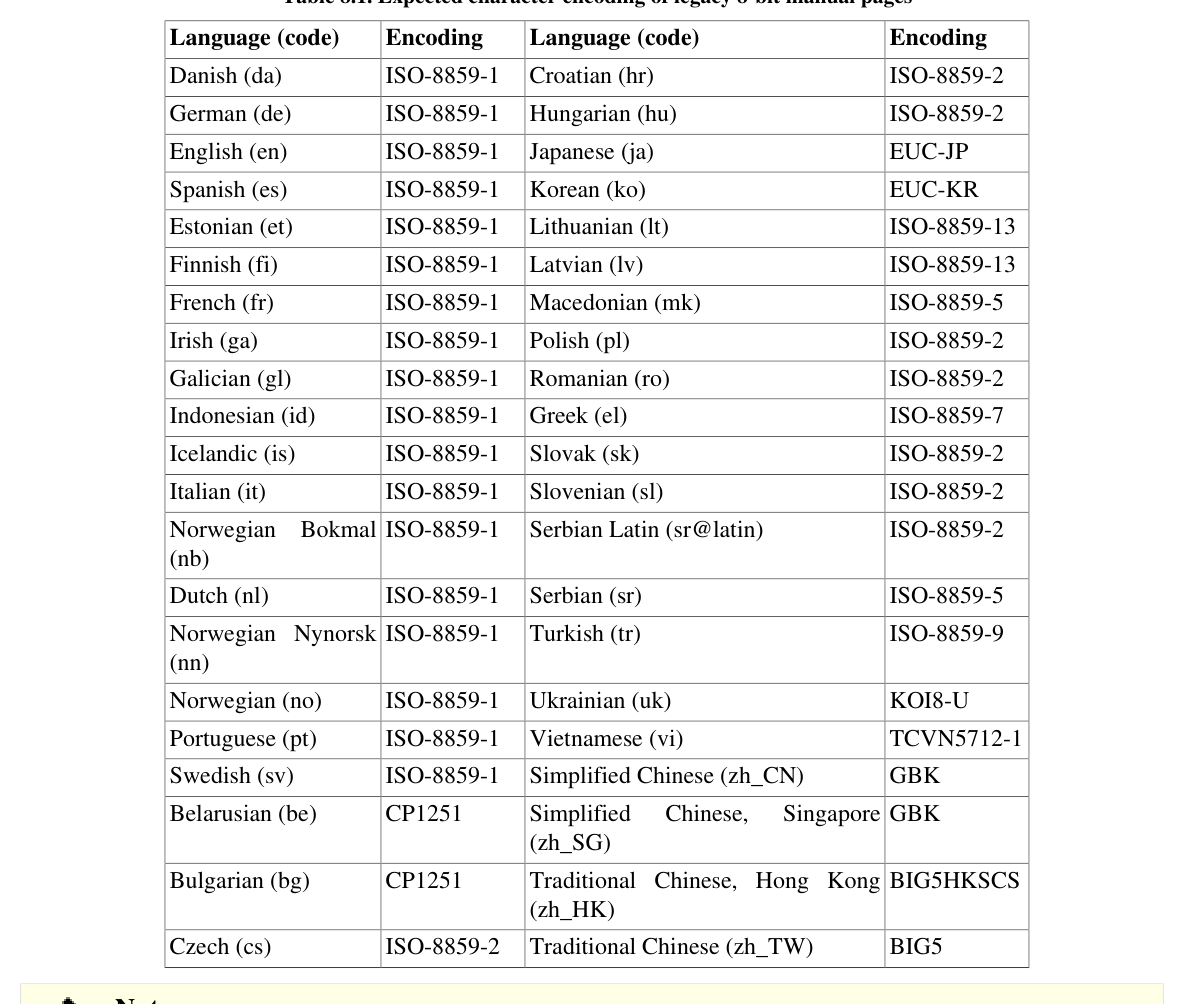
8.80. E2fsprogs-1.47.3

The E2fsprogs package contains the utilities for handling the ext2 file system. It also supports the ext3 and ext4 journaling file systems.

Approximate build time: 2.4 SBU on a spinning disk, 0.5 SBU on an SSD Required disk space: 100 MB (Required disk space: 100 MB)

8.80.1. Installation of E2fsprogs

The E2fsprogs documentation recommends that the package be built in a subdirectory of the source tree:

mkdir -v build
cd       build

Prepare E2fsprogs for compilation:

../configure --prefix=/usr       \
--sysconfdir=/etc   \
--enable-elf-shlibs \
--disable-libblkid  \
--disable-libuuid   \
--disable-uuidd     \
--disable-fsck

The meaning of the configure options:--enable-elf-shlibs This creates the shared libraries which some programs in this package use.

--disable-*

These prevent building and installing the libuuid and libblkid libraries, the uuidd daemon, and the fsck wrapper; util-linux installs more recent versions.

Compile the package:

make

To run the tests, issue:

make check

One test named m_assume_storage_prezeroed is known to fail. Another test named m_rootdir_acl is known to fail if the file system used for the LFS system is not ext4 .

Install the package:

make install

Remove useless static libraries:

rm -fv /usr/lib/{libcom_err,libe2p,libext2fs,libss}.a

This package installs a gzipped .info file but doesn't update the system-wide dir file. Unzip this file and then update the system dir file using the following commands:

gunzip -v /usr/share/info/libext2fs.info.gz
install-info --dir-file=/usr/share/info/dir /usr/share/info/libext2fs.info

If desired, create and install some additional documentation by issuing the following commands:

makeinfo -o      doc/com_err.info ../lib/et/com_err.texinfo
install -v -m644 doc/com_err.info /usr/share/info
install-info --dir-file=/usr/share/info/dir /usr/share/info/com_err.info

8.80.2. Configuring E2fsprogs

/etc/mke2fs.conf contains the default value of various command line options of mke2fs . You may edit the file to make the default values suitable for your needs. For example, some utilities (not in LFS or BLFS) cannot recognize a ext4 file system with metadata_csum_seed feature enabled. If you need such a utility, you may remove the feature from the default ext4 feature list with the command:

sed 's/metadata_csum_seed,//' -i /etc/mke2fs.conf

Read the man page mke2fs.conf(5) for details.

8.80.3. Contents of E2fsprogs

Installed programs:

badblocks, chattr, compile_et, debugfs, dumpe2fs, e2freefrag, e2fsck, e2image, e2label, e2mmpstatus, e2scrub, e2scrub_all, e2undo, e4crypt, e4defrag, filefrag, fsck.ext2, fsck.ext3, fsck.ext4, logsave, lsattr, mk_cmds, mke2fs, mkfs.ext2, mkfs.ext3, mkfs.ext4, mklost+found, resize2fs, and tune2fs

Installed libraries:

libcom_err.so, libe2p.so, libext2fs.so, and libss.soInstalled directories:

/usr/include/e2p, /usr/include/et, /usr/include/ext2fs, /usr/include/ss, /usr/lib/e2fsprogs, /usr/share/et, and /usr/share/ss

Short Descriptions

badblocks Searches a device (usually a disk partition) for bad blocks

chattr Changes the attributes of files on ext{234} file systems

compile_et An error table compiler; it converts a table of error-code names and messages into a C source file suitable for use with the com_err library

debugfs A file system debugger; it can be used to examine and change the state of ext{234} file systems dumpe2fs Prints the super block and blocks group information for the file system present on a given device

e2freefrag Reports free space fragmentation information

e2fsck Is used to check and optionally repair ext{234} file systems e2image Is used to save critical ext{234} file system data to a file

e2label Displays or changes the file system label on the ext{234} file system on a given device

e2mmpstatus Checks MMP (Multiple Mount Protection) status of an ext4 file system

e2scrub Checks the contents of a mounted ext{234} file system

e2scrub_all Checks all mounted ext{234} file systems for errors

e2undo Replays the undo log for an ext{234} file system found on a device. [This can be used to undo a failed operation by an E2fsprogs program.]

e4cryptExt4 file system encryption utility

e4defrag Online defragmenter for ext4 file systems

filefrag Reports on how badly fragmented a particular file might be

fsck.ext2 By default checks ext2 file systems and is a hard link to e2fsck

fsck.ext3 By default checks ext3 file systems and is a hard link to e2fsck

fsck.ext4 By default checks ext4 file systems and is a hard link to e2fsck

logsave Saves the output of a command in a log file

lsattr Lists the attributes of files on a second extended file system

mk_cmds Converts a table of command names and help messages into a C source file suitable for use with the libss subsystem library

mke2fs Creates an ext{234} file system on the given device

mkfs.ext2 By default creates ext2 file systems and is a hard link to mke2fs

mkfs.ext3 By default creates ext3 file systems and is a hard link to mke2fs

mkfs.ext4 By default creates ext4 file systems and is a hard link to mke2fs

mklost+found Creates a lost+found directory on an ext{234} file system; it pre-allocates disk blocks to this directory to lighten the task of e2fsck

resize2fs Can be used to enlarge or shrink ext{234} file systems

tune2fs Adjusts tunable file system parameters on ext{234} file systems


libcom_err The common error display routine

libe2p Used by dumpe2fs , chattr , and lsattr

libext2fs Contains routines to enable user-level programs to manipulate ext{234} file systems libss Used by debugfs

8.81. Sysklogd-2.7.2

The Sysklogd package contains programs for logging system messages, such as those emitted by the kernel when unusual things happen.

Approximate build time: less than 0.1 SBU Required disk space: 3.9 MB (Required disk space: 3.9 MB)

8.81.1. Installation of Sysklogd

Prepare the package for compilation:

./configure --prefix=/usr      \
--sysconfdir=/etc  \
--runstatedir=/run \
--without-logger   \
--disable-static   \
--docdir=/usr/share/doc/sysklogd-2.7.2

Compile the package:

make

This package does not come with a test suite.

Install the package:

make install

8.81.2. Configuring Sysklogd

Create a new /etc/syslog.conf file by running the following:

cat > /etc/syslog.conf << "EOF"
# Begin /etc/syslog.conf
auth,authpriv.* -/var/log/auth.log
*.*;auth,authpriv.none -/var/log/sys.log
daemon.* -/var/log/daemon.log
kern.* -/var/log/kern.log
mail.* -/var/log/mail.log
user.* -/var/log/user.log
*.emerg *
# Do not open any internet ports.

8.81.3. Contents of Sysklogd

Installed program:

syslogd

Short Descriptions

syslogd

Logs the messages that system programs offer for logging [Every logged message contains at least a date stamp and a hostname, and normally the program's name too, but that depends on how trusting the logging daemon is told to be.]

8.82. SysVinit-3.14

The SysVinit package contains programs for controlling the startup, running, and shutdown of the system.

Approximate build time: less than 0.1 SBU Required disk space: 3.9 MB (Required disk space: 3.9 MB)

8.82.1. Installation of SysVinit

First, apply a patch that removes several programs installed by other packages, clarifies a message, and fixes a compiler warning:

patch -Np1 -i ../sysvinit-3.14-consolidated-1.patch

Compile the package:

make

This package does not come with a test suite.

Install the package:

make install

8.82.2. Contents of SysVinit

Installed programs:

bootlogd, fstab-decode, halt, init, killall5, poweroff (link to halt), reboot (link to halt), runlevel, shutdown, and telinit (link to init)

Short Descriptions

bootlogd Logs boot messages to a log file

fstab-decode Runs a command with fstab-encoded arguments

halt Normally invokes shutdown with the -h option, but when already in run-level 0, it tells the kernel to halt the system; it notes in the file /var/log/wtmp that the system is going down

init The first process to be started when the kernel has initialized the hardware; it takes over the boot process and starts all the processes specified in its configuration file killall5 Sends a signal to all processes, except the processes in its own session; it will not kill its parent shell

poweroff Tells the kernel to halt the system and switch off the computer (see halt)

reboot Tells the kernel to reboot the system (see halt)

runlevel Reports the previous and the current run-level, as noted in the last run-level record in /run/utmp

shutdown Brings the system down in a secure way, signaling all processes and notifying all logged-in users

telinit Tells init which run-level to change to

8.83. About Debugging Symbols

Most programs and libraries are, by default, compiled with debugging symbols included (with gcc 's -g option). This means that when debugging a program or library that was compiled with debugging information, the debugger can provide not only memory addresses, but also the names of the routines and variables.

The inclusion of these debugging symbols enlarges a program or library significantly. Here are two examples of the amount of space these symbols occupy:

  • A bash binary with debugging symbols: 1200 KB
  • A bash binary without debugging symbols: 480 KB (60% smaller)
  • Glibc and GCC files ( /lib and /usr/lib ) with debugging symbols: 87 MB
  • Glibc and GCC files without debugging symbols: 16 MB (82% smaller)

Sizes will vary depending on which compiler and C library were used, but a program that has been stripped of debugging symbols is usually some 50% to 80% smaller than its unstripped counterpart. Because most users will never use a debugger on their system software, a lot of disk space can be regained by removing these symbols. The next section shows how to strip all debugging symbols from the programs and libraries.

8.84. Stripping

This section is optional. If the intended user is not a programmer and does not plan to do any debugging of the system software, the system's size can be decreased by some 2 GB by removing the debugging symbols, and some unnecessary symbol table entries, from binaries and libraries. This causes no real inconvenience for a typical Linux user.

Most people who use the commands mentioned below do not experience any difficulties. However, it is easy to make a mistake and render the new system unusable. So before running the strip commands, it is a good idea to make a backup of the LFS system in its current state.

A strip command with the --strip-unneeded option removes all debug symbols from a binary or library. It also removes all symbol table entries not normally needed by the linker (for static libraries) or dynamic linker (for dynamically linked binaries and shared libraries). Using --strip-debug does not remove symbol table entries that may be needed by some applications. The difference between unneeded and debug is very small. For example, an unstripped libc.a is 22.4 MB.

After stripping with --strip-debug it is 5.9 MB. Using --strip-unneeded only reduces the size further to 5.8 MB.

The debugging symbols from selected libraries are compressed with Zstd and preserved in separate files. That debugging information is needed to run regression tests with valgrind or gdb later, in BLFS.

Note that strip will overwrite the binary or library file it is processing. This can crash the processes using code or data from the file. If the process running strip is affected, the binary or library being stripped can be destroyed; this can make the system completely unusable. To avoid this problem we copy some libraries and binaries into /tmp , strip them there, then reinstall them with the install command. (The related entry in Section 8.2.1, “Upgrade Issues” gives the rationale for using the install command here.)


Note

The ELF loader's name is ld-linux-x86-64.so.2 on 64-bit systems and ld-linux.so.2 on 32-bit systems. The construct below selects the correct name for the current architecture, excluding anything ending with g , in case the commands below have already been run.


Important

If there is any package whose version is different from the version specified by the book (either following a security advisory or satisfying personal preference), it may be necessary to update the library file name in save_usrlib or online_usrlib . Failing to do so may render the system completely unusable.


save_usrlib="$(cd /usr/lib; ls ld-linux*[^g])
libc.so.6
libthread_db.so.1
libquadmath.so.0.0.0
libstdc++.so.6.0.34
libitm.so.1.0.0
libatomic.so.1.2.0"
cd /usr/lib
for LIB in $save_usrlib; do
objcopy --only-keep-debug --compress-debug-sections=zstd $LIB $LIB.dbg

... (39 more lines)

A large number of files will be flagged as errors because their file format is not recognized. These warnings can be safely ignored. They indicate that those files are scripts, not binaries.

8.85. Cleaning Up

Finally, clean up some extra files left over from running tests:

rm -rf /tmp/{*,.*}

There are also several files in the /usr/lib and /usr/libexec directories with a file name extension of .la. These are "libtool archive" files. On a modern Linux system the libtool .la files are only useful for libltdl. No libraries in LFS are expected to be loaded by libltdl, and it's known that some .la files can break BLFS package builds. Remove those files now:

find /usr/lib /usr/libexec -name \*.la -delete

For more information about libtool archive files, see the BLFS section "About Libtool Archive (.la) files".

The compiler built in Chapter 6 and Chapter 7 is still partially installed and not needed anymore. Remove it with:

find /usr -depth -name $(uname -m)-lfs-linux-gnu\* | xargs rm -rf

Finally, remove the temporary 'tester' user account created at the beginning of the previous chapter.

userdel -r tester